Optional Devices
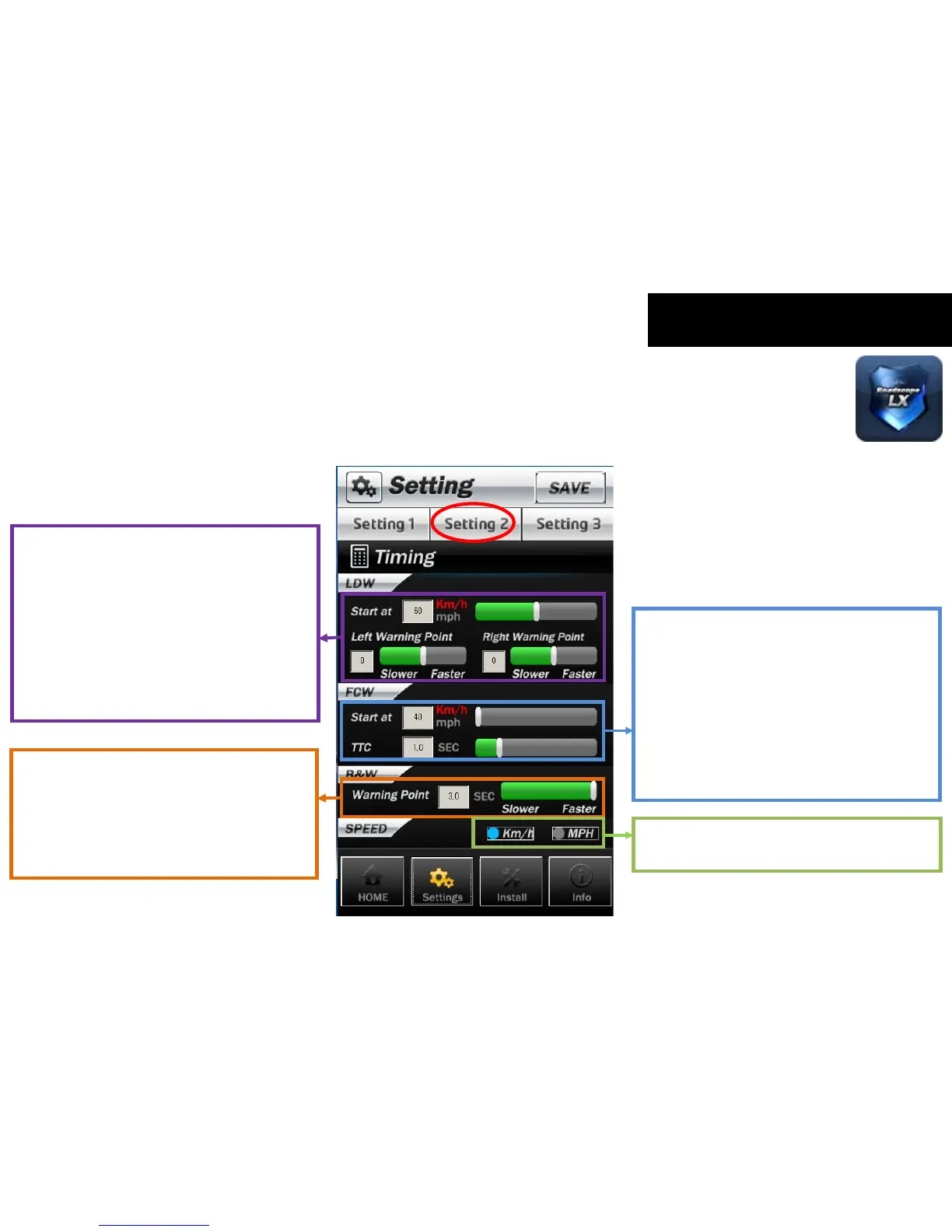
LDW Function Timing Setting
Start point : for setting the LDW threshold
warning point (-5~+5) : for adjusting warning
spot / Whenever you change the bar by one,
warning point will be changed by 10 cm from
the default value. The Default value of
left/right warning point is ‘O’.
If you want to change this value, please move
the control bar or enter the value in the box.
FCW Function Timing Setting
Start point : for setting FCW threshold
TTC : the expected time to collision (The
second warning point can be set up.)
The smaller TTC set value is, the faster the
warning is generated. The bigger TTC set value
is, the slower the warning is generated. If you
want to change this value, please move the
control bar or enter the value in the box.
Beep&Watch warning timing setting
If you want to change B&W warning point,
please move the control bar or enter the value
in the box.
The values can be adjusted from 0.0 to 3.0 by
0.1.
You can select the displaying method between
KPH and MPH.
3-3-2. Setting 2 _ Timing setting of each functions
* When you click the ‘SAVE’ button, the changes of setting will be applied immediately.



 To Next Page