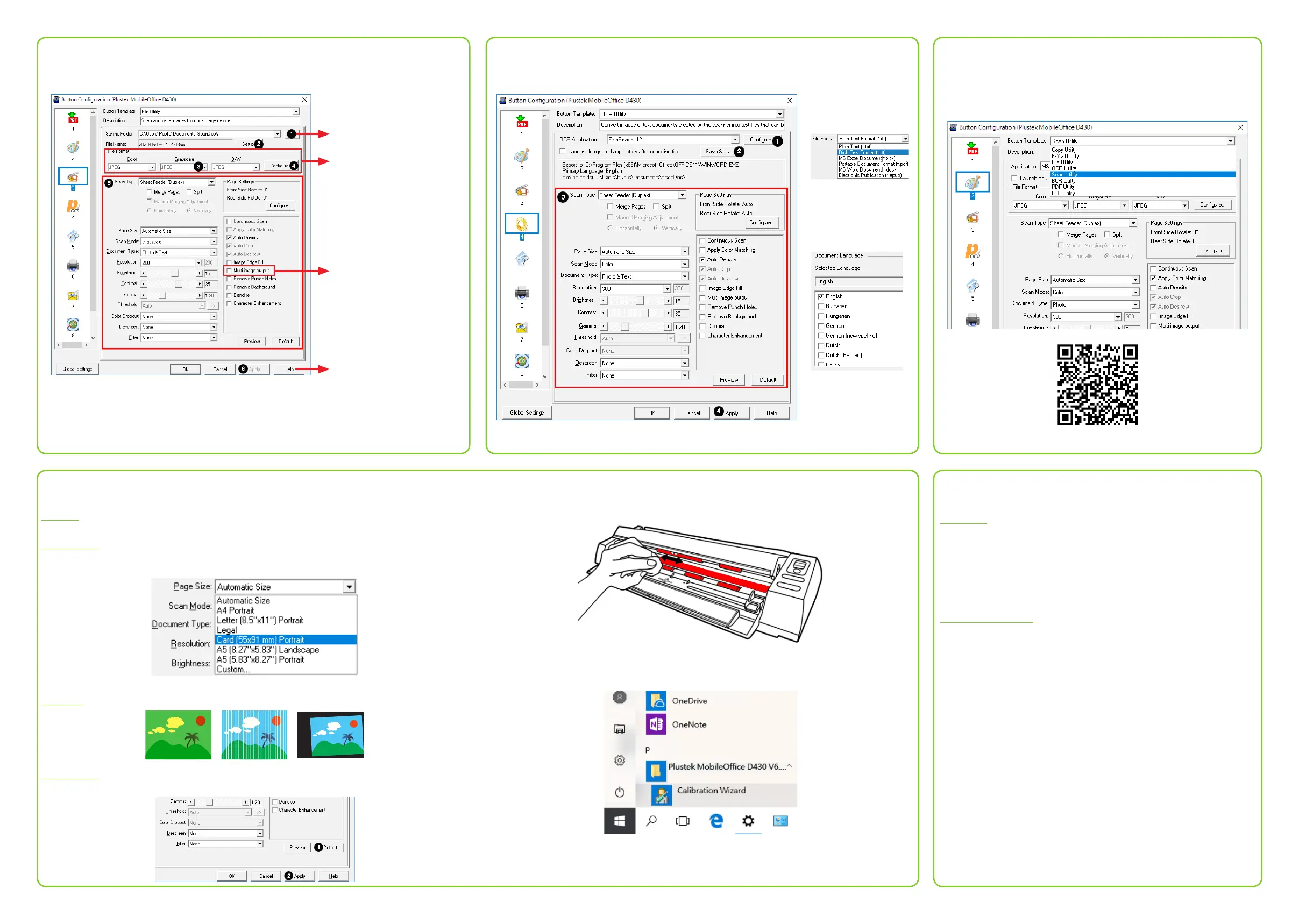
File Utility
Select desired saving
destination.
Select desired le
format.
Select to output up to
three multiple images
by one scan.
Click to access
online help for more
detailed information.
OCR Utility
More Utilities
All buttons are customizable, you may select the desired
utilities from the Button Template dropdown list. For
more information, please refer to software tutorial videos.
software tutorial videos
Technical Support
USA/CA
714-670-7713
9am to 5:30pm Pacic Time, Monday through Friday
infoUSA@PlustekUS.com
United Kingdom
0125-674-1513
9am-4pm, Monday through Friday
support@agxuk.com
Troubleshooting
FAQ 1: The plastic card scan is not successful.
Solutions:
Please remember to select Card as Page Size.
FAQ 2: The scanned images are strange.
Solutions:
● Reset the scan settings to default.
● Clean your scanner regularly to ensure the best scanning performance.
● Calibrate the scanner if colors of the scanned image vary a lot. Find.
Calibration Wizard as follows:
Select the desired
le format.
Select the desired
OCR language.







 To Previous Page