EasyManua.ls Logo

PMFoundations 3080 VCO - User Manual

PMFoundations 3080 VCO
2 pages
Print Icon
To Next Page IconTo Next Page
Loading...
3080 VCO v1.2 User Guide
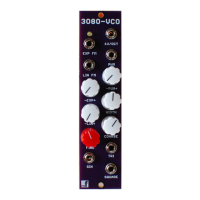
This is the setup and user guide. The unit is designed for a monophonic Analog synthesizer.
The module is designed and sized for Eurorack systems. You will need a 16 pin Eurorack power
ribbon connector with 12/0/+12 which is connected to a synth power supply. You will also need a
trimmer adjustment tool, a digital volt meter, a frequency counter and, if possible, an oscilloscope.
Calibrating the 3080-VCO
If you bought PCBs or a kit, you should only need to calibrate the unit once. If you bought a pre-built
and tested unit, you can skip this section. Power up the device and allow it to warm up for 15 minutes.
1. Set R30 HF Trim to 0. This is done by turning the screw counter clockwise until it hits the end
stop. A quiet click can be heard.
2. Disconnect all CV sources from the inputs.
3. Set the coarse and fine tuning controls to their center position.
4. Put a frequency counter on the SIN output.
5. Offset adjustment: Adjust R1 Offset until the frequency is 16.35Hz.
6. Connect a CV source such (as a keyboard controller CV) into the 1V/octave jack.
Question and Answer IconNeed help?

Do you have a question about the PMFoundations 3080 VCO and is the answer not in the manual?

PMFoundations 3080 VCO Specifications

General IconGeneral
BrandPMFoundations
Model3080 VCO
CategoryControl Unit
LanguageEnglish

Summary

3080 VCO Setup and Requirements

Module Description and System Requirements

Details the module's design for Eurorack systems and lists necessary components and tools for setup.

Calibrating the 3080-VCO

Initial Calibration Settings

Prepare the unit by setting HF Trim, disconnecting CV, centering controls, and connecting a frequency counter.

Offset Adjustment

Adjust R1 Offset to set the initial frequency to 16.35Hz.

1 V;Octave Adjustment

Adjust R20 V/Oct to ensure accurate pitch tracking across octaves.

High Frequency Trim

Adjust R30 HF trim to maintain accurate pitch tracking at higher frequencies.

Sine Wave Shape Adjustment

Adjust R19 Sine Symmetry and R2 Sine Round for optimal sine wave output.