515 58th Ave SE, Calgary, Alberta, T2H 0P7
1-888-869-7652 | info@precisionmounts.com
WWW.PRECISIONMOUNTS.COM
USING THE CRADLE
Pg 6
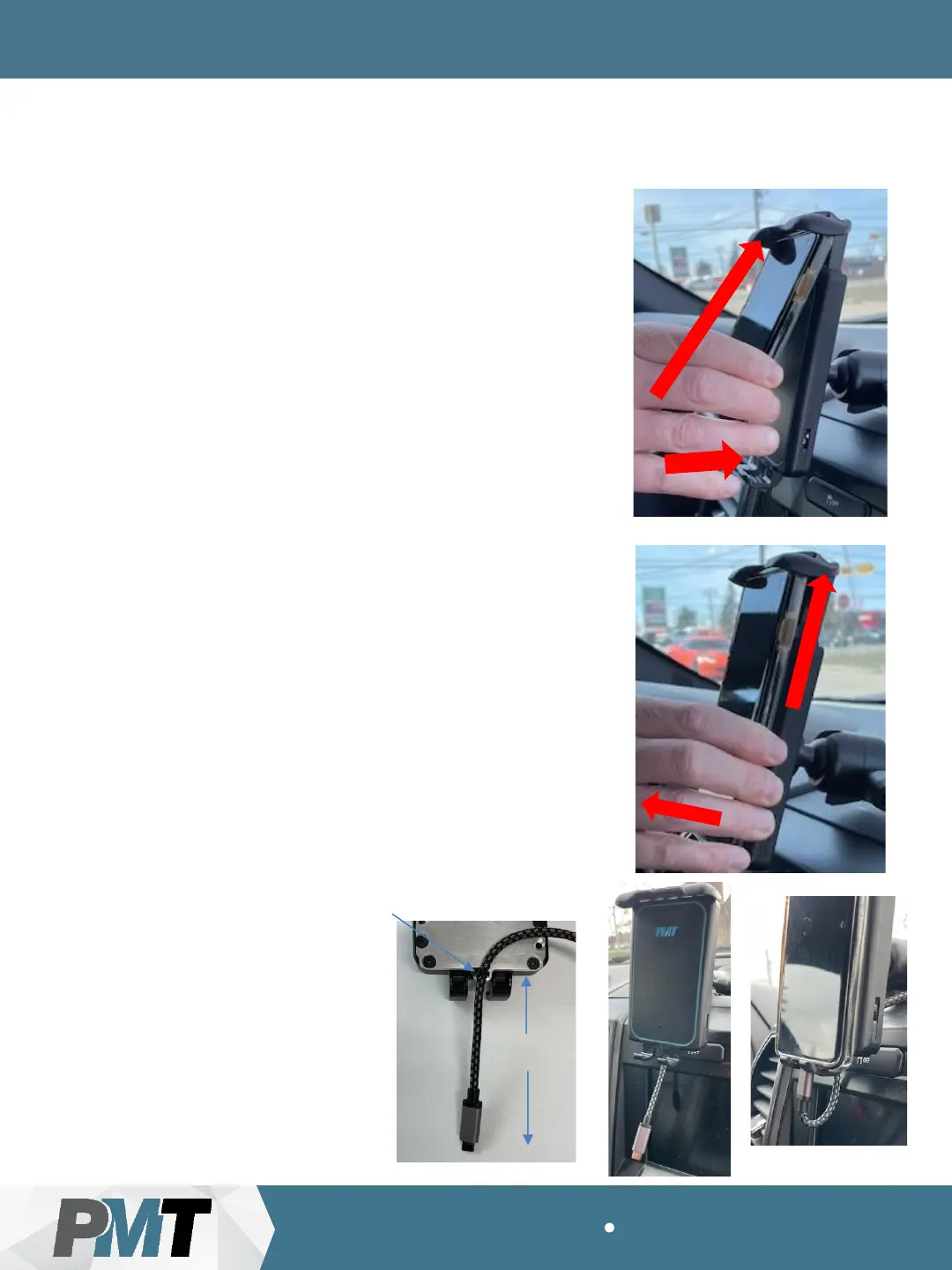
Loading a Mobile Device:
Load the mobile device by (1) pushing the top
of the device up into the top clamp of the
cradle and then (2) push the bottom of the
mobile device back into the cradle and let rest
on the bottom clamps.
Removing a Mobile Device:
Remove the mobile device by (1) lifting it up
against the top clamp of the cradle and (2)
tilting the bottom edge out away from the
cradle.
1
2
1
2
Cable tie (“zip-tie”)
Apx 10cm
Note: If you wish to use a cable
(not provided) to connect the
mobile device while in the cradle
you can utilize the built-in tie rail
to “zip-tie” the cable for easy
access. Be sure to manually
remove the cable from the
device before removing the
mobile device from the cradle to
prevent damage.


 To Next Page