EN
3
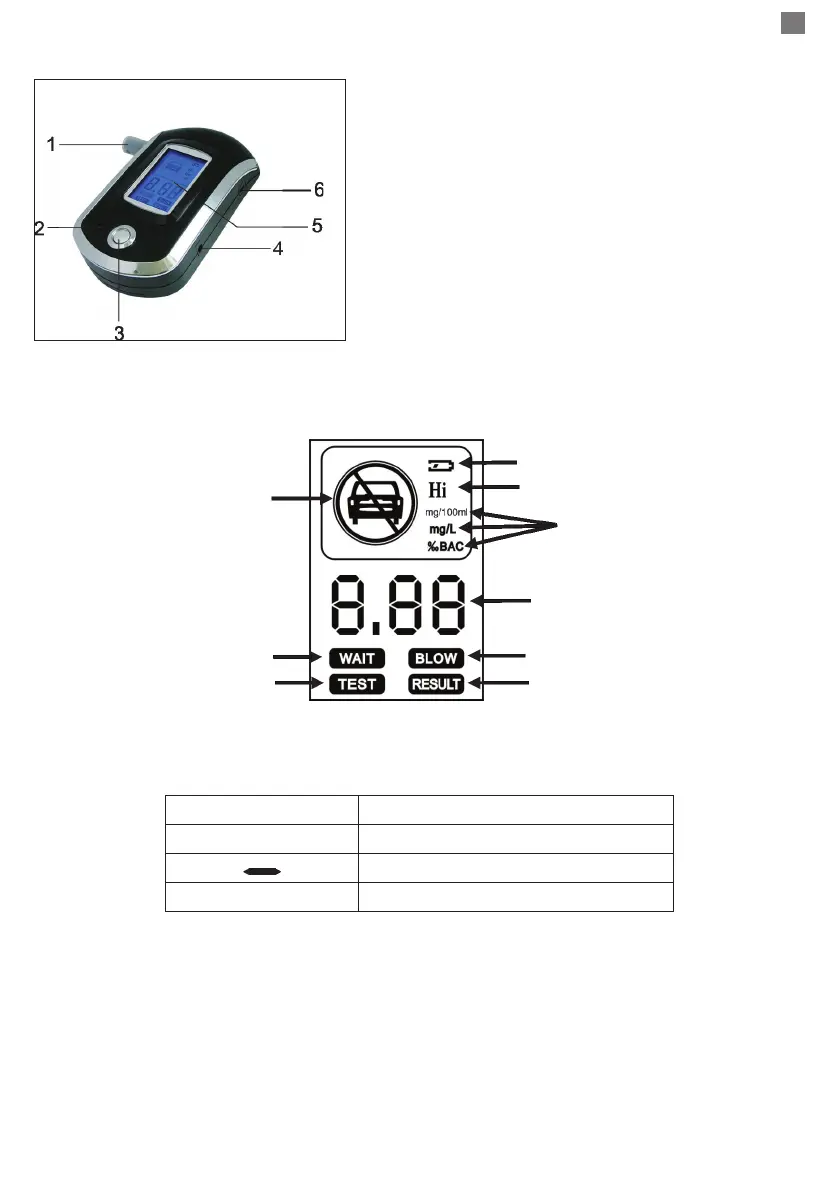
Product description and operating mode:
1. Mouthpiece
2. Speaker
3. Button
4. Output for external power
5. LCD screen
6. Ventilation hole
Screen description:
Symbols description:
8.8.8 Alcohol content
“C” You may blow
“ “ Wait, calculating the concentration
FFF Sensor error
Basic user instruction:
- Inserto into the device 3 AAA 1.5V batteries, respecting polarity.
- Press and hold for one second the on/o button. Immediately, a short acknowledgment sound
will be heard. The “Wait” message will be displayed on the screen. Do not blow while the device is
heating, otherwise you will get erroneous results.
After the heating period has ended, the device will sound a short acknowledgment sound. The
“Blow” message and the “C” symbol will be displayed on the screen. Now you can start testing.
NOTE: The time elapsed before displaying the result depends on the concentration of alcohol. If
this is high, the time will be longer.
Battery discharge indicator
Alcohol excess
Alcohol excess
Test
Wait.
The device heats up.
Unit
Test result
Blow
Test result


 To Next Page
 Loading...