9 User manual
English
• check the SIM card and remove the PIN code (in a phone);
• check if the SIM card is 4G compatible and has active mobile data (in a
phone).
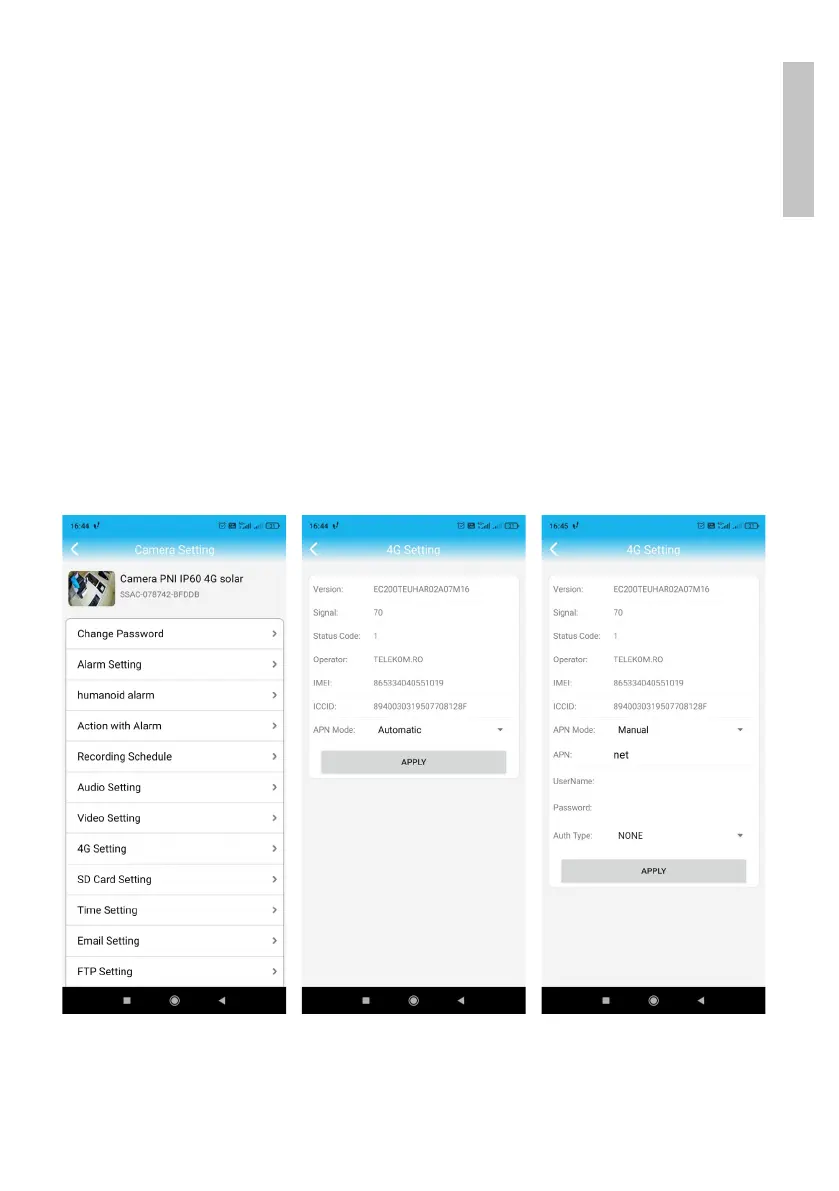
• check the signal strength: it must be greater than 60. If not, move the
camera to a place with a better signal.
• check the status with another SIM card from the same operator or
another operator (without active PIN code)
• The status LEDs next to the SIM card: the 2 rear LEDs are lit and the
front one flashes when the camera is connected to the Internet.
• In the “4G settings” “Status Code” menu: “0” sim not connected (check/
reinsert SIM, check signal); “1” successful connection; “2” - failed
connection to the network.
• check the APN in the APN Mode menu. Set to Manual and manually
enter only the correct APN obtained from the SIM card operator and
save the settings.
5. Disconnect the LAN cable between the camera and the local network
router and restart the camera (disconnect the power). Open the
application and check the camera status in about 5 minutes. If everything


 To Next Page