ENGLISH /
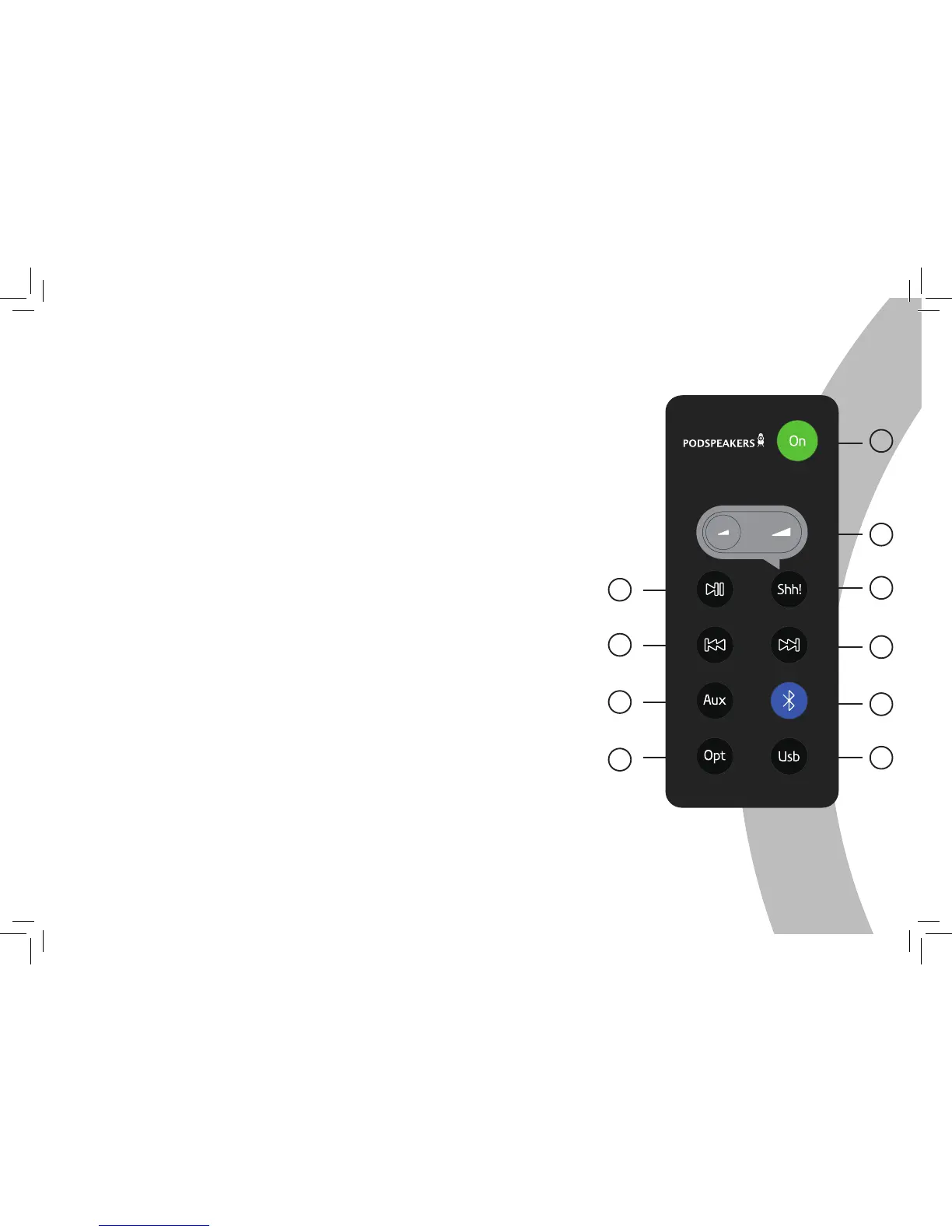
Remote control
// 7
1 Power on/off
A/ Power on: The blue LED will be turned on at high level.
B/ Power off: The blue LED will be turned on at low level.
2
Shh! ( mute )
The blue LED will flash slowly
3
Volume +/-
Volume increase/decrease, the blue LED will flash one time.
When volume is at MAX/MIN the blue LED will not flash.
4
Bluetooth
When you choose BT input the blue LED will flash one time.
5
AUX
When you choose AUX input the blue LED will flash one time.
6
Optical Input
USB Input
7
8
9
Play/Pause
Control Play/Pause in Bluetooth mode.
This button can only be used in Bluetooth mode.
PREV/FWD
Choose Previous/Next song in Bluetooth mode.
This button can only be used in Bluetooth mode.
1
2
3
5
7
9
5
4
6
8
USB Coding support sampling rate 48/44.1KHz/16bt
optical input support sampling rate 192KHz 24bt.


 To Next Page