
 Need help?
Do you have a question about the POHL+SCHMITT MD500 and is the answer not in the manual?
Turn off the dehumidifier, then slide out the water tank.
Pour out water, reinsert drain plug, and slide tank back in.
Unplug unit before cleaning. Wipe exterior with a damp cloth, avoiding harsh chemicals.
Clean tank regularly with vinegar solution and soapy water to prevent mold.
Ensure voltage matches, avoid extension cords, unplug properly, and do not immerse.
Use on stable surface, keep upright, do not cover, avoid heat sources and direct sunlight.
Not for unsupervised children. Do not repair yourself; use authorized service.
Ensure unit is OFF, connect DC power jack, and plug into an outlet.
Place on a stable surface, press ON/OFF button to start; 'ON' light indicates operation.
Unit stops automatically when water tank is full; 'FULL' light illuminates.
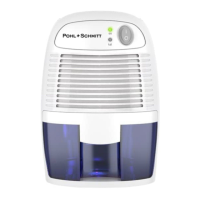
The Pohl+Schmitt Mini Dehumidifier, Model No.: MD500, is a compact and quiet appliance designed to remove excess moisture from small rooms and poorly ventilated areas. Utilizing Peltier technology (no compressor), it is lightweight and ideal for spaces such as wardrobes, cabinets, bathrooms, or storage rooms that are susceptible to damp odors and fungus.
The primary function of this mini dehumidifier is to extract moisture from the air, thereby reducing humidity levels. It operates by drawing in moist air, cooling it to condense the water vapor, and then expelling dry air. The collected water is stored in a removable water tank. The unit features an ON/OFF button, an "On" indicator light (green), and a "Full" indicator light. When the water tank is full, the unit automatically stops operating, and the "Full" indicator light illuminates, signaling that the tank needs to be emptied. A light breeze will be felt from the Dry Air Outlet when the dehumidifier is operating.
Pohl+Schmitt USA provides customer support via:
 General
| Brand | POHL+SCHMITT |
|---|---|
| Model | MD500 |
| Category | Dehumidifier |
| Language | English |

 To Next Page