2322
super mode icon, super mode is selected.
When super mode is selected, super mode icon will light on, and the display
window will show -25°C. In super mode, touching “FREEZER” button,
super mode icon will flash 3 times, but freezer temperature can not be
changed.
To exit Super mode,
– Press "SUPER" button to deselect Super mode,
– Or after 50 hours of super mode without any operation, the refrigerator
will automatically stop it and enter to previous setting.
Warning:
In super mode, noise of the appliance may be slightly higher than normal
running.
z ALARM/ECO: clear door opening alarm and high temperature alarm, select
and deselect ECO mode
Short touch “ALARM/ECO” button to clear door opening alarm and high
temperature alarm. Touch “ALARM/ECO” button for 3 seconds to select
ECO mode. After 5 seconds flashing of ECO mode icon, ECO mode is
selected.
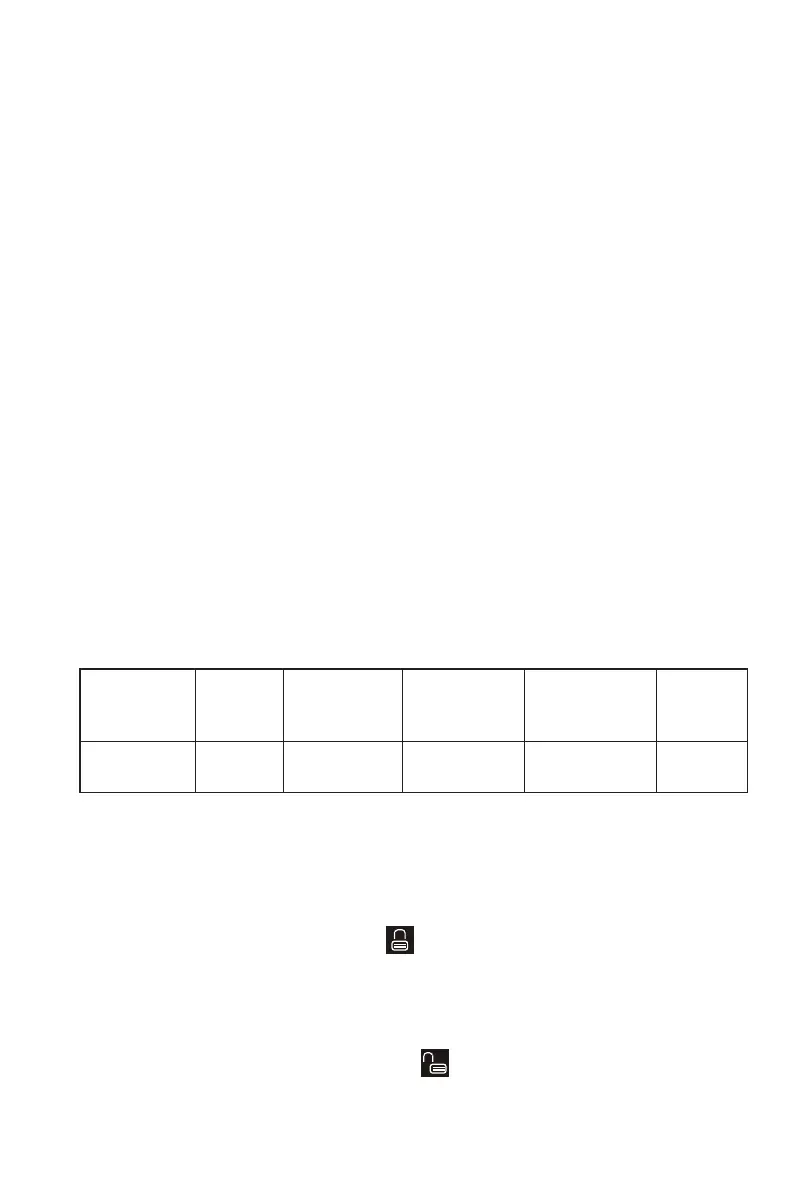
When ECO mode is selected, ECO mode icon will light on, and the display
window will show different preset temperatures, depending on the
ambient temperature (Ta) of where the appliance be placed, as below.
Ambient
Temperature
(Ta)
Ta≤13°C 14°C<Ta≤20°C 21°C<Ta≤27°C 28°C<Ta≤34°C Ta≤35°C
Preset
Temperature
-18°C -18°C -18°C -16°C -15°C
In ECO mode, “FREEZER" button will not respond to any touching.
Touch "ALARM/ECO" button for 3 seconds to deselect ECO mode.
z LOCK: Locking and Unlocking
Touching “LOCK” button for 3 seconds to lock the control panel, then the
locking and unlocking icon will be “ ”.
In locking status, touch any button, the locking and unlocking icon will
flash 3 times.
Touching “LOCK” button for 3 seconds to unlock the control panel, then
the locking and unlocking icon will be “ ”.
In unlocking status, all buttons are available.


 To Next Page
 Loading...