8
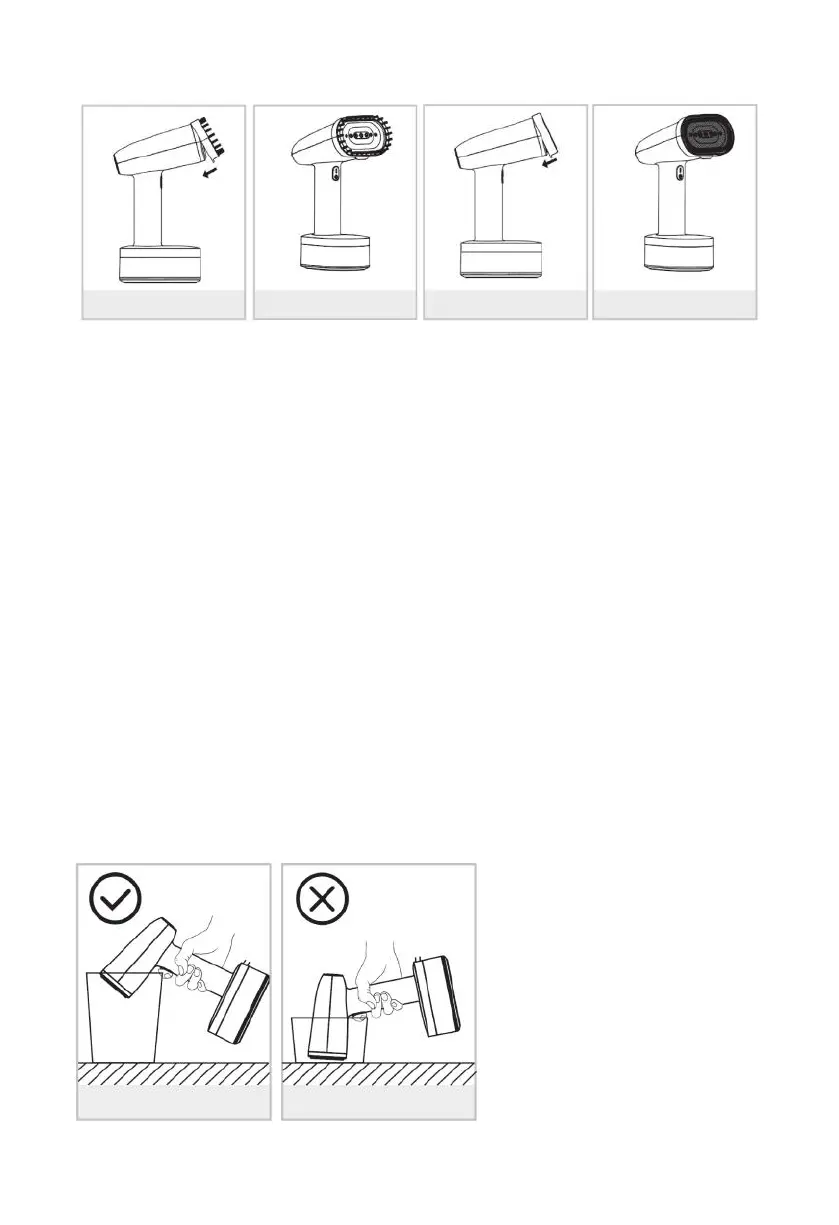
Note: before removing or attaching the steam brush, unplug your appliance
and allow it to cool down.
6. After use, unplug the appliance.
7. Remove the water tank, empty the water tank completely, then return the
water tank to its place on the appliance.
Note: If there is no water, it will automatically stop after 45'S, and the power
lighting will be quick flashing. Static protect after 8 mins stop heating will be
quick flashing.
During use or while the unit is heating or cooling, place the product on a flat
stable and heat-resistant place.
SELF-CLEANING FUNCTION
Note:Please make sure the appliance is cold when use Self-cleaning function
When you want to use this function,first you need to prepare a contain-
er,handle the appliance to put nozzle down into the container(pic 7),don’t
directly put the nozzle against bottom if container(pic 8).fill water into water
tank to max,plug in the appliance,long press the self-clean button 5s,then
the appliance began self-cleaning,now the appliance will spray water
out,which is normal.You will listen warning sound after self-clean
finished.now you can unplug the appliance.
PIC 3 PIC 4 PIC 5 PIC 6
PIC 7 PIC 8


 To Next Page
 Loading...