
 Need help?
Do you have a question about the PoKeys PoKeys57CNC and is the answer not in the manual?
Illustrates pin assignments for major connectors and defines pin functionalities.
Specifies the physical size and operational environmental conditions for the device.
Covers configuration of digital pins, counters, and encoders.
Details setup for the pulse generator and motion control features.
Discusses configuration of keyboards, analog inputs, joystick mapping, and PWM outputs.
Covers LCD display, PoExtBus expansion, PoNET, and network interface configuration.
Details sensor configuration and data reporting to network servers.
Covers USB configuration, network functionality, and security settings.
Explains how to configure and use the web dashboard and Modbus protocol.
Covers user ID management, saving configurations, and device recovery.
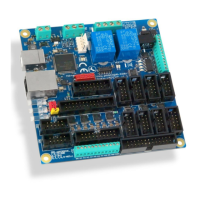
Provides a visual overview of major connectors like Motor, LCD, and Pendant.
Specifies parameters for DI5P, DO5, and DO5_D pin types.
Details parameters for DIO33 digital I/O and OCOC open-collector outputs.
Details parameters for OCSSR, REL, and AN33 pin types.
Specifies parameters for AN33F analog input and explains Status LEDs.
Specifies the physical size and operational environmental conditions for the device.
Provides step-by-step instructions for setting up USB and direct Ethernet connections.
Covers setting up Ethernet via DHCP and using both USB and Ethernet connections.
Explains how to connect motor drivers and other peripherals to the device.
Details configuration of digital pins and how to use the PoKeys configuration software.
Explains how to set up and use digital counters on selected pins.
Details how to connect and configure various types of encoders.
Explains setup for fast encoders and viewing raw encoder data.
Explains the dialog for controlling and monitoring the pulse engine states.
Describes the various settings and controls within the Pulse Engine status/control dialog.
Covers settings for individual axes, including limits, homing, and motion parameters.
Explains how to customize the homing procedure based on events and actions.
Presents standard homing configurations for CNC machines.
Discusses filtering for switches and configuring PoStep drivers.
Guides on how to connect PoStep drivers using PoExtension2 bus.
Explains how to map matrix keyboard keys to USB keyboard functions.
Details the digital low-pass filter and analog input usage.
Explains how to configure joystick settings, including analog mapping and key mapping.
Explains how to set PWM period and duty cycles for the output pins.
Covers LCD initialization, clearing, cursor control, and display settings.
Details display on/off, custom character creation, and character testing.
Details the setup dialog and connector type for PoExtBus devices.
Provides schematics and rules for connecting PoNET and PoExtBus devices.
Guides on registering and configuring new PoNET devices with the system.
Explains how to map the kb48CNC keyboard to the PoKeys matrix keyboard.
Details the settings for digital outputs, PWM, PoExtBus, and Pulse Engine failsafe states.
Details the I2C bus, its connection, and testing procedure.
Details the 1-Wire bus, its connection, and testing procedure.
Explains the main dialog and how to scan for I2C sensors.
Guides on scanning for 1-Wire sensors and adding DHTxx temperature/humidity sensors.
Explains how to set up analog sensors for reading.
Lists various sensors compatible with the EasySensors feature.
Covers start options, communication interval, and interface enabling/disabling.
Details how to configure IP addresses and how the device is discovered on the network.
Explains how to connect to the device when it's not automatically detected.
Explains how to set user access levels and passwords for network security.
Details enabling the web interface and configuring dashboard items.
Explains how to add and configure individual items displayed on the dashboard.
Covers how to add, edit, and manage user accounts for the web interface.
Explains Modbus TCP operation and lists available registers for inputs, outputs, and parameters.
Lists remaining Modbus registers for PWM, PoExtBus, LCD, and encoder values.
Shows PoExtBus mapping and details the Modbus configuration dialog.
Guides on setting up custom reports, including headers and data formatting.
Details how to configure PoKeys to send data directly to Xively.
Provides step-by-step instructions for setting up Xively reporting.
Explains how to configure dashboard items for Xively data reporting.
Guides on setting up data upload to a server using HTTP POST/PUT.
Explains how to change User ID and save/load device configurations to/from files.
Briefly mentions the PoIL core and its limitations regarding power failure.
Outlines the steps to enter recovery mode for clearing settings or updating firmware.
Covers software installation, driver problems, and connectivity troubleshooting.
Notes device reset behavior and pull-up resistor requirement for probing input.
Details access, usage, copyright, liability, and virus policies.
 General
| PWM Outputs | 8 |
|---|---|
| Communication Interfaces | USB, Ethernet |
| Encoder Inputs | 4 |
| Operating Voltage | 5V |
| Operating Temperature | -20 to +70°C |

 To Next Page