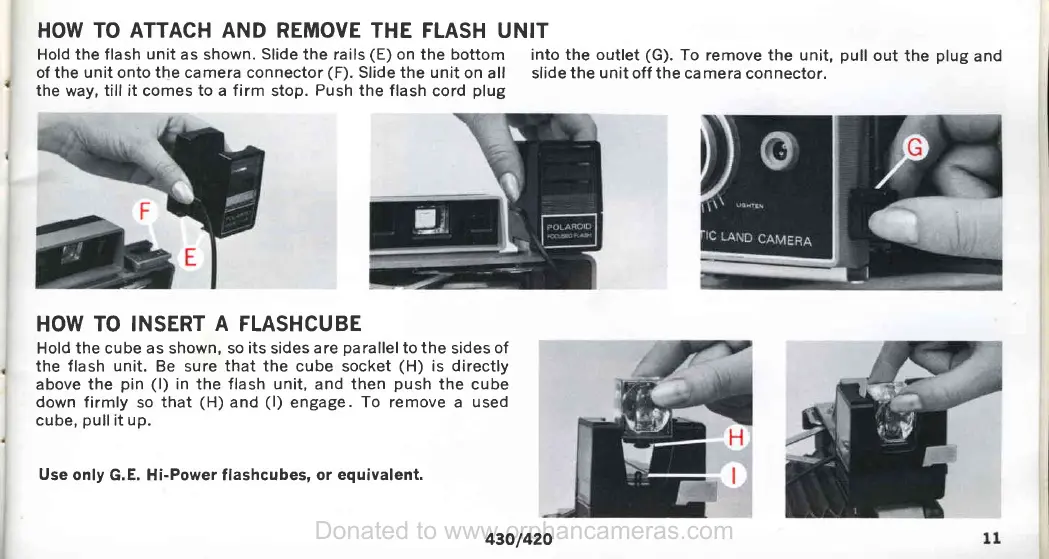
HOW TO ATTACH AND REMOVE THE FLASH
UNIT
Hold the flash
unit
as shown.
Slide
the rails
(E)
on
the
bottom
into the outlet
(G).
To remove the unit,
pull
out
the
plug
and
of
theunitontothecameraconnector(F).Slidetheunitonall
slidetheunitoff thecameraconnector.
the
way,
till it
comes
to a firm
stop.
Push
the flash
cord
plug
HOW
TO INSERT
A
FLASHCUBE
Hold the cube as shown, so
its
sides
are
parallelto
the
sides
of
the flash
unit.
Be sure
that
the cube socket
(H)
is directly
above the
pin (l)
in
the
flash unit,
and
then
push
the cube
down firmly
so
that
(H)
and
(l)
engage.
To remove
a
used
cube,
pull
it
up.
Use
only G.E. Hi-Power flashcubes, or
equivalent.
43O/42O
Donated to www.orphancameras.com










 To Next Page