
 Need help?
Do you have a question about the Polaroid Now Plus and is the answer not in the manual?
Connect the Polaroid Now+ camera to your mobile phone via Bluetooth to unlock extra creative tools.
Attach colored or effect filters to the lens to alter the look of your photographs.
Use the self-timer to include yourself in photos or to stabilize the camera.
Combine two images onto a single photo for creative effects.
Save your favorite app mode directly to the camera for quick access.
Understand the camera's operating mode via the indicator light.
Diagnose and resolve problems with photo or darkslide ejection.
Troubleshoot why the camera's flash is not activating.
Identify causes and solutions for photos appearing too dark.
Find out why photos might be blurry and how to prevent it.
Address issues where the film counter display shows the wrong number.
Learn how to cancel the first shot of a double exposure.
Understand the steps to take if the film door is opened during use.
Follow steps to reset the camera if it behaves strangely.
Important warnings regarding electrical shock, water, and physical handling.
Guidelines for safe use and charging of the built-in battery.
Recommendations for operating the device in suitable environmental conditions.
Important directions for the safe handling and disposal of Lithium-Ion batteries.
Information on EU Declaration of Conformity, FCC, and Industry Canada statements.
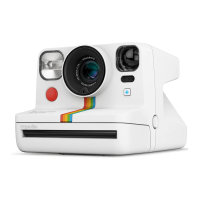
The Polaroid Now+ is a connected analog instant camera designed to offer a blend of classic instant photography with modern creative tools accessible via a mobile app. It allows users to capture and print photos instantly, providing a tangible output in a world dominated by digital images.
The primary function of the Polaroid Now+ is to capture instant photographs using Polaroid i-Type and 600 instant film. It features an auto-switching hyperfocal optical system with two zones (Close-Up and Standard) to ensure subjects are in focus from 0.4m to infinity. The camera includes a built-in flash that triggers by default for most shooting situations, ensuring adequate lighting unless explicitly disabled. Photos are ejected from a slot at the front of the camera, covered by a film shield to protect them from light during development.
The "Now+" aspect signifies its connectivity to the Polaroid app via Bluetooth® wireless technology. This connection unlocks a suite of creative tools that expand beyond the camera's physical controls. These app-enabled features include:
The camera also features a +Button mode indicator (an LED below the viewfinder) that changes color to signify the active creative mode (orange for self-timer, green for double exposure, red for custom shortcut).
Getting started with the Polaroid Now+ involves a few simple steps. First, the camera needs to be charged using the provided micro USB cable. A full charge takes approximately 2 hours and provides enough power for up to 15 film packs. The battery level indicator LED blinks during charging and turns off when fully charged. Users are advised to turn off the camera when not in use to conserve battery life.
Inserting a film pack is straightforward: the film door is opened, and the film cassette is slid in with the darkslide facing up until it clicks. The darkslide will then eject, covered by a retractable film shield that protects the developing photo from light. It's crucial not to pull on the film shield. The film counter display, located on the camera, indicates the number of photos remaining, starting at '8' for a new pack.
To take a photo, users aim the camera at their subject, ensuring they are at least 45cm (1.47ft) away. The viewfinder, located on the left side of the lens barrel, assists with composition, though users should be aware that the final photo may not perfectly match the viewfinder's perspective, especially for close subjects. The shutter button can be half-pressed to lock focus and exposure, allowing for recomposition before fully pressing to take the shot.
The Polaroid Now+ comes with a lens filter kit, including Starburst, Red Vignette, Orange, Blue, and Yellow filters. These can be easily attached to the lens to add creative effects, contrast, or color to photos. The Starburst and Red Vignette filters require alignment with the light meter for proper placement.
The camera's exposure value (EV) can be adjusted to make photos brighter or darker. This is done by holding down the flash button to enter EV mode and then pressing it again to toggle between +1/2 EV, neutral, or -1/2 EV. The selected value blinks to confirm it has been saved.
Connecting to the Polaroid app is a key feature. Users download the app, enable Bluetooth® on their phone, and select 'Now+' from the app's menu. The camera's +Button will turn blue to indicate a successful connection. The app provides a user-friendly interface to access and control the camera's advanced features.
Maintaining the Polaroid Now+ primarily involves cleaning the film rollers and the lens. The camera's two metal rollers, responsible for spreading developer paste, can accumulate dirt, leading to marks on developed photos. To clean them, users should ensure the camera has no film, turn it off, and open the film door. A soft, damp cloth can then be placed over the rollers, and the black plastic gear rotated to move the rollers and wipe them clean. This cleaning is recommended every 2-3 film packs.
For lens cleaning, a microfiber cloth is advised to avoid scratches and ensure optimal photo quality.
The camera also provides troubleshooting guidance for common issues such as photos not ejecting (check battery and film count), flash not firing (press flash button to turn on), dark photos (check flash coverage, avoid direct sun, consider light sources), blurry photos (maintain distance, hold steady, ensure sensors are clear), incorrect film counter display (resets to '8' with each new pack), and accidental film door opening (take a photo to remove potentially damaged film). A camera reset can be performed by opening the film door and holding the ON|OFF button for more than 8 seconds.
 General
| Type | Instant Camera |
|---|---|
| Connectivity | Bluetooth |
| Film Format | Polaroid i-Type and 600 film |
| Aperture | f/11, f/32 |
| Shutter Speed | 1/200 to 1 second |
| Flash | Built-in |
| App Compatibility | iOS and Android |
| Battery | Rechargeable lithium-ion |
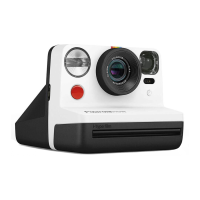
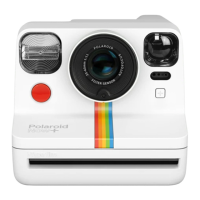
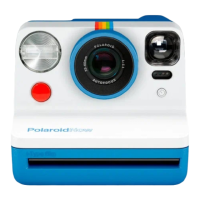
| Color Options | Black, White, Blue |








 To Next Page