8
9
→ Self-timer. Press +Button once to
activate.Pressoncetodeactivate.
→ Double exposure. Double press
+Button to activate. Press once to
deactivate.
→ Custom shortcut. Long press
+Button to activate. Press once to
deactivate.
Using the ash
In any situation where you’re not shooting in
bright,directsunlight,werecommendusing
theashtogetthebestPolaroidphotos.
That’swhytheashwilltriggerbydefault
every time you press the shutter button. The
ashbuttonisthesmalllightningboltnextto
the ON | OFF button.
→
Flash ready.
Flash is always on, unless
youdisableit.
Ifdisabled,presstoturnon.
→
Flash off.
Pressfor<1secondto
deactivateforthenextshot.
Doublepresstodeactivate
unlesscameraisturnedoff.
→ Flash charging
Setting exposure value (EV)
Theashbuttonalsoallowsyoutoadjustthe
exposurevalueofthePolaroidNow+.Holdthe
ashbuttondowntoenterEVmodeonthelm
counterdisplay.Pressitagaintotogglebetween
brighter(+1/2EV),neutral,ordarker(-1/2EV).
Leaveitfor7seconds.Theselectedbarwill
blinktoshowtheEVvaluehasbeensaved.
Special Features
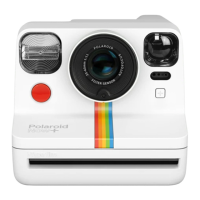
ThePolaroidNow+cameraalsohassome
creativetoolsyoucanaccessoutsideof
the app.
Self-timer
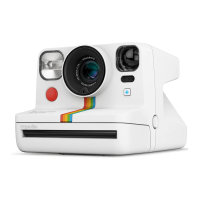
Get everyone in the photo with the
PolaroidNow+self-timer.Pressthe
+Buttonandthe+Buttonmodeindicator
(theLEDbelowtheviewnderonthefront
of the camera) will turn orange. Once
youhaveframedyourphoto,pressthe
shutter button. The orange LED will blink
toindicatetheself-timercountdown.You
have9secondsbeforethephotoistaken.
Ifyouchangeyourmind,youcancancel
the self-timer by pressing the shutter
buttonbeforetheendofthecountdown
or simply turning off the camera.
Double Exposure
Combine two exposures in the one photo
withdoubleexposure.Doubletapthe
+Buttontostart.The+Buttonmode
indicatorwillturngreen.Thelmcounter
displaywillblink‘1’.Youcannowtakeyour
rstexposure.Itwillthenblink‘2’asa
signaltotakeyoursecondexposure.
Custom Shortcut
A custom shortcut makes creating easier.
Chooseyourfavoritemodefromtheapp
andsenditdirecttoyourPolaroidNow+
camera to use whenever you like — without
needingtoconnectyourphone.Toseta
shortcut,gotoyourfavoritemodewithin
theappandpressthe+Buttonatthetop
ofthescreen.Nowthismodeissaved
in your camera. To activate it, long press
the +Button on the camera. The +Button
modeindicatorwillturnredtoshowthat
theshortcutisnowactive.Todeactivateit,
press the +Button again.
+Button Mode Indicator
Tocheckwhichcreativemodeyou’rein,turn
tothe+Buttonmodeindicator.Itsitsjust
belowtheviewnder.
Tips to take great photos
Lightisyourbestfriendwhenitcomesto
analoginstantphotography,sowerecommend
toalmostalwaysusetheash.ThePolaroid
Now+ashreaches2m(6.56ft),soifyour
subjectisfurther,yourashphotomayturn
outtoodark.
Ifyou’reoutdoorsandyoursubjectis
beyondtheashrange,werecommend
keepingtheashoff.Thiswillpreventthe
camerafromadjustingitsaperture,resulting
inanunderexposedphoto.
Ifit’sasunnydayoutdoors,letthesunbe
your light source. Position yourself so the sun
isbehindyou,faceyoursubjectside-onto
avoidashadow,turntheashoff,andkeep
thecameraassteadyaspossible.
Charging
Above the micro USB slot sits the battery level
indicatorLED.Tocheckthebatterylevel,turn
thecameraon,andmatchtheLEDwiththe
table below.
Battery Level
IndicatorLED This means:
→ Camera is off
→ Battery full
→ Battery half full
→ Battery empty
Ifyouwanttogetamoredetailedbattery
reading,holddownthe+Buttonwhileturningon
thecamera.Thelmcounterdisplaywillshow
the battery level as a number, which correlates
witha%.Oncethe+Buttonisreleasedthe
displayrevertstothelmcount.
Display This means:
Unlit Poweredoff
0 N/A
1 Batteryat
2 20%charged
3 30%charged
4 40%charged
5 50%charged
6 60%charged
7 70%charged
8 80%charged
9 Fullycharged
To charge the camera, plug the micro USB
endofthechargingcableintothesideof
thecamera,andtheUSB-AsideintoaUSB
wallcharger(5V/1A).Wedon’trecommend
charging via a laptop. A full charge through a
wall socket usually takes about 2 hours. The
batterylevelindicatorLEDtellsyouhowmuch
charge is remaining.
Battery Level
IndicatorLED This means:
→ Cameraisfullycharged
→
Charging, battery almost full
→
Charging, battery is half full
→ Charging, battery is low
Cleaning
WhenyoutakeaPolaroidphotograph,
thephotoispushedthroughtwometal
rollers.Thisiswherethedeveloperpasteis
spreadbetweenthenegativeandpositive
components of the photograph. If these rollers
aredirty,thechemistrywillnotspreadevenly,
andcancausesmallmarksonyourdeveloped
photo.
Whenyourcamerahasnolm,turnitoff
andopenthelmdoor.Lookforthesetwo
metalrollersnearthelmejectslot.Position
asoft,dampclothovertherollers.Rotatethe
rollers by turning the black plastic gear. Wipe
the cloth across the rollers as they move. Be
carefulthattheclothdoesn’tcauseajam.


 To Next Page
 Loading...