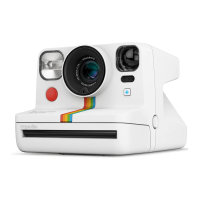
A
Shutter Button
B
Lens
C
Flash
D
Viewnder
E
Photo Eject Slot
F
Film Door Button
G
Flash & EV Button
H
ON | OFF Button
I
Film Counter Display
J
Neck Strap Loop
K
USB Charging Port &
BatteryLevelIndicator
L
+ButtonModeIndicator
M
+Button
N
Light Meter
O
TripodMount
P
Starburst
Q
RedVignette
R
Orange
S
Blue
T
Yellow
Display This means:
Unlit → Camera is off
- → Darkslideisinside
0 → Nolm
0 (blinking) → Nolm
1 → One photo remaining
1 (blinking) → Exposure 1 of Double
Exposure
2 → Two photos remaining
2 (blinking) → Exposure 2 of Double
Exposure
3 → Three photos remaining
4 → Four photos remaining
5 → Five photos remaining
D
G
H
I
JJ
K
A
B
N
O
C
M
L
E
F
D
Film Counter Display
Camera
Filters
Display This means:
6
→ Six photos remaining
7
→ Seven photos remaining
8
→ Eight photos remaining
door → Filmdoorisopen
→ Ejectlmanimation
→ Brighter +½EV
→ Neutral
→ Darker –½EV
c → Subject too close
F → Subject too far
b
(blinking 5×) → Battery too low for
camera to turn on
Thelmcounterdisplayprovidesalotof
information about your camera: from how many
photos are left to battery level.
6 Gettingstarted
6 Howtotakeyourrstphoto
7 Connecting to the app
7 Addingalenslter
8 Special Features
8 Usingtheash
8 Setting exposure value (EV)
9 Tips to take great photos
9 Charging
9 Cleaning
10 Troubleshooting
11 Customer Support
11 Warranty
11 TechnicalSpecications
12 Safety Information
12 Compliance
Index
P Q R S T









 To Next Page