32
Chapter 3 Using the LCD TV
Turn your LCD TV on.
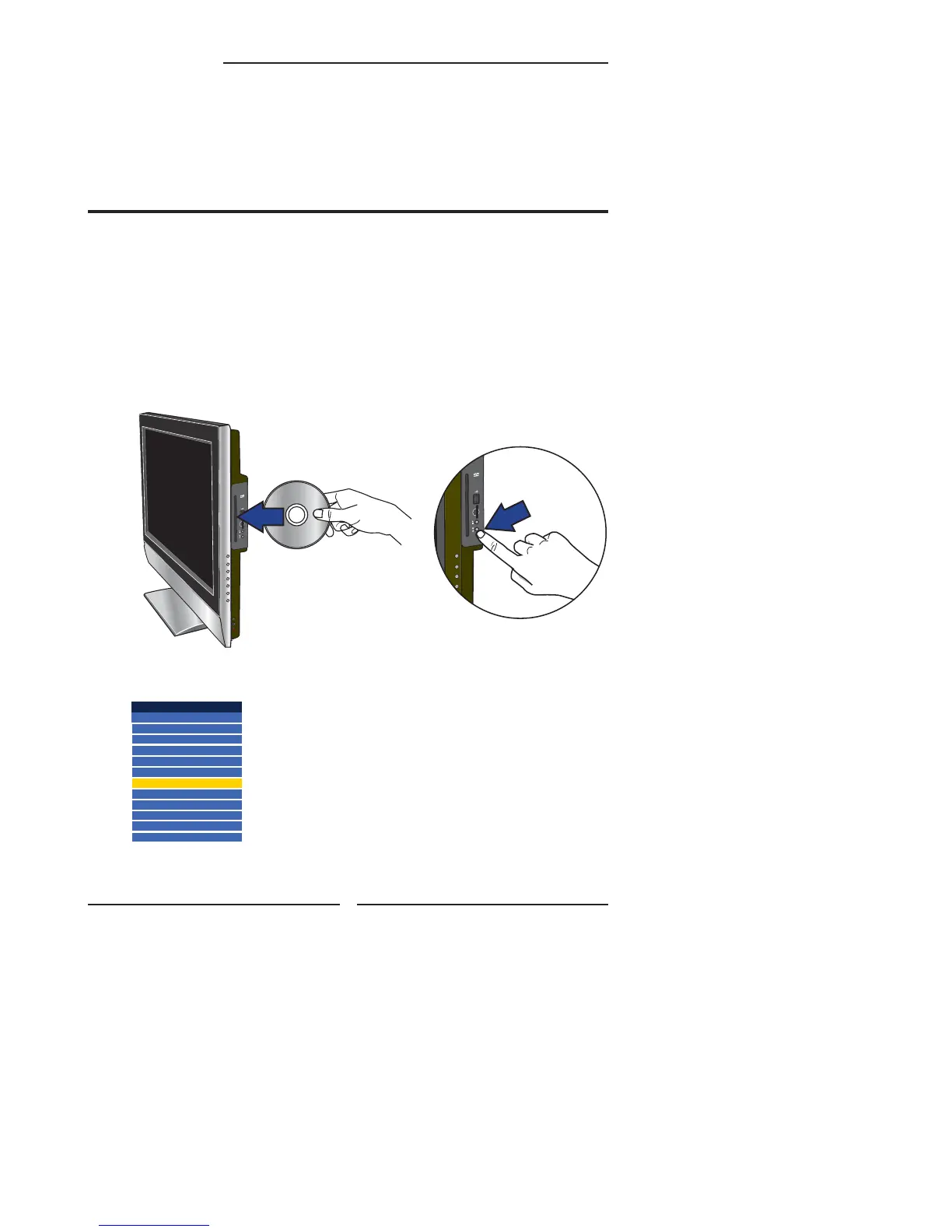
Insert a disc (DVD, VCD, SVCD, or audio CD).
NOTE: The printed side of the disk should face the front of the TV.
Using The Built-in DVD
Press the Input button on the remote, use ▲▼ to select DVD and press
the OK button.
Chapter 3
USING THE FEATURES
Input Source
TV(CABLE/AIR)
VIDEO1 (SIDE)
VIDEO2 (REAR)
VIDEO3 (S-VIDEO)
VIDEO4 (YPbPr1)
VIDEO5 (YPbPr2)
DVD
USB
CARD READER
VIDEO6 (HDMI1)
VIDEO7 (HDMI2)
COMPUTER(VGA)
Insert
Push
TO INSERT A DISC
Any of the following disc types can be
played on the DVD player: DVD-Video/DVD
R/RW/SVCD/VCD/CD/CD-R/CD-RW.
TO REMOVE A DISC
When removing the disc, do not
attempt to pull it from its slot. Please
push the EJECT button as
illustrated below.


 To Next Page
 Loading...