DB6501 & DB5251
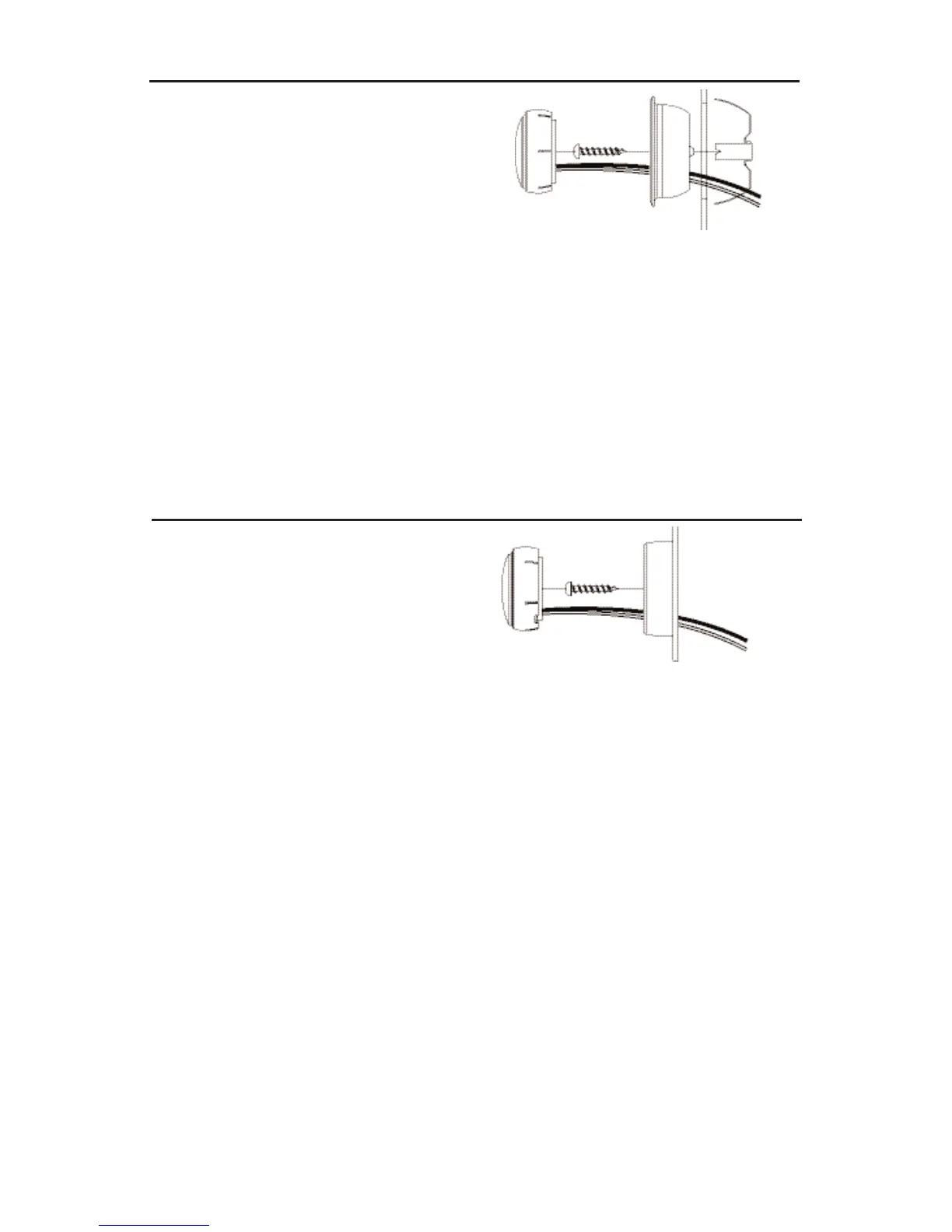
Figure 14
Flush Mount
TWEETER MOUNTING
1. Check for proper clearance: The flush mount
kit is 7/8" (22.2mm) deep.
2. Mark the center of the spot and cut a
2" (50.8mm) diameter hole using a hole
saw, drill bit or razor knife.
3. Assemble the cup, clamp and machine
screw loosely as shown.
4. Route wires through the round opening in the
bottom of the cup.
5. Press the assembly into the 2" (50.8mm) diameter
hole until the clamp edge is below the mounting
surface, then tighten the screw. The legs of
the clamp can be bent outward by inserting
a screwdriver through the holes in the cup
while still mounted.
6. Connect wires from the tweeter terminals of the
Crossover to the tweeter itself using the faston
connectors. Connect the red wire from the (+)
terminal of the Crossover tweeter output to
the red (+) wire from the tweeter.
7. Mount the tweeter by snapping it into the
mounting cup.
DB6501 & DB5251
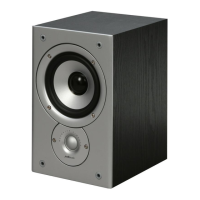
Figure 15
Surface Mount
TWEETER MOUNTING
1. Using the base of the surface mount cup as
a template, mark the screw hole and drill them
using a 1/8" (3mm) drill bit. Drill a second hole
(for the speaker wire) using a 3/16" (5mm) drill bit.
2. Screw surface mount cup to the panel.
3. Push the tweeter wires through the open area at
the bottom of the cup and through the 3/16" (5mm)
hole in the panel.
4. Connect wires from the tweeter terminals of
the Crossover to the tweeter wires using faston
connectors. Be sure to connect the red wire
strand from the tweeter to the (+) terminal
of the crossover tweeter output.
5. Mount the tweeter by snapping it into the
mounting cup.




 To Next Page