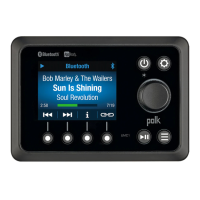
The Polk UMC1 is an Ultramarine Certified marine audio system designed for installation and operation in marine environments. It functions as a wired commander with a 2.8" color TFT display, offering a range of audio playback and control features.
Function Description:
The UMC1 serves as a central control unit for a marine audio system, providing access to various audio sources and settings. It includes an AM/FM US/EURO Tuner with 30 presets (12 AM, 18 FM), allowing users to listen to radio broadcasts. For digital audio, it supports USB playback of MP3 and WMA files, and features Bluetooth connectivity (A2DP & AVRCP) for wireless audio streaming from compatible devices. The unit is also "APP Ready," meaning it can be controlled via a dedicated mobile application, transforming a smartphone or tablet into a remote control for the stereo. A Weatherband Tuner with alerts is integrated for receiving local weather emergency information.
The system offers comprehensive audio control, including electronic adjustments for Bass, Treble, Subwoofer, Balance, and Fader. It has a mute function for quick audio silencing. The output power is 50W x 4, and it provides 4-Channel Pre-amp Line Level Outputs (Front & Rear RCA) for connecting external amplifiers. An Auxiliary Audio Input (RCA) allows for connecting external audio devices. The unit is also Wired Remote Control Ready, supporting optional PRC100BC and PRC200BC remote controls.
Important Technical Specifications:
- Display: 2.8" color TFT
- Tuner: AM/FM US/EURO Tuner with 30 Presets (12 AM, 18 FM)
- FM Frequency Coverage (USA): 87.5 to 107.9 MHz
- FM Frequency Coverage (Europe): 87.5 to 108 MHz
- FM Sensitivity (S/N = 30dB): 4uV
- FM Image Rejection: >45 dB
- FM Stereo Separation: >25 dB
- AM/MW Frequency Coverage (USA): 530-1710 kHz
- AM/MW Frequency Coverage (Europe): 522-1620 kHz
- AM/MW Sensitivity (S/N = 20dB): 36dB
- USB Playback: MP3 and WMA files
- Maximum number of folders: 512 (including skipped directories)
- Maximum number of folder levels: 12
- Maximum number of MP3 files: 999
- Maximum number of characters for MP3 file name and folder name: 32
- Sampling frequency: 16KHz, 22.05KHz, 24KHz, 32KHz, 44.1KHz, 48KHz
- Bit rates: maximum 384 Kbps
- ID3 Tag version 1.0: 32 characters
- ID3 Tag version 2.x: 32 characters
- Supports USB flash drives up to 64 GB
- Bluetooth: A2DP & AVRCP support
- Frequency band(s): 2.4~2.4835GHz
- Maximum radio-frequency power transmitted: 4 dBm
- Stores up to 5 paired devices (FIFO order)
- Weatherband Frequencies:
- 162.400 MHz (Preset 1)
- 162.425 MHz (Preset 2)
- 162.450 MHz (Preset 3)
- 162.475 MHz (Preset 4)
- 162.500 MHz (Preset 5)
- 162.525 MHz (Preset 6)
- 162.550 MHz (Preset 7)
- Power Output: 50W x 4
- Pre-amp Outputs: 4-Channel Line Level (Front & Rear RCA)
- Auxiliary Input: RCA
- Tone Controls: Bass (at 100 Hz) ±10dB, Treble (at 10 kHz) ±10dB
- Operating Voltage: DC 12 Volts
- Grounding System: Negative Ground
- Speaker Impedance: 4-8 ohms per channel
- Current Drain: 15 Ampere (max.)
- Tuner/Amp Box Dimension: 7.4(L) x 7.4(W) x 2.2(H) Inches
- Front Panel Dimensions: 6.8(L) x 5.0(W) x 2.8(H) Inches
Usage Features:
- Power On/Off: Press and hold the Power button (1) to turn the unit on/off.
- Volume Control: Rotate the Encoder Knob (3) clockwise to increase volume, counter-clockwise to decrease.
- Play/Pause/Mute: Press the Play/Pause button (8) to pause/mute audio; press again to unmute/resume.
- Mode Selection: Press the Mode button (9) to enter mode selection display. Rotate the Encoder Knob (3) to page through modes (Tuner, Weatherband, USB, Bluetooth, Auxiliary), then press the Encoder Knob to select.
- Audio Settings: Press the Menu button (2) to access audio settings (Bass, Treble, Balance, Fader, Sub, Loudness, Zones, Profiles). Use the Encoder Knob (3) to navigate and select.
- Loudness: Toggle on/off with the Loud soft button (4) to boost bass and treble at low volumes.
- Zones: When Zone Toggle is On (via System Menu), Zone Settings and SUB volume are adjustable. Press Menu (2), then button (6) to enter Zone Settings. Rotate Encoder Knob to select and adjust Zone volume.
- Profiles: Press button (5) to enter Profile Settings: Drive, Chill, Tow-Wake, Tow-Surf, Tow-Ski.
- System Menu: Press and hold the Menu button (2) for >3 seconds to enter system settings (Key Beep, LCD Backlight, LCD Contrast, Button Backlight, Power Button Backlight, Tuning Region, Bluetooth Setup, Low Battery Alarm, Low Battery Auto Off, Zone Toggle, System Reset, Firmware). Use Encoder Knob (3) to navigate and select.
- Bluetooth Setup (Sub Menu): Accessible in Bluetooth mode. Options include Bluetooth On/Off, Bluetooth Device List (Lock/Unlock, Disconnect/Connect, Delete paired devices), and Bluetooth Pair.
- Low Battery Alarm: If set to "ON," an alarm (3 beeps every 30 sec) sounds when voltage drops to 10.8V (+/- 0.3V), with a "Battery Low" visual warning. Default is "OFF."
- System Reset: Resets unit to factory default settings.
- Auxiliary Input: Connect portable audio player to AUX IN cables. Select Auxiliary audio input mode via Mode button (9) and Encoder Knob (3).
- Back Key (Swoop Arrow): Press button (7) to exit current operation and return to previous menu.
- Tuner Operation:
- Band Selection: Press Band button (6) to switch between FM or AM bands.
- Manual Tuning: Press Tune button (5). Use |<< or >>| buttons (4, 5) for step-by-step tuning.
- Seek Tuning: Press and hold |<< or >>| buttons (4, 5) for automatic seek to strongest stations.
- Preset List: Press List button (4) to display preset list (18 FM, 12 AM).
- Store a Station: Tune to desired station, rotate Encoder Knob (3) to highlight preset memory location, then press and hold Encoder Knob for 3 seconds or press Save soft button.
- Recall a Station: Rotate Encoder Knob (3) to highlight preset, then press Encoder Knob to tune.
- Scan: Press Scan button (5) to scan stored stations; pauses for 10 seconds per station. Press Scan again to stop.
- Autosave: Press Autosave button (6) to automatically select and store strongest stations, replacing existing presets.
- PTY (Program Type): Press PTY button (7) to search for stations broadcasting RBDS information. Rotate Encoder Knob to select program type (e.g., News, Rock, Jazz).
- Stereo (ST): "ST" icon appears when FM stereo signal is available; reverts to mono if not.
- Weather Band Operation:
- Tuning: Select Weather mode via Mode button (9) and Encoder Knob (3). Unit automatically tunes to strongest station in area within 10 seconds.
- Manual Tuning: Press Tune button (5). Use |<< or >>| buttons (4, 5) for step-by-step tuning.
- Preset List: Press Presets soft button to display fixed weatherband preset list.
- Recall a Station: Rotate Encoder Knob (3) to highlight preset, then press Encoder Knob to tune. Presets are assigned and cannot be changed.
- USB MP3 Operation:
- Inserting/Removing: Insert USB device into USB jack. Select USB mode via Mode button (9) and Encoder Knob (3). To remove, select another mode first.
- Selecting Tracks: Use |<< or >>| buttons (4, 5) for previous/next track. Press and hold for fast forward/reverse.
- Browse Files/Folders (LIST): Rotate Encoder Knob (3) to view files/folders. Press Encoder Knob to select. Press BACK button (7) to navigate back.
- Play/Pause: Press Play/Pause button (8).
- RRI (Repeat, Random, Intro):
- Previewing Tracks (Intro): Press Intro button (6) to play first 10 seconds of each file. Press again to stop.
- Repeat Play: Press Repeat button (5) to repeat current file. Press again to stop.
- Random Play: Press Random button (4) to play files in current folder in random order. Press again to stop.
- Bluetooth Operation:
- Pairing: On personal Bluetooth device, enable Bluetooth and search for devices. Enter Bluetooth mode on UMC1 (Mode button, then Bluetooth selection). Press Pairing button (7) to begin pairing for 120 seconds. Select PA4A/UM2 on Bluetooth device. Enter 0000 if password requested. Alternatively, pair via Bluetooth Setup in System Menu.
- Receiving Calls: Bluetooth audio pauses during calls. May need to press play button to resume after call.
- Bluetooth Audio (A2DP): Stream audio from connected Bluetooth device. Select Bluetooth mode via Mode button (9).
- Selecting Tracks: Use |<< or >>| buttons (4, 5) for previous/next track.
- Pausing Playback: Press Play/Pause button (8). "||" appears on LCD. Press again to resume. If mode changes, mobile audio pauses; return to Bluetooth mode via Mode button (7) to resume.
- Info: Press Info button (6) to view connected device name.
- APP Operation (Ultramarine app):
- Connecting: After installing Ultramarine app, pair device via Bluetooth. Once paired, open app to use with UMC1. For Android, close app before Bluetooth pairing to avoid errors.
- Features: Power on/off, volume/mute, AM/FM tuner control (stations, presets), NOAA weather band/alerts, Bluetooth streaming, USB file structure/track selection, auxiliary input control, audio menu controls (bass, treble, balance, fader, subwoofer, speaker selection), visual display feedback (artist/album info).
Maintenance Features:
- Safety Information:
- Keep volume low to be aware of surroundings.
- Do not submerge in water.
- Use included cover to protect from sunlight, dust, and water when not in use.
- Do not mount near heat sources (radiators, heat registers, stoves, amplifiers, engine compartment).
- Use only manufacturer-specified attachments/accessories.
- Operate with a 12 volt DC negative ground battery system.
- Servicing: Refer all servicing to qualified service personnel. Do not open covers or repair yourself. Servicing is required if the apparatus is damaged (e.g., power-supply cord/plug damaged, liquid spilled, objects fallen in, exposed to rain/moisture, dropped, or not operating normally).
- Troubleshooting: A dedicated section provides solutions for common issues:
- No Power: Check vessel's accessory switch, ignition key position, and fuse.
- No Sound: Check fuse, volume level, and wiring connections.
- Operation keys do not work: Check wired commander installation/connection, press RESET button on back of Tuner/Amp Module.
- Installation Notes:
- Always disconnect the negative battery terminal before installation.
- Test wiring connections before final installation.
- Consult dealer for drilling or modifications.
- Install where it doesn't interfere with vessel operation or injure passengers.
- Use included template for cutout.
- Choose a clean, flat mounting area for the wired commander to ensure proper gasket seal.
- Secure with bracket mount (included hardware) or screw mount (#6 stainless steel pan head screws, not included).


 To Next Page
 General