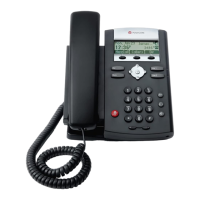
Polycom SoundPoint IP 331 Series Quick Reference Guide
Copyright Fuze, 2018
Rejecting an Incoming Call
1. Pick up handset
2. Or press speaker button
3. Or press headset button
4. Or press New Call soft key
5. Enter the number
6. Wait 3 seconds
1. Pick up handset
2. Or press speaker button
3. Or press headset button
4. Press the Answer soft key
1. Press the More soft key while phone is
ringing
2. Press the Reject soft key
3. Call will be sent to voicemail
Ignoring an Incoming Call
Blind Transferring a Call
1. Press the Ignore soft key
2. Audible ringing ceases
3. Call will still appear on phone display
1. Answer phone call
2. Notify caller of transfer
3. Press the Trnsfr soft key
4. Enter number or extension to transfer call
5. Wait 3 seconds
6. Wait for party to answer
7. Announce caller
8. Press the Trnsfr soft key
1. Answer phone call
2. Notify caller of transfer
3. Press the Trnsfr soft key
4. Press the Blind soft key
5. Enter number or extension to transfer call
6. Wait 3 seconds
Placing a Call to a Speed Dial
1. Select contact within the directory
2. Press the Edit soft key
3. Press the button on contact record to
Speed Dial Index field
4. Press the button
5. Enter the next available speed dial number
6. Press Ok soft key
7. Press the button
8. Press the Yes soft key
1. Pick up handset
2. Or press speaker button
3. Or press headset button
4. Or press the New Call soft key
5. Enter the number designated to that speed
dial followed by #
6. Wait 3 seconds
1. Press the More soft key
2. Press the Dir soft key
3. Arrow and select contact’s name
4. Press the button to edit, delete, or add
new contact
5. Press the button to place call

 Need help?


 To Next Page
 General