colour
reference
guide
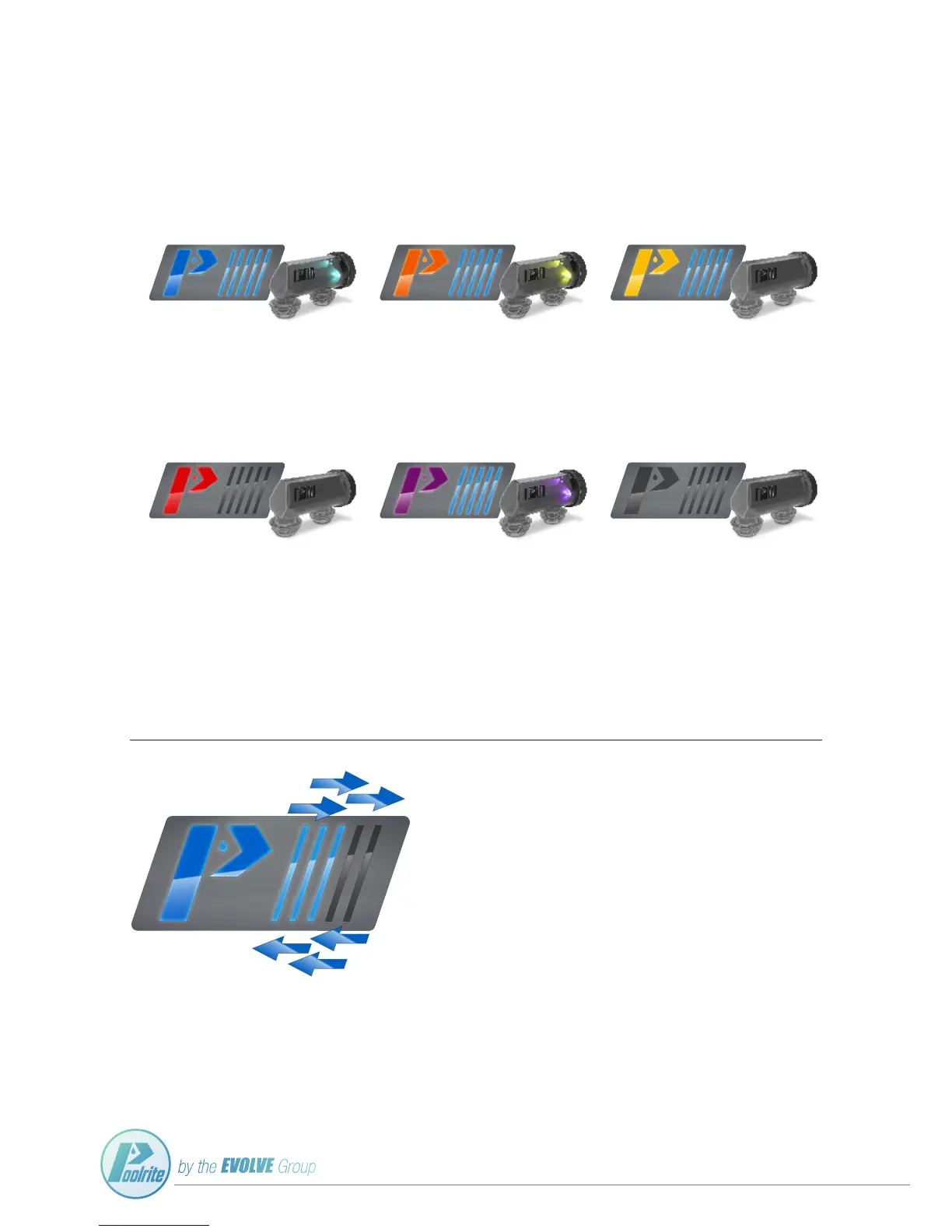
The Poolrite innoChlor salt and mineral salt chlorinator has been made with a self-diagnosing LED display in both
the power pack and cell. The chlorinator will change colours depending on the status and condition of the pool
water, pump ow, chlorinator and/or cell.
LIGHT BLUE
OPTIMAL SALT LEVEL
When the pool salt level is correct
(approx. 3500ppm). The innoChlor colour
LED will shine a blue colour.
ORANGE
LOW SALT
The LED indicator will change to ORANGE
when the salt level falls below the minimum
setting (approx. 1500ppm).
YELLOW
HIGH SALT
The LED indicator will change to YELLOW
when the salt is above the recommended
level (approx. 6500ppm).
RED
EXTREME HIGH SALT
When extreme high salt is detected
(above approx. 8000ppm) the chlorinator will
shut down and attempt to restart after 2
hours. If an extreme high salt alarm persists
after 3 Hours, check and lower your pool salt
concentrate to the recommended level.
PURPLE
NO WATER FLOW
Ensure your pool pump is active, if your pool
pump has unexpectedly stopped priming, shut
down the chlorinator immediately.
BLANK
POWER OUTTAGE
Ensure the innoChlor is receiving power.
4
CHLORINE OUTPUT LED BAR
The Poolrite innoChlor utilises LED lights to assist you in knowing how much you are
increasing, or decreasing the chorine output. By turning the Chlorine Output Control
Knob (see page 2) the ve 'light bars' located on the front of the unit will display what
strength the chlorine output is.
The fewer LED bars = the lower amount of chlorine is being produced.
The more LED bars = the higher amount of chlorine is being produced.


 To Next Page