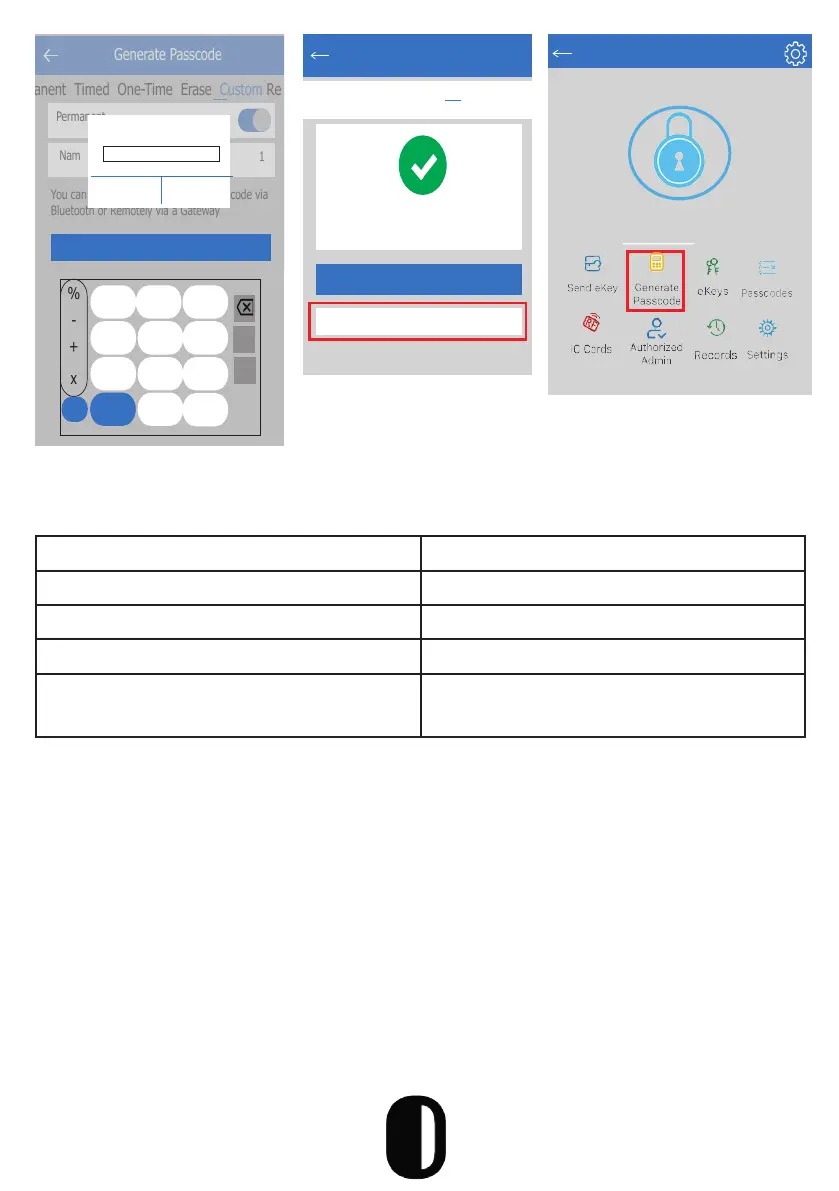
٭You can share the
Passcode to other
users via WeChat, SMS,
Email, Messenger and
WhatsApp
Passcode Type Description
Permanent General Use passcode
Limited-Time Passcode with set time frame
Single Use Single-use short term password
Custom Schedule Set your own passcode and time
frame
Passcode Types
Passcode Management
All generated passwords can be viewed and managed in the password
management module. This includes a password change, password
deletion, password reset and password unlock record.
You can Configure the Customized Passcode via
Bluetooth or Remotely via a Gateway
Generate Passcode
anent Timed One-Time Erase Custom Re
Permanent
Nam
1
4-9 Digits in length
Cancel OK
Set Passcode
%
-
+
x
1 2
3
4 5
6
7 8 9
0
,
@
Generate Passcode
anent Timed One-Time Erase Custom Recurruring
Succeeded. The passcode is
25097
Complete
Share
16
TTLock
S31A
Touch to Unlock. Long Press to Lock
Unlock with Passcode
In order to open the door using passcode, enter the code and “#”
1. You will hear a voice command “unlock” and then open the door
2. If the wrong passcode is entered, you will hear “operation failed” and
re-enter
3. You can enter a decoy code along with the actual code followed by
“#”


 To Next Page