BATTERY MONITOR QUICK GUIDE
Type 1 & Type 2
Type 1 Battery Monitor
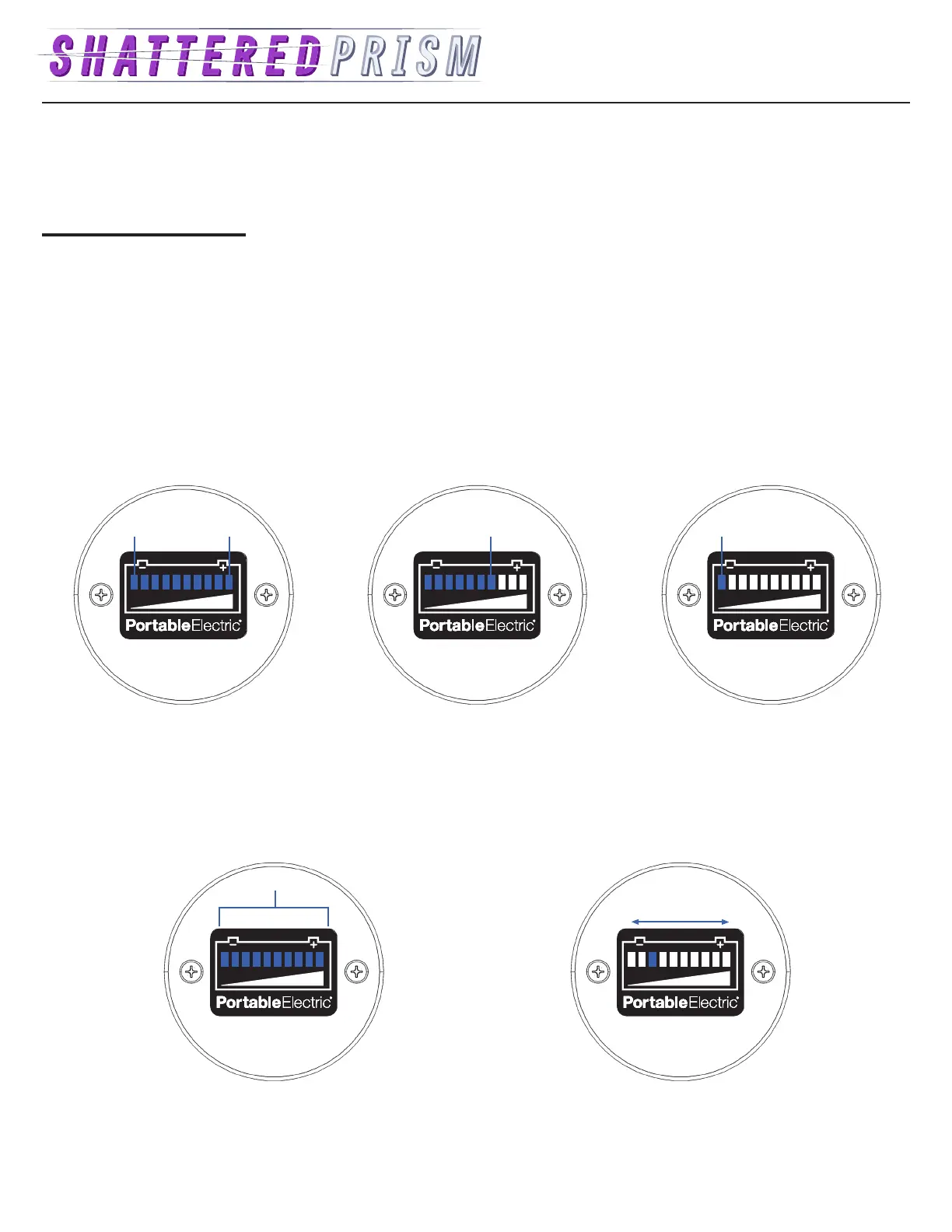
The Type 1 Battery Monitor has ten blue LEDs. Full illumination of the ten LED’s indicates 100% State of Charge.
Discharging Charging State of Charge
Discharging
The Battery Monitor will show the State of
Charge when discharging.
Charging
The right most blue LED will blink.
State of Charge Low
The last remaining LED will blink indicating the
State of Charge is approaching zero.
Blink Low
Fault Warning
All of the LEDs will blink. This can indicate an overload
fault warning, or over temperature fault warning.
Connection Error
A single blue LED will move continually from left to right
and back again. This indicates a connection error in the
Battery Monitor.
Fault
Connection
0% SOC 100% SOC
Blink


 To Next Page