Type 2 Battery Monitor
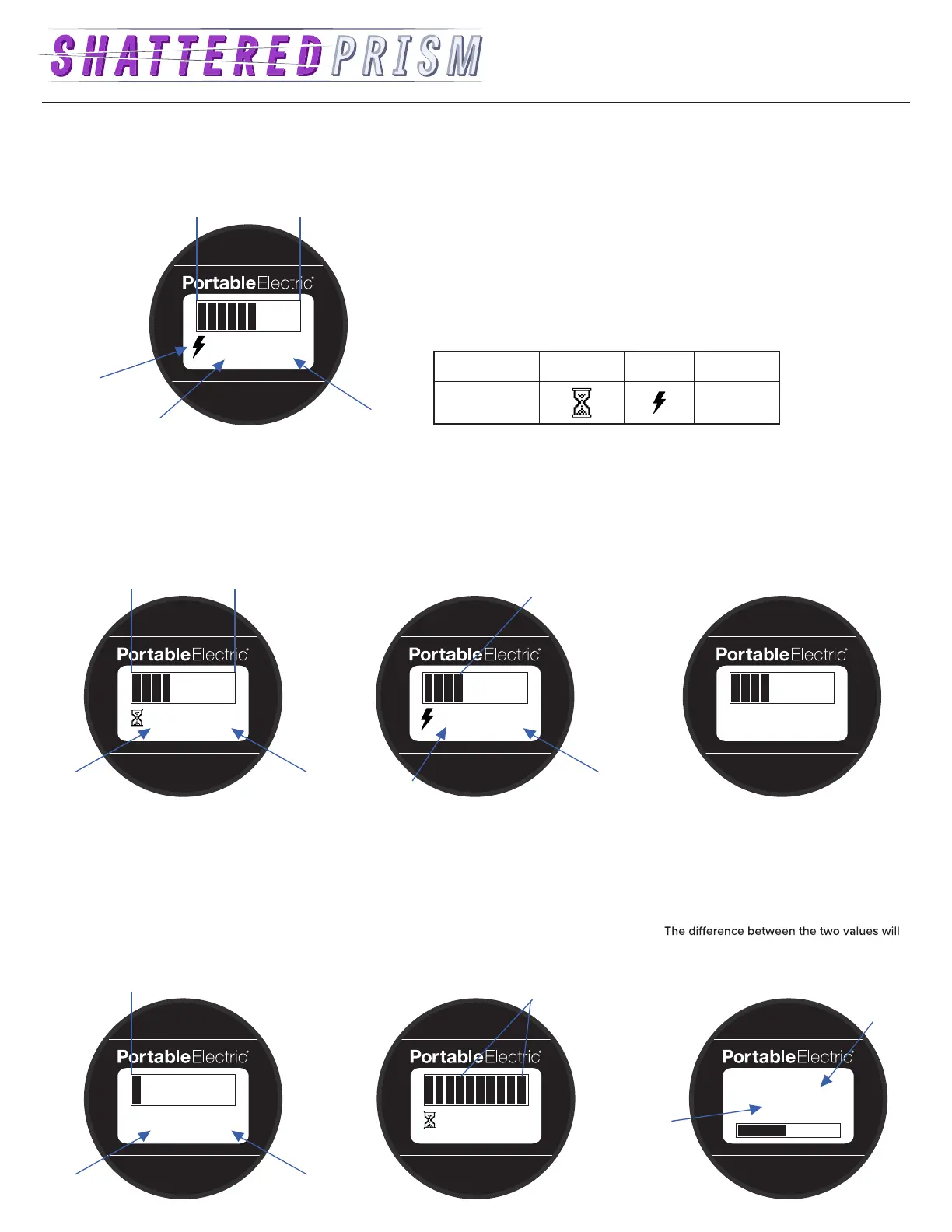
The Type 2 Battery Monitor has an LCD screen which displays the State of Charge, Power State, discharge Run Time, charge Time Remaining, and Net Power
of the VOLTstack.
Discharging
The Battery Monitor will show the State
of Charge, as well as the estimated Run
Time in hh:mm format.
Idle
The Battery Monitor will display
Idle at a Net Power of 0.
03:02 1000W
State of Charge
Power
State
Net Power
Run Time (Discharging)
Time Remaining (Charging)
Power State Discharging Charging Idle
Symbol
IDLE
State of Charge Low
The last remaining State of Charge interval
will blink indicating the State of Charge
is approaching zero. The Run Time will
indicate a capacity of less than 15
minutes remaining.
< 15 min –1000W
Blinking
Run
Time
Net
Power
Charging
The right most interval will blink, and the
charging symbol with estimated charge
Time Remaining will be displayed.
03:02 –1000W
IDLE
0% 100%
Run
Time
(hh:mm)
Net
Power
03:02 1000W
Blink
Charge
Time Remaining
(hh:mm)
Net
Power
Fault Warning
All of the State of Charge intervals will
blink. This can indicate an overload fault
warning, or over temperature fault warning.
03:02
Blink
–1000W
Loading Screens
Loading Screen 3: The total usage of the
VOLTstack can be calculated by adding
the charging and discharging kWh used.
indicate time spent at Idle.
103 kWh In
100 kWh Out
Total
Charging
usage in
kWh
Total
Discharging
usage in kWh
0W
• The State of Charge is divided into 10 intervals based on 0-100% State of Charge.
• The Run Time and Time Remaining are based on average Net Power, and will
update as the Net Power changes.
• The loading screens display critical information and cannot be skipped. Loading
Screen 1 and 2 are for maintenance, and Loading Screen 3 displays the historical
usage of the VOLTstack.


 To Previous Page
 Loading...