
 Need help?
Do you have a question about the Portacool PACJS220 and is the answer not in the manual?
Steps for removing the cooler from its packaging and positioning it.
Instructions for filling the tank or connecting a water hose and plugging into power.
Guidance on filling the tank, turning on the pump, and starting the fan.
Importance of adequate ventilation for optimal cooler performance.
Critical warnings for safe operation, including user restrictions.
Procedures to mitigate risks of electric shock, fire, and injury during use.
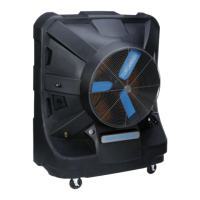
Diagram identifying key parts of the PACJS220 model.
Explanation of GFCI/ELCI and related safety warnings.
Diagram identifying key parts of the PACJS230 model.
Diagram identifying key parts of the PACJS240 model.
Diagram identifying key parts of the PACJS250 model.
Diagram identifying key parts of the PACJS260 model.
Diagram identifying key parts of the PACJS270 model.
Explanation of Grounded Fault Circuit Interrupter and Equipment Leakage Circuit Interrupter.
Description of the liquid level indicator and its automatic pump shutoff function.
Recommendations for positioning the evaporative cooler for maximum airflow.
Instructions for starting the pump and adjusting water flow to the media.
Steps to start the fan and ensure casters are locked before operation.
Daily drying of media and weekly draining and cleaning of the tank.
Steps for draining, cleaning, and storing the cooler to prevent damage.
Troubleshooting steps for power, motor, or circuit issues.
Solutions for low air output, including placement and motor checks.
Remedies for water leaks from the unit or loose drain plugs.
How to address knocking, shaking, or rattling sounds.
Causes and remedies for odors emanating from the cooler.
Solutions for water being expelled with the air stream.
Covers assembly, preparation for storage, and media lifespan.
Addresses cooling problems, odors, optimal conditions, and moisture.
Differentiates cooling types and guides on obtaining parts.
Information on where to find the model and serial numbers on the unit.
Step-by-step instructions for replacing the Kuul Comfort evaporative media.
Table listing part numbers for various components by model.
Information on additional HVAC and refrigeration products.
 General
| Model | PACJS220 |
|---|---|
| Type | Evaporative Cooler |
| Airflow | 2, 000 CFM |
| Cooling Area | 500 sq ft |
| Fan Speeds | 3 |
| Electrical Requirements | 60Hz |

 To Next Page