EasyManua.ls Logo

Portamate PM7000 - User Manual

Portamate PM7000
20 pages
Print Icon
To Next Page IconTo Next Page
Loading...
OPERATORS MANUAL
Assembly Operation Parts List Warnings Warranty
Caution: Read all instructions carefully.
SAVE THESE INSTRUCTIONS. Refer to them often and use them to instruct others.
PM7000
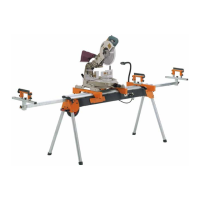
Miter Saw
WorkCenter
Date Purchased/Date d’achat /Fecha de compra:
Where Purchased/Lieu d’achat /Dónde se compró:
Address/Adresse /Dirección:
Patents Pending
En instance de brevet
Patentes Pendientes
MANUEL DE L’UTILISATEUR
Assemblage Fonctionnement Liste de pièces Avertissements • Garantie
Mise en garde : Lire attentivement l’ensemble des instructions.
CONSERVER CES INSTRUCTIONS. Les consulter souvent et les utiliser pour éduquer les autres.
MANUAL DEL OPERADOR
Ensamble Operación Lista de Partes Advertencias Garantía
Precaución: Lea cuidadosamente todas las instrucciones.
GUARDE ESTAS INSTRUCCIONES. Refiérase a las instrucciones y úselas para enseñarle a otras personas.
Question and Answer IconNeed help?

Do you have a question about the Portamate PM7000 and is the answer not in the manual?

Summary

Parts List and Identification

Optional Accessories Overview

Lists optional accessories available for the WorkCenter, enhancing its functionality.

Features and Accessories Guide

Standard Features Explained

Details the standard features included with the WorkCenter for optimal use.

Available Optional Accessories

Lists additional accessories that can be purchased separately to customize the WorkCenter.

General Safety Instructions

Miter Saw Stand Safety Guidelines

Specific safety guidelines for operating and using the miter saw stand safely.

Assembly and Setup Instructions

Installing T Supports and Roller Supports

Step-by-step guide for attaching "T" supports and roller supports to the WorkCenter.

Attaching Benchtop Power Tools

Guide on how to mount a miter saw or other tools securely to the WorkCenter.

Using Tools Separately

Instructions on how to use the benchtop tool independently from the WorkCenter.

Attachment and Adjustment Procedures

Adjusting Roller Supports and Flip Stops

How to adjust roller supports and flip stops for precise material positioning.

Material Supports Usage

Instructions for utilizing roller supports for smaller workpieces and material positioning.

Material Stops and WorkCenter Use

Transporting and Storing the WorkCenter

Procedures for securing attachments and folding the WorkCenter for transport or storage.

WorkCenter as a Woodworking Hub

Demonstrates versatility by showing the WorkCenter with various benchtop tools.

One Year Limited Warranty Information

Portamate PM7000 Specifications

General IconGeneral
MaterialSteel
Adjustable HeightYes
Adjustable LengthYes
FoldableYes
Wheel Kit IncludedYes
ModelPM7000

Related product manuals