1010
CLAMPS
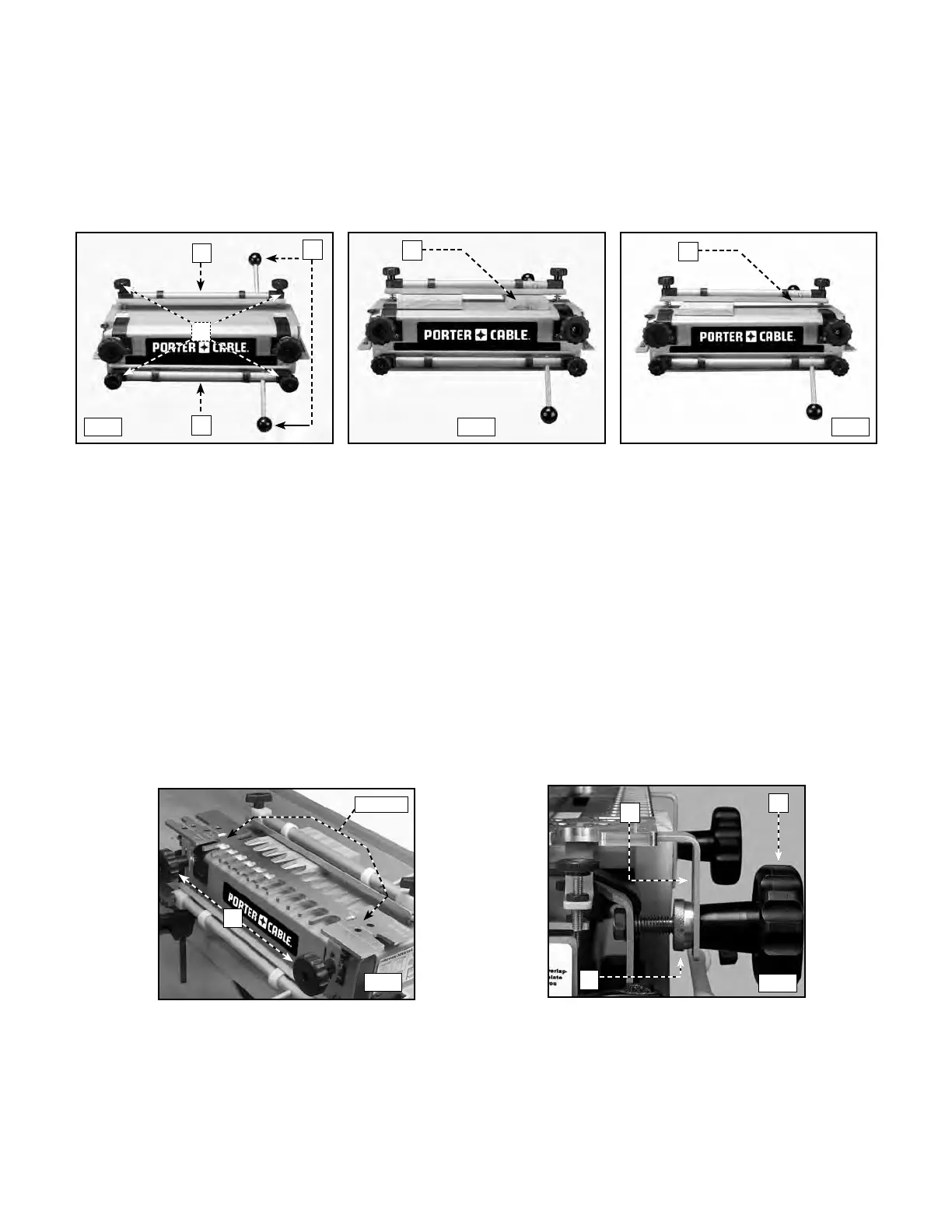
The 4200 series jigs are equipped with two cam-action clamps (A) Fig. C1 with knobs (B) to
adjust for workpiece thickness, and levers (C) for quick clamping and releasing of workpieces.
NOTE: Use a scrap board (A) Fig. C2 to prevent misalignment (A) Fig. C3.
TEMPLATE MOUNTING
You can mount the templates in two positions on the jig(s) which allows the production of multiple types of joints
with each template. To reverse a template, loosen the template knobs (C) Fig. D1, remove the template (B) from the
base, rotate it 180 degrees horizontally, replace it on the base, and tighten the template knobs.
NOTE: Secure the templates by inserting the template brackets (A) Fig. D2 between the large template knobs (B)
Fig. D2 and the brass adjustment knobs (C). You can then make front-to-back adjustments by loosening the large
template knobs (B) and rotating the brass adjustment knobs (C).
A
B
C
A
A
B
C
A
C1
C2 C3
D1
D2
C
A
ROTATE




 To Next Page