Need help?
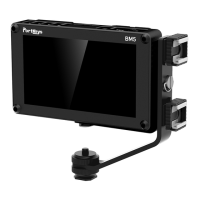
Do you have a question about the PortKeys BM5 and is the answer not in the manual?
Adjusts brightness, contrast, chroma, sharpness, tint, and color temperature.
Configure and load LUT files from USB.
Displays the current firmware version.
Updates the firmware using a USB drive.
Set camera model, position, and update firmware.
Important notes regarding firmware upgrade process.
Instructions for upgrading the main firmware.
Verify software version after upgrade.
 General
| Touchscreen | Yes |
|---|---|
| Contrast Ratio | 1000:1 |
| Input Voltage | 7-24V |
| Waveform Monitor | Yes |
| Vectorscope | Yes |
| False Color | Yes |
| Peaking | Yes |
| Zebra | Yes |
| Anamorphic Desqueeze | Yes |
| Audio Monitoring | Yes |
| Resolution | 1920x1080 |
| Viewing Angle | 178 degrees |
| LUT Support | Yes |
| Mounting Options | 1/4 inch screw holes |

 To Next Page