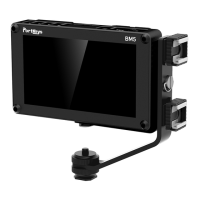
The Portkeys HS7T is a 7-inch on-camera monitor designed for professional videography and filmmaking, offering a comprehensive set of features for monitoring and analysis. It is manufactured by Shenzhen Portkeys Electronic Technology Co., Ltd.
Function Description:
The HS7T serves as a high-brightness, high-resolution display for real-time video monitoring. It supports a wide range of input and output resolutions and frame rates for both SDI and HDMI signals, making it compatible with various cameras and video sources. The monitor provides essential monitoring tools such as guides, false color, peaking, zebra, histograms, and audio meters, which are crucial for accurate exposure, focus, and framing. It also includes advanced features like LUT (Look Up Table) support for on-set color grading and anamorphic de-squeeze for working with anamorphic lenses. The user interface is navigable via a scroll wheel menu key and custom function keys, allowing for quick access and adjustment of settings. Firmware upgrades are supported via a USB port, ensuring the monitor can be kept up-to-date with new features and improvements.
Important Technical Specifications:
- Size: 7 inches
- Dimensions: 190x122.4x41mm
- Viewing Angle: 178°H/178°V
- Brightness: 1200nit
- Resolution: 1920x1200
- Contrast Ratio: 1200:1
- Weight: 520g
- Color Depth: 8bit
- Material: Aluminum Alloy + Toughened Glass
- Input Voltage: DC 7~24V
- Power Consumption: 13W
- Signal Input: 3G SDI, 4K HDMI
- Signal Output: 3G SDI, 4K HDMI
- Headphone Output: Yes
- Menu Language: Simplified Chinese/English
- Operating Temperature: 0°C~58°C
- 1920×1080p@50fps, 59.94fps, 60fps
- 1920×1080p@50Hz, 59.94Hz, 60Hz YUV422
- 1920x1080p@23.97Hz, 24Hz, 25Hz, 29.94Hz, 30Hz YUV444/YUV422/RGB444
- 1920x1080psf@23.97Hz, 24Hz, 25Hz, 29.97Hz, 30Hz YUV444/YUV422/RGB444
- 1920×1080i@50Hz, 59.94Hz, 60Hz YUV444/YUV422/RGB444
- 1280×720p@50Hz, 59.94Hz, 60Hz YUV444/YUV422/RGB444
- 720×480i@59.94Hz YUV422
- 720×576i@50Hz YUV422
- 4096×2160p@24Hz
- 3840×2160p@23.97Hz, 24Hz, 25Hz, 29.97Hz, 30Hz
- 1920x1080p@23.97Hz, 24Hz, 25Hz, 29.97Hz, 30Hz, 50Hz, 59.94Hz, 60Hz
- 1920x1080psf@23.97Hz, 24Hz, 25Hz, 29.97Hz, 30Hz
- 1920×1080i@50Hz, 59.94Hz, 60Hz
- 1280×720p@50Hz, 59.94Hz, 60Hz
- 720x576p&720×576i@50Hz
- 720×480p&720×480i@50Hz, 59.94Hz, 60Hz
Supported Output Resolution and Frame Rate (SDI Signal):
- 1920×1080p@50fps, 59.94fps, 60fps
- 1920×1080p@50Hz, 59.94Hz, 60Hz YUV422
- 1920x1080p@23.97Hz, 24Hz, 25Hz, 29.94Hz, 30Hz YUV444/YUV422/RGB444
- 1920x1080psf@23.97Hz, 24Hz, 25Hz, 29.97Hz, 30Hz YUV444/YUV422/RGB444
- 1920×1080i@50Hz, 59.94Hz, 60Hz YUV444/YUV422/RGB444
- 1280×720p@50Hz, 59.94Hz, 60Hz YUV444/YUV422/RGB444
- 720×480i@59.94Hz YUV422
- 720x576i@50Hz YUV422
Supported Output Resolution and Frame Rate (HDMI Signal):
- 4096×2160p@24Hz
- 3840×2160p@23.97Hz, 24Hz, 25Hz, 29.97Hz, 30Hz
- 1920×1080p@23.97Hz, 24Hz, 25Hz, 29.97Hz, 30Hz, 50Hz, 59.94Hz, 60Hz
- 1920x1080psf@23.97Hz, 24Hz, 25Hz, 29.97Hz, 30Hz
- 1920×1080i@50Hz, 59.94Hz, 60Hz
- 1280×720p@50Hz, 59.94Hz, 60Hz
- 720x576p&720×576i@50Hz
- 720×480p&720×480i@50Hz, 59.94Hz, 60Hz
Standard Accessories:
- HS7T Monitor X1
- Screen cleaning wipe X1
- M2 Allen key X1
- U Disk (Instructions for use is enclosed) X1
- Shoulder strap X1
- Silicone pad X6
- Warm reminder card X1
- D-TAP to 4-pin aviation power cable 100cm X1
Usage Features:
- Custom Function Keys (F1-F4): The monitor features four customizable function keys (F1-F4) that can be assigned to frequently used monitoring tools. A long press (3 seconds) on these keys brings up the setting menu for the assigned function, allowing for quick adjustments. Continuous clicking on a button cycles through its settings.
- Scroll Wheel Menu Key: The scroll wheel serves as the primary navigation tool for the menu system and allows for parameter adjustments. Pressing the scroll wheel confirms selections.
- Video Configuration: Users can adjust basic display parameters such as brightness, contrast, chroma, sharpness, tint, and color temperature (with options for 5600K, 6500K, 7500K, 9300K, or manual adjustment). Backlight intensity and anamorphic de-squeeze settings are also configurable.
- System Configuration: This section allows for setting OSD language (Simplified Chinese/English), OSD duration, OSD transparency, menu setup, system reset, flip control (for image orientation), waveform source, low battery alarm, and fan control.
- LUT Support: The HS7T supports 3D LUTs for on-set color grading. Users can load LUT files from a USB disk into the monitor's "user storage." The monitor supports LUT files in Cube format with 16/17/32/33/64/65 precision (LUT_3D_SIZE). Loaded LUTs can be applied and saved automatically.
- Monitoring Tools:
- Guides: Customizable frame guides (H and V custom percentages) and various aspect ratios (80%, 90%, 1:1, 16:9, 9:16, 15:9, 4:3, 1.5:1, 1.85:1, 2:1, 2.35:1, 2.39:1) with adjustable color and thickness.
- Cross Hair: On/Off toggle with adjustable color and X/Y offsets.
- Grids: Multiple grid options (1-10) with adjustable color.
- Peaking: Focus assist with adjustable factor (1-15) and color (Red/Green/Blue/Black/White).
- False Color: Exposure assist with adjustable under-warn (-10~15), over-warn (85~110), and tooltip display.
- Zebra: Exposure warning with adjustable under-warn (-10~15), over-warn (85~110), and tooltip display.
- UnderScan: Adjusts the display area (50~100).
- Histogram: Displays luminance and RGB histograms with adjustable position, size (Small/Large), and transparency.
- Luma Waveform: Displays the luminance waveform.
- Zooming: Digital zoom function with adjustable X/Y offsets, ratio (User/X1.5/X2/X2.5/X3), and H/V zoom levels (X1.01~X3.00).
- Audio Meters: Displays audio levels with adjustable position (Top/Left/Division/Right/Bottom) and blending (1~100).
- Pixel To Pixel: Displays the image at 1:1 pixel mapping with adjustable X/Y offsets.
- HDR (HLG): High Dynamic Range support.
- Display Flip: Flips the display image.
- OSD Flip: Flips the On-Screen Display.
- Check Field: A monitoring tool to check specific color channels.
- H/V Delay: Displays horizontal and vertical sync information.
Maintenance Features:
- Firmware Upgrade: The monitor supports firmware upgrades via a USB disk. Users can download the latest firmware from the Portkeys official website, unzip the files, and transfer them to the root directory of a FAT, FAT32, ExFat, or NIFS formatted USB disk. The upgrade process involves inserting the USB disk into the monitor's USB upgrade port, navigating to the "Firmware" menu, selecting "Update(USB)," and confirming the upgrade. The monitor will restart automatically during the process. It is crucial not to power off the device during the upgrade.
- System Reset: The "System Reset" option in the System Config menu allows users to restore the monitor to its factory default settings.
- Screen Cleaning: A screen cleaning wipe is included as a standard accessory for maintaining the display's clarity.
- Temperature Warning: The monitor operates within a temperature range of 0°C~58°C. A warning is provided to "Pay attention to high temperature, Be careful burns," indicating that the device can get warm during operation.
- Physical Durability: The construction from Aluminum Alloy and Toughened Glass suggests a robust design intended for demanding on-set environments.

 Need help?
 General

 To Next Page