www.portkeys.com
HS7T HS7T5 6
Email:sales@pkscorp.com
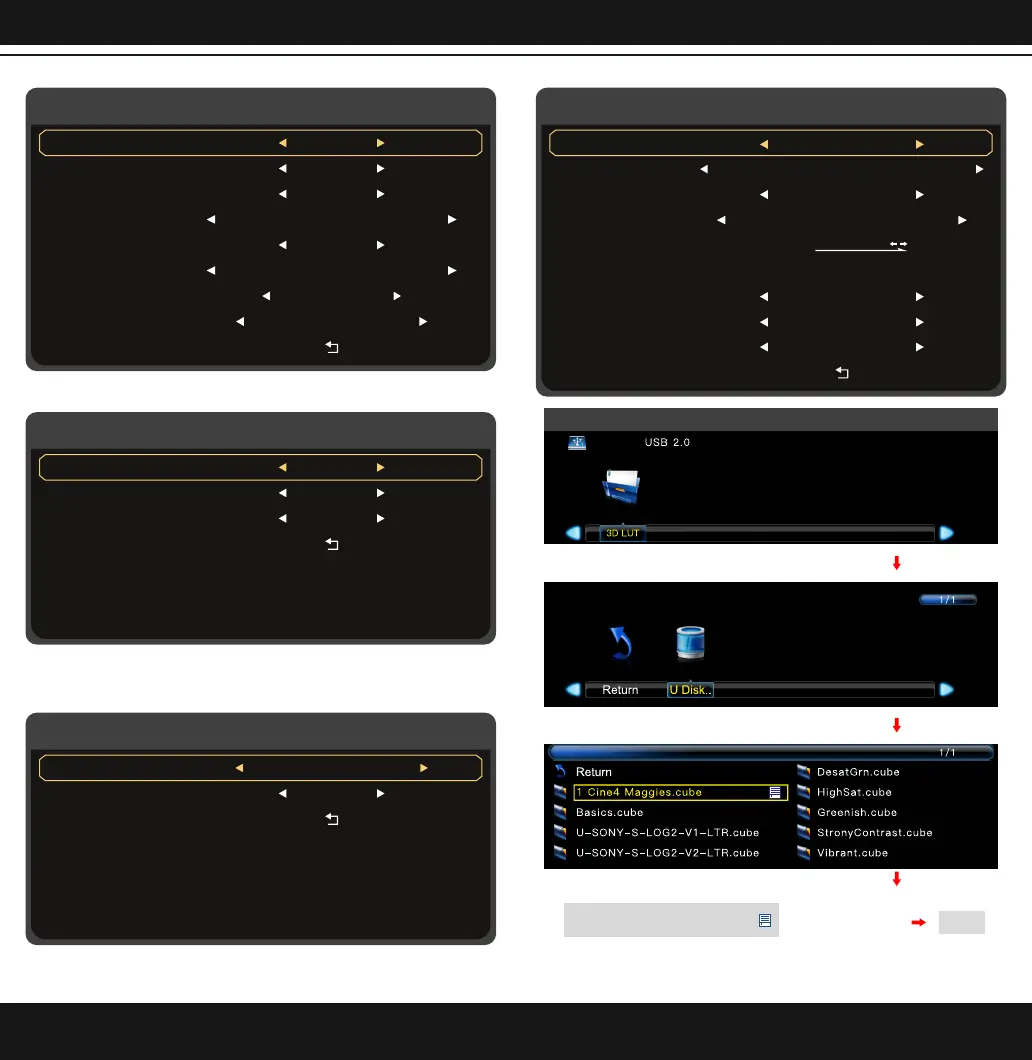
Video Config
Sharpness
Anamorphic
Backlight
Color Temperature
Tint
Chroma
Contrast
Brightness
Low/Middle/High
User/1X/1.33X/1.42X/1.5X/
1.66X/1.85X/2X/2.35X
0~100
0~100
0~100
5600K/6500K/7500K/9300K/Manual
0/10/20/30/40/50/60/70/80/90/100
0~100
Back
Color Temperature adjusts to Manual Setting (Confirm by MENU)
Color Temperature Manual
Back
Blue
Green
Red
0~255
0~255
0~255
Anamorphic adjusts to User (Confirm by MENU)
Anamorphic Setting
Back
User
Anamorphic
User/2.35X/2X/1.85X/1.66X/
1.5X/1.42X/1.33X/1X
1.00X~3.00X
(Press "Scroll Wheel Menu Key" Confirm)
(Press "Scroll Wheel Menu Key" Confirm)
(Press "Scroll Wheel Menu Key" Confirm)
USB Looks
*LUT file could be stored repeatedly,to delete,please enter the user storage interface and delete it
by the above steps.LUT file format Cube,support16/17/32/33/64/65 precision (LUT_3D_SIZE).
(Press "Scroll Wheel
Menu Key" Confirm)
Apply 3D LUT mode and it will be
*
saved automatically to "user storage"
EXIT
System Config
Menu Setup
Low Battery ALM
Waveform Source
Flip Control
System Reset
OSD-Transparancy
OSD-Duration
OSD-Language
Back
Fan
简体中文/English
Load LUT/Original
Off/Low/Middle/High
5Sec/10Sec/15Sec/20Sec/25Sec/30Sec/Off
>
User1/User2/User3/User4/User5
Low/Middle/High/Off
Yes/NoAre you sure?
Press MENU, Then
Low/Middle/High


 To Next Page