
 Need help?
Do you have a question about the POS Tablet Star TSP 143 and is the answer not in the manual?
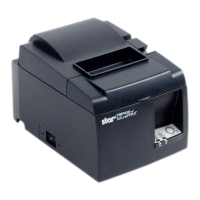
Details on the front-facing parts of the printer, including the printer cover, lever, power switch, and control panel.
Details on the back-facing parts of the printer, including Ethernet, peripheral drive, and power connectors.
Step-by-step instructions for connecting the DK power module, wireless router, and cash drawer to the printer.
Guidance on loading an 80mm width paper roll into the printer.
Instructions to ensure cables are connected and turn on the printer, noting the READY indicator light.
Instructions to open a web browser, enter the router IP, and log in with default credentials.
Steps to select 'Quick Setup' and 'Client Mode' on the router interface.
Guidance on using the 'Survey' screen to find and connect to the desired WiFi network.
Instructions to select security options, enter the WiFi password, and proceed.
Procedure to reboot the router to apply saved configuration changes.
Addresses issues with printers not acquiring an IP by adjusting DIP switch settings.
Detailed steps to turn off the 20-second auto-timeout via DIP switch adjustment.
 General
| Brand | POS Tablet |
|---|---|
| Model | Star TSP 143 |
| Category | Printer |
| Language | English |

 To Next Page