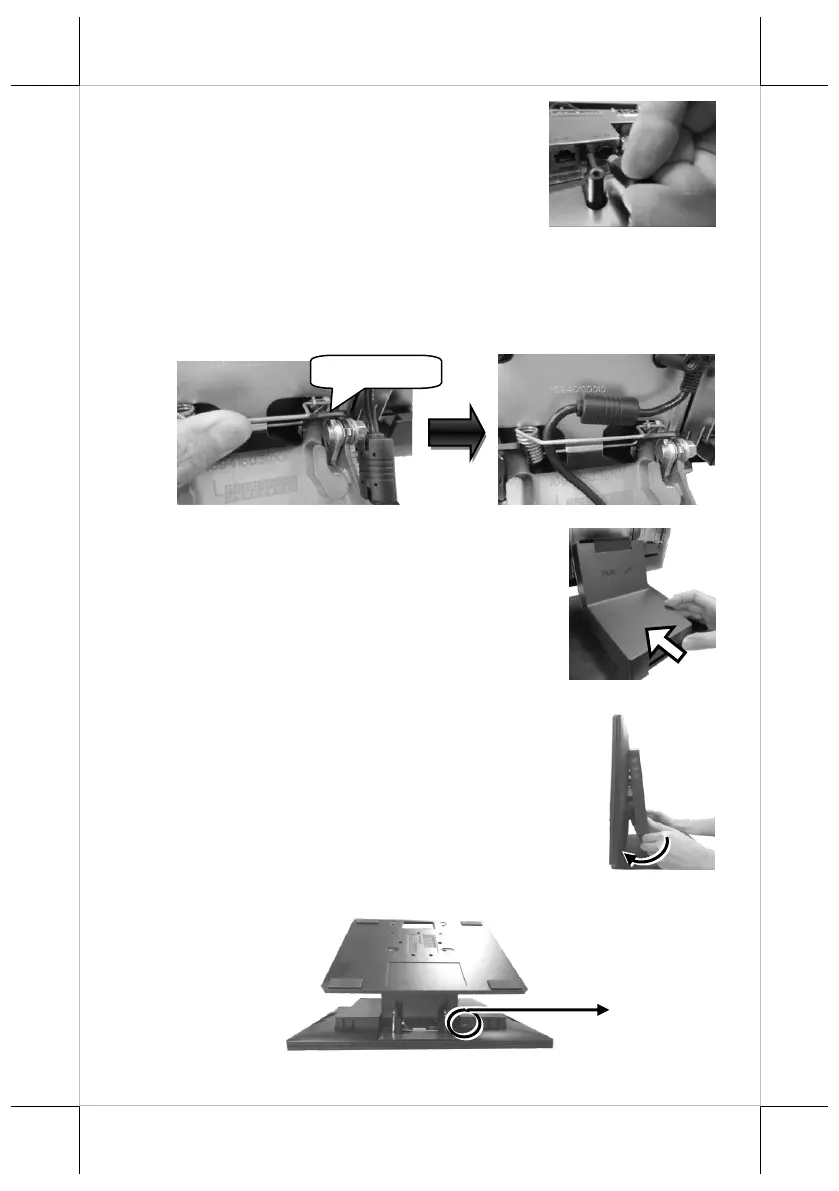
4. Connect the connector of the power adapter
to the DC-IN power jack. If necessary,
properly insert other cables into the correct
port.
5. Neatly arrange the cables. Locate the cable holder inside the base as
shown in the figure. Push down the lever to release if from the hook,
pass the cable through cable holder, and then press down the lever
again to lock it onto the hook.
6. Make sure the cord can be held into place and
passed through the cable exit after sliding back
the stand cover.
7.1 Place back the sytem back cover. Make sure
it is well locked into place with a click sound.
7.2 For the fire-resistant system back cover, please insert another
screw into the screw hole indicated in the figure, and secure it.
Screw for Fire-Resistant
System Back Cover


 To Next Page
 Loading...