22
Pro
essional Video Monito
Outstan
ing Picture Qua
it
OBM-N/L/R/H Ser
e
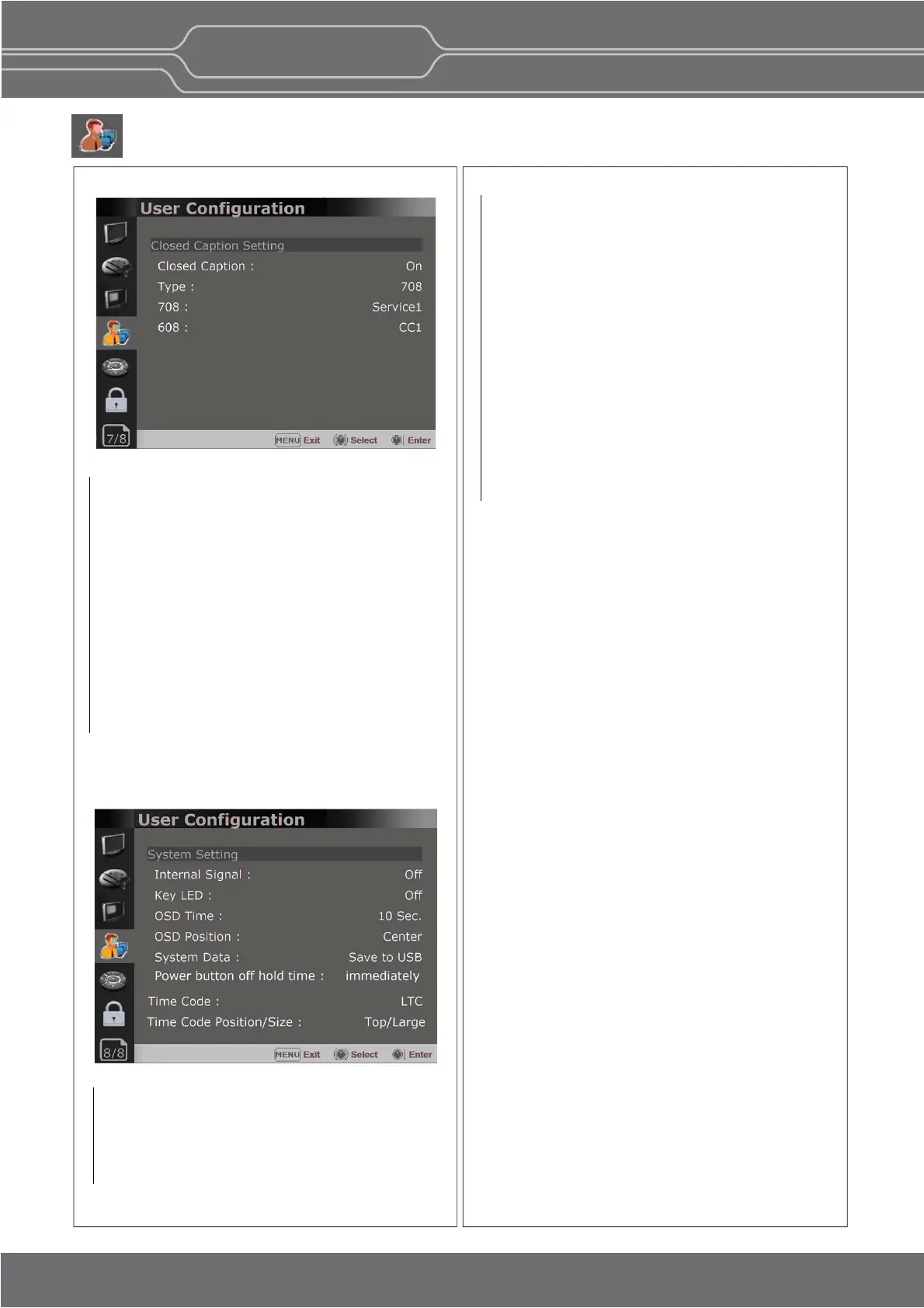
User Conguration Menu
Page 7/8
Page 8/8
Closed Capon
Selects [On] to display the Closed Capon and
[Off] not to display.
Type Sets the Closed Capon type.
[708]: Selects this mode to display 708 when
HD-SDI signal is input.
[608(VBI)]: Selects this mode to display 608(VBI)
when SD-SDI signal is input.
[608(708)]:
Selects this mode to display
608(708)
when HD-SDI signal is input.
708 Sets the Closed Capon type for 708.
Selects from [Service1] to [Service6].
608 Sets the Closed Capon type for 608(708) and
608(VBI). Selects from [CC1] to [CC4].
Key LED
Sets On to turn on the LED of the keys, and sets
Off to turn off the LED of the keys.
OSD Time
Adjusts the display me of the OSD menu.
[10 Sec.]: The OSD menu will be disappeared
aer 10 seconds.
[20 Sec.]: The OSD menu will be disappeared
about 20 seconds.
[30 Sec.]: The OSD menu will be disappeared
about 30 seconds.
[On]: The OSD menu will not be disappeared.
OSD Posion
Sets the posion of OSD. Selects [Center] to
[Le Boom].
System Data
-[Save to USB]
Saves the current sengs of the monitor to the
USB memory.
-[Copy from USB]
Recalls the sengs saved in the USB memory,
and load them to the monitor.
- Saves and adjusts the sengs of User 1 of User
Preset.
Time Code
-
Selects the type of the me code to be displayed.
[VITC]: To display the VITC me code
[LTC]: To display the LTC me code
Closed Capon Seng
System Seng
Time Code Posion/Size
- Allows to adjust the size and posion of the
Time Code.
Internal Signal
Generates the White and Color Bar internally.
The selectable range is from 100%(White) to
0%(Black).
Power buon off hold me
-Set the acon when pressing the front panel
power buon.
- [Immediately], [1 second], [2 seconds]
- [Immediately] : Power off immediately
[1 second] : Press and hold for 1 second to turn
off the power
[2 seconds] : Press 2ch connuously to turn off
the power


 To Next Page