28
System Date Copy
This funcon allows users to save the monitor configuraon and adjustment sengs on the USB memory sck
and load them to other monitors. This is useful for mulple monitor systems, allowing the transfer of one
monitor’s setup and adjustment data to another.
Camera Log Selecon
The OBM series has the built-in camera LUT of the various camera manufacturers. It allows users to load the
following camera logs.
Log-C, C-Log / S-Log2, S-Log3 / J-Log1
The more camera LUTs will be updated.
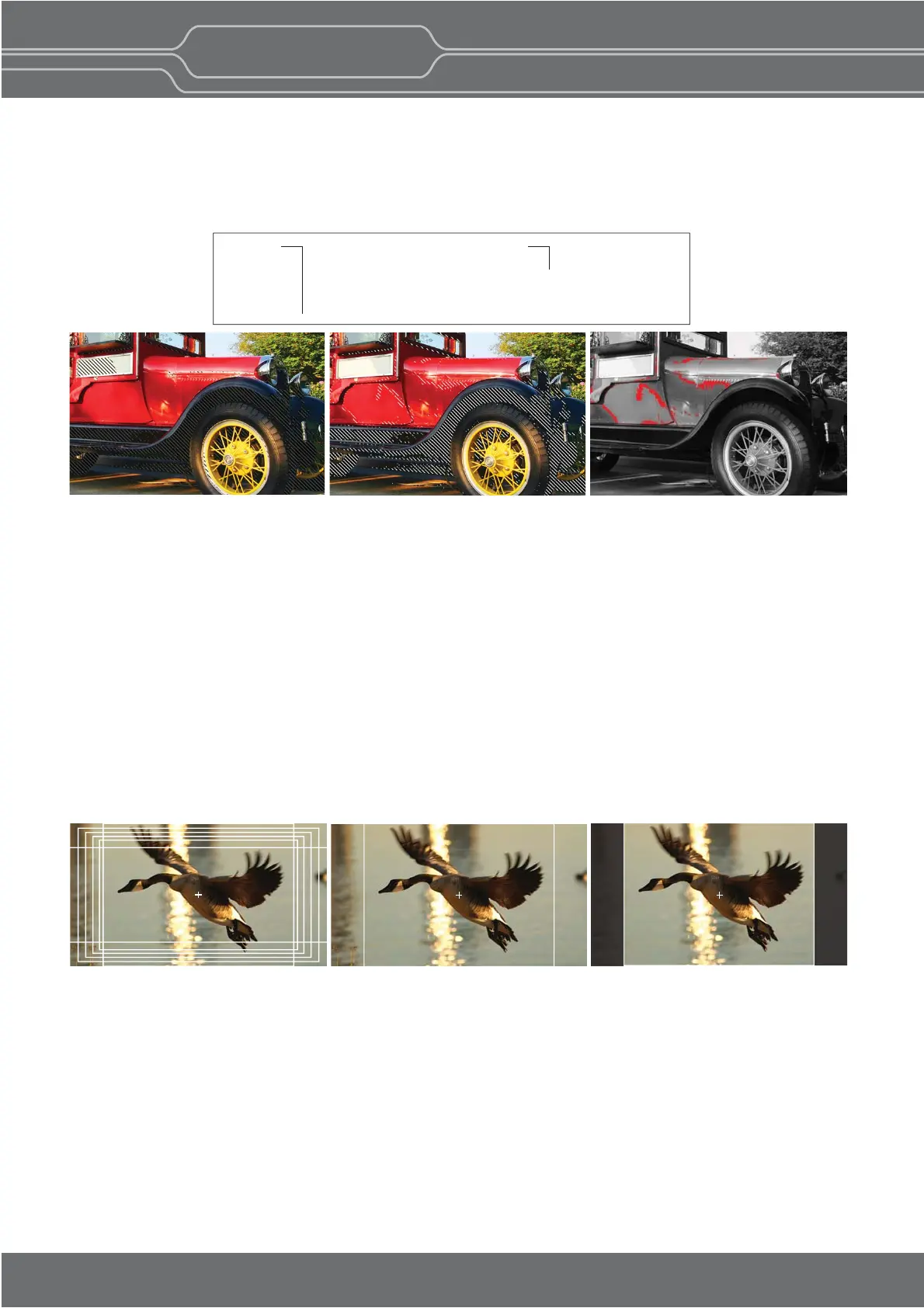
Various Markers
The OBM N series can display various markers, including aspect marker, area marker, and center marker. In addion, the detailed
display sengs of each marker are allowed. For example, the color, brightness, horizontal/vercal posion, and thickness of aspect
markers can all be adjusted.
Aspect Mat 0 Aspect Mat 5Display various markers
Gamut Error
Zebra paern or Color is displayed on the poron whose Y, Cb, Cr and R, G, B are out of the range of the adjusted values based
on the target color space which the user selects.
The default values of Y Maximum/Minimum, Chroma Maximum/Minimum, RGB Maximum/Minimum are in compliance with
EBU R 103 standard. And, the values can be adjusted by the user.
** Default Values
Type 1: Black Zebra
When the targeted color space is
selected as BT.709, the pixels
outside of the targeted color
space are displayed as Black
Zebra. The pxels over Y Maximum,
Chroma Maximum, RGB Maximum
are displayed as Black Zebra, and
the pixels below Y Minimum,
Chroma Minimum, RGB Minimum
are also displayed as Black Zebra.
Type 3: Mono
When the targeted color space is
selected as BT.709, the pixels
inside of the targeted color space
are displayed as Mono, and the
pixels outside of the targeted color
space are displayed as the color. In
this type, black and white area is
not recognized.
Type 2: Black & White Zebra
When the targeted color space is
selected as BT.709, the pixels
outside of the targeted color space
are displayed as Black or White
Zebra. The pxels over Y Maximum,
Chroma Maximum, RGB Maximum
are displayed as Black Zebra, and
the pixels below Y Minimum,
Chroma Minimum, RGB Minimum
are displayed as White Zebra.
YCbCr Y Maximum : 984
Y Minimum : 20
Chroma Maximum : 1004
Chroma Minimum : 19
RGB Maximum : 984
Minimum : 20
Pr
essi
n
l Vi
e
M
nit
Outstanding Picture Qualit
OBM-N
L
R
H Serie


 To Next Page