18
BM-N/L/R Ser
es
Pr
essi
n
l Vi
e
M
nit
Outstan
ing Picture Qua
it
Camera Assist Menu
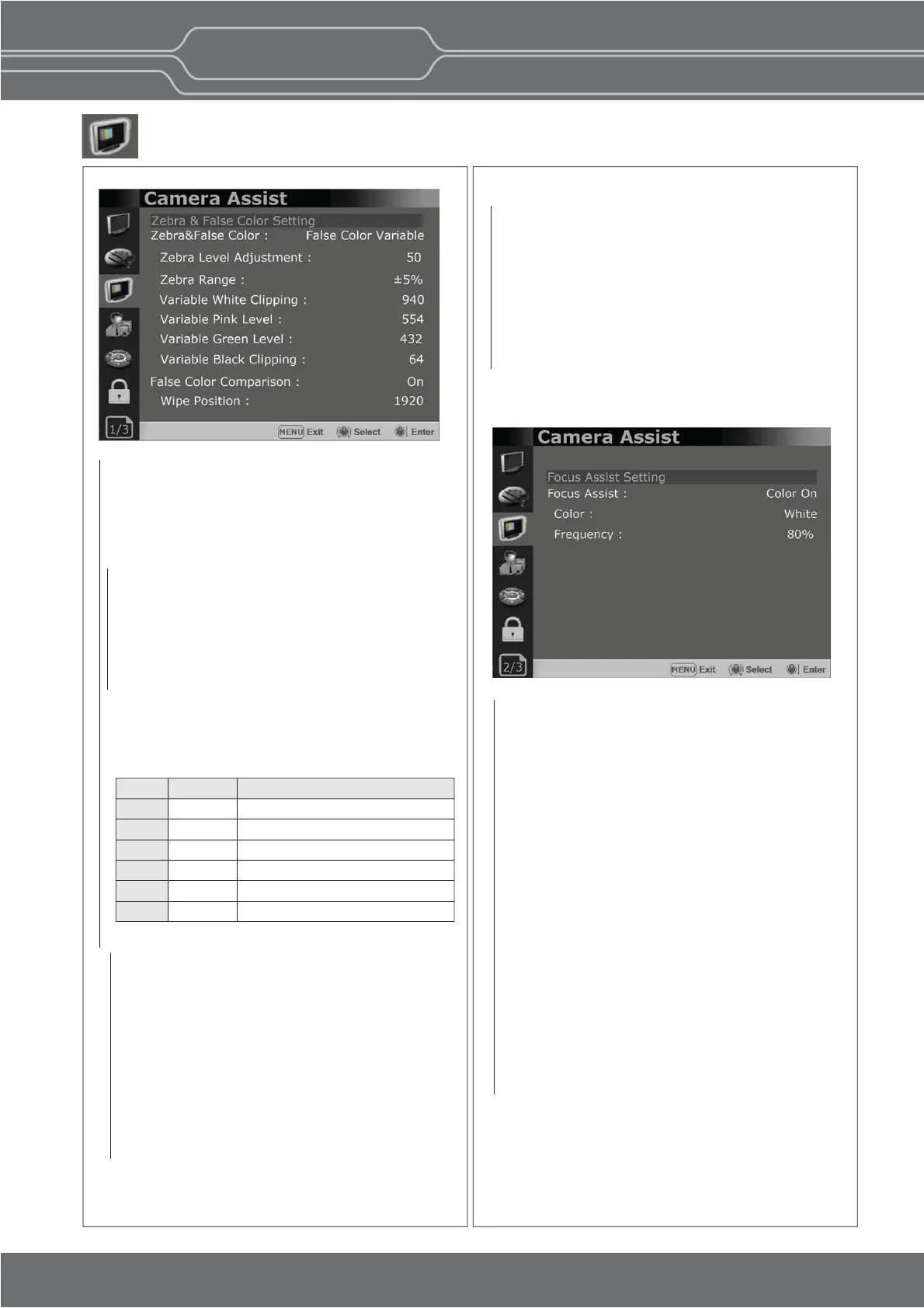
Zebra & False Color
- Evaluates the Luma(Y’) level of the input image.
If the certain Y’ level is set, the pixels with the
designated Luma(Y’) level are displayed in
zebra paern or color paern.
Zebra
Pixels with Y’ level over 100% turn to red
zebra paern, and pixels with Y’ level under
0% turn to green zebra paern.
Zebra Level Adjustment
- Adjusts the Y’ level as the user wants.
Zebra Range
- Adjusts the Y’ level as the user wants
False Color ARRI
The color paern is displayed with ARRI camera
standard.
Page 1/3
Page 2/3
Focus Assist
- Controls the aperture level of a video signal
and displays images on screen with sharpened
edges to help camera focus operaon.
Available types are [Color On] and [Mono On].
- [Color On]: The background image is the
original color type.
- [Mono On]: The background image is the
mono type.
Color
- Selects a color for Focus Assist among [Red],
[Green], [Blue], [White], [Yellow], [Cyan],
[Magenta].
Frequency
- Adjusts the edge difference level between the
edges in an image.
- Available values are from 0% to 100%.
Color
red
yellow
pink
green
blue
purple
Level
99~100%
97~99%
52~56%
38~42%
2.5~4.0%
0~2.5%
Descripon
White clipping
Just below white clipping/white shoulder
One stop over medium gray (Caucassian skin)
18% neutral gray
Just above black clipping/black slope
Black clipping
False Color Comparison
- Allows the user to divide the picture side by
side and compare the original image on the
le half and the False Color image on the
right half.
Wipe Posion
Adjusts the boundary line of the le and right
area. Allowed to adjust the boundary line by
using the SELECT/VOLUME knob.
False Color Variable
This mode allows the user to adjust White
clipping, Pink level, Green level, Black Clipping.
Variable White Clipping
- Adjusts White Clipping from 0 to 1023.
Variable Pink Level
- Adjusts Pink level from 0 to 1023.
Variable Green Level
- Adjusts Green level from 0 to 1023.
Variable Black Clipping
- Adjusts Black Clipping from 0 to 1023.


 To Next Page