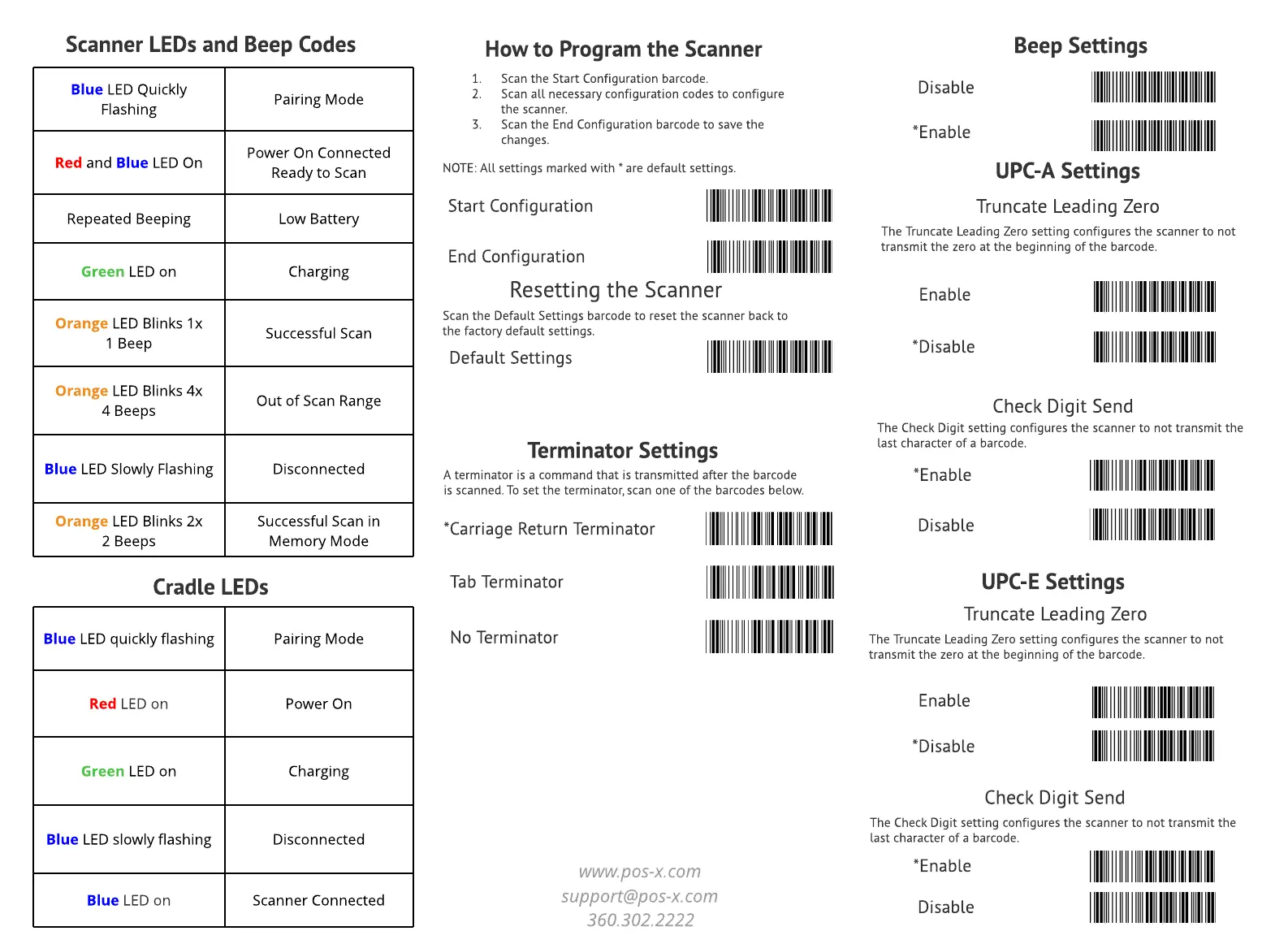
UPC-A Settings
Truncate Leading Zero
The Truncate Leading Zero setting configures the scanner to not
transmit the zero at the beginning of the barcode.
Enable
*Disable
Check Digit Send
The Check Digit setting configures the scanner to not transmit the
last character of a barcode.
*Enable
Disable
UPC-E Settings
Truncate Leading Zero
The Truncate Leading Zero setting configures the scanner to not
transmit the zero at the beginning of the barcode.
Enable
*Disable
Check Digit Send
The Check Digit setting configures the scanner to not transmit the
last character of a barcode.
*Enable
Disable
Beep Settings
Disable
*Enable
How to Program the Scanner
1. Scan the Start Configuration barcode.
2. Scan all necessary configuration codes to configure
the scanner.
3. Scan the End Configuration barcode to save the
changes.
NOTE: All settings marked with * are default settings.
Start Configuration
End Configuration
Resetting the Scanner
Scan the Default Settings barcode to reset the scanner back to
the factory default settings.
Default Settings
Terminator Settings
A terminator is a command that is transmitted after the barcode
is scanned. To set the terminator, scan one of the barcodes below.
Tab Terminator
No Terminator
*Carriage Return Terminator
support@pos-x.com
360.302.2222
www.pos-x.com
Blue LED Quickly
Flashing
Pairing Mode
Red and Blue LED On
Power On Connected
Ready to Scan
Repeated Beeping Low Battery
Green LED on Charging
Orange LED Blinks 1x
1 Beep
Successful Scan
Orange LED Blinks 4x
4 Beeps
Out of Scan Range
Blue LED Slowly Flashing Disconnected
Orange LED Blinks 2x
2 Beeps
Successful Scan in
Memory Mode
Scanner LEDs and Beep Codes
Blue LED quickly flashing Pairing Mode
Red LED on Power On
Green LED on Charging
Blue LED slowly flashing Disconnected
Blue LED on Scanner Connected
Cradle LEDs


 To Previous Page
 Loading...