8
four mounting screws. See A TT ACHING THE
MET AL SHIELD and INST ALLA TION OF THE
MET AL BLADE for illustrations. Be sure to store
all parts and instructions for future use.
ATTACHING THE PLASTIC SHIELD
ANDTRIMMERHEAD
WARNING: The shield must be prop-
erly installed. The shield provides partial
protection to the operator and others from the
risk of thrown objects, and is equipped with a
line limiter blade which cuts excess line to the
proper length. The line limiter blade (on un-
derside of shield) is sharp and can cut you.
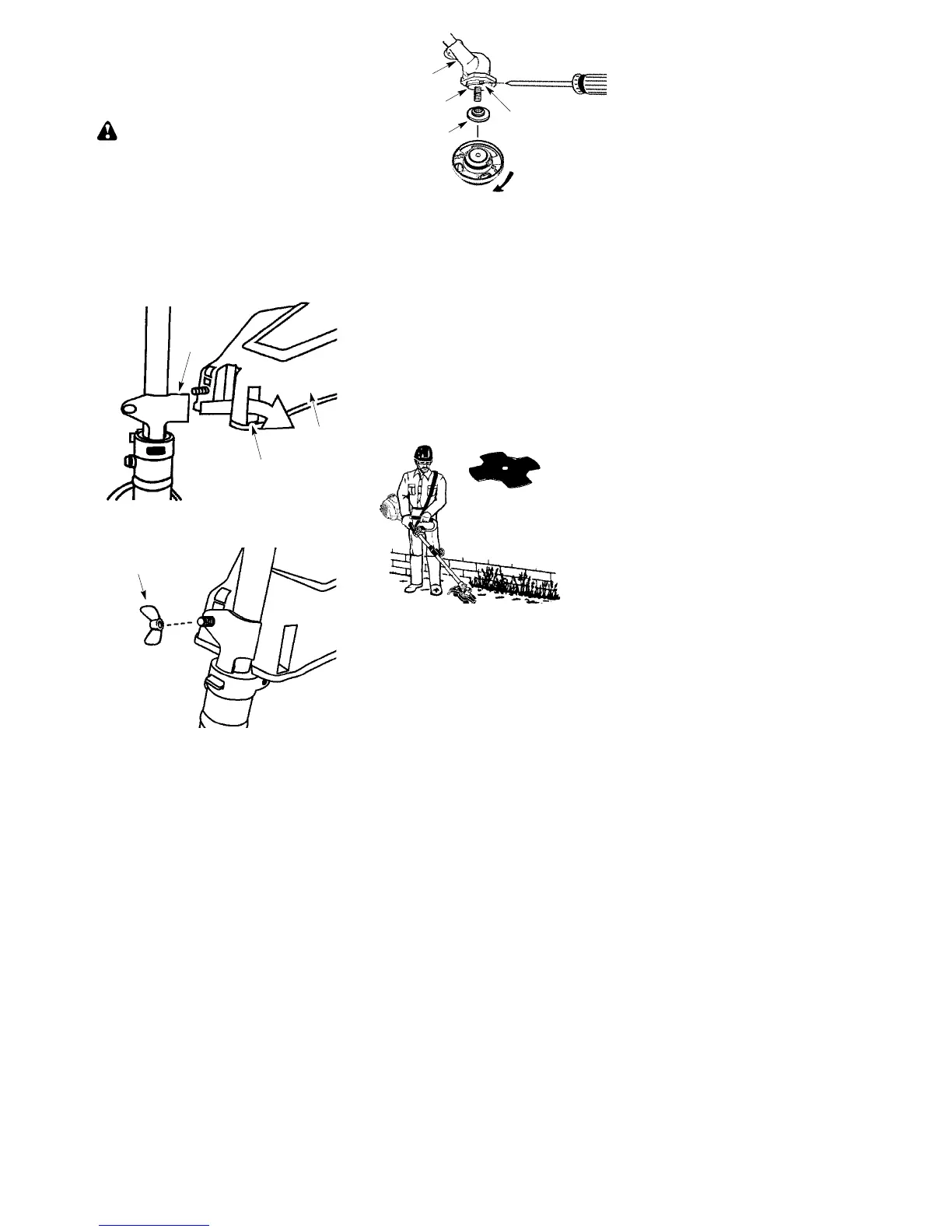
1. Remove wing nut from shield.
2. Insert bracket into slot on shield.
3. Pivot shield until bolt passes through hole
in bracket.
Bracket
Slot
Shield
4. Reinstall wing nut and tighten securely.
WingNut
NOTE: If your unit has a plastic cover over
the threads on the threaded shaft, remove the
covering to expose the threads. Before instal-
ling the trimmer head, make sure the dust cup
and retaining washer are positioned on the
gearbox as shown below.
Retaining
Washer
Dust Cup
Gearbox
Aligned Holes
NOTE: Make sure all parts are properly
installed as shown in the illustration before
installing the trimmer head.
5. Align hole in the dust cup with the hole in
the side of the gearbox by rotating the
dust cup.
6. Insert a small screwdriver into aligned
holes. This will keep the shaft from turn-
ing while tightening trimmer head.
7. While holding the screwdriver in position,
thread trimmer head onto the shaft in the
direction shown on the decal (counter-
clockwise looking from bottom of unit).
Tighten until secure.
NOTE: The retaining washer must be posi-
tioned with the raised section facing toward the
gearbox.
ASSEMBLY INFORMATION -- W EED
BLADE
WEED
BLADE
NOTE: Remove the trimmer head and plastic
shield before attaching the metal shield and
installing the weed blade. To remove the trim-
mer head, align hole in the dust cup with the hole
in the side of the gearbox by rotating the dust
cu p. Inse rt a sm al l screw driver i nt o al igned
holes. This will keep the shaft from turning while
loosening the trimmer head. Remove the trim-
mer head by turning clockwise. Remove the
screwdrive r. To remove the pla s ti c shie ld, lo os-
en and remove wing nut. Pivot shield to release
bracket from slot. See INSTALLATION OF
THE CUTTING HEAD and ATTACHING THE
PLASTIC SHIELD for illustrations. Be sure to
store all parts and instructions for future use.
Never use the trimmer head with the metal
blade installed.


 To Next Page