The PowaKaddy FW5s GPS Rental Cart is an advanced electric golf trolley designed to enhance the golfing experience with integrated GPS capabilities and a robust feature set. This owner's manual provides comprehensive instructions for assembly, operation, maintenance, and battery care, ensuring optimal performance and longevity of the device.
Function Description:
The PowaKaddy FW5s GPS Rental Cart serves as a motorized golf trolley that assists golfers by carrying their golf bags across the course, reducing physical strain. Its primary function is to provide intelligent navigation and distance management through an integrated GPS system, eliminating the need for external devices. The trolley features a powerful 230w motor, a bright multi-function LCD display, and cutting-edge styling. It is designed for ease of use, with a simple assembly process and intuitive controls. The integrated GPS comes pre-loaded with over 37,000 worldwide golf course maps, offering real-time distances to the front, middle, and back of the green, as well as hole and par information. The device also includes a "Demo Mode" for exploring features without a GPS signal and an "Admin" section for customizing settings.
Important Technical Specifications:
- Motor: Powerful 230w motor.
- GPS: Fully integrated GPS with over 37,000 pre-loaded course maps.
- Display: Bright multi-function LCD display.
- Battery: Lithium Battery, including a 36-hole option. Features a Plug'n'Play™ system with sprung terminals and a locking mechanism for secure power connection.
- Charging: Dedicated PowaKaddy charger required. Charging time for a Lithium battery can be up to 7 hours, depending on capacity and discharge depth.
- USB Charging Port: Located on the underside of the handle, rated to 5v/500mA, suitable for most USB devices.
- Connectivity: Bluetooth for updates via the PowaKaddy App (available on Apple App Store and Google Play).
- Security: User Security Pin (4-digit) and Admin Pin (4-digit) for locking controls and settings. Default factory PINs are 7921 for User Security and 1256 for Admin.
- Quiet Mark: All PowaKaddy electric trolleys, including this model, have been awarded the Quiet Mark by the Noise Abatement Society.
Usage Features:
- Getting Started:
- Wheel Fitment: Wheels are fitted by pressing a black release button and pushing onto the axle until the clutch engages. They can be locked into two positions: inner groove for drive, outer groove when drive is not required.
- Frame Opening: Slide the main lock forward to release the handle latch and open the frame.
- Battery Connection: Engage the rear of the battery first, then press the front until it clips into position. Power connects automatically. To remove, depress the front latch and lift the front of the battery.
- Battery Activation: The Lithium battery has an isolation button on the underside. The green LED must be illuminated for use and charging.
- Front Wheel Adjustment: The front wheel can be adjusted to correct tracking issues (left or right) by releasing a lever and rotating an adjustment roller. Rotate up for left tracking, down for right tracking.
- Controls Overview:
- Central Control Dial: Rotates to adjust speed (0-9), presses to pause/resume speed, and navigates/selects menu options.
- Left Button: Moves to the previous hole when connected to GPS.
- Right Button: Moves to the next hole when connected to GPS.
- Left + Right Buttons (hold for 2 seconds): Enters/exits the admin settings menu.
- GPS Functions:
- Play Golf Mode: Searches for GPS signal (up to 3 minutes), displays nearest 5 local courses, and provides real-time distances (Front, Centre, Back) to the green.
- Auto-Hole Advance: Automatically advances to the next hole when traveling from green to tee, though manual advancement via left/right buttons may be necessary due to GPS variations or golfer's route.
- Competition Mode: Disables all distance measuring features for use in competitions. Automatically deactivates when the trolley is switched off.
- Low Signal Indicator: Appears if GPS lock isn't acquired after 3 minutes, prompting the user to move to an open sky position.
- Admin Options: Allows customization of settings such as:
- Connectivity: Displays pairing status with mobile device for updates.
- Default Course: Sets a preferred course to shorten start-up time.
- Distance Units: Selects between Yards/Miles or Metres/Km.
- Time Adjust: Adjusts clock time for daylight saving.
- Competition Mode (on/off): Enables/disables competition mode.
- User Security Pin (on/off): Protects the trolley with a 4-digit PIN.
- Admin Pin (on/off): Protects admin settings with a 4-digit PIN.
- Tips (on/off): Provides periodic tips on advancing holes.
- Demo Mode (on/off): Enables/disables Demo Mode in the Main Menu.
- GPS Version/Electronics Version: Displays firmware and software versions.
- Return to Main Menu: Option to return to the main menu.
- Updating Your PowaKaddy:
- Download the PowaKaddy App.
- Power on the cart, enter settings, and select "Connectivity" to pair the device.
- In the App, select "Pair Device" and enter the 6-digit code displayed on the trolley.
- Once paired, return to the App menu, select "Update Course," and choose the desired course for update.
- The serial number for pairing is located on the underside of the powaframe.
- Note: Motor function must be paused during updates.
Maintenance Features:
- General Care: The PowaKaddy Rental Cart is designed for simple maintenance.
- Cleaning: Never jet wash or immerse the trolley in water.
- Wheel/Axle Maintenance: Occasionally remove the wheels and apply grease to the axle and moving parts.
- Battery Care (Important Safety Information):
- Never submerge the battery in water.
- Never leave the battery in the trolley when cleaning the frame.
- Do not use or attempt to recharge a damaged battery or charger.
- A submerged or damaged Lithium battery is a fire hazard; dispose of safely at a local recycling center. Do not recharge.
- Avoid charging in temperatures below 0°C or exposing to temperatures below -5°C or above 40°C.
- Place the charger on a hard, flat, heat-resistant surface. Do not wrap or cover.
- Never expose the charger to rain, moisture, or damp.
- Only use the compatible PowaKaddy charger.
- Never discharge the battery other than in normal use on the trolley.
- Check with airlines before transporting batteries by air.
- Charging Your Lithium Battery:
- Connect the battery and charger first, then plug into mains power.
- Charge only when the Green Isolation LED is illuminated.
- Charger indicator lights: Red for bulk charge, Green when complete.
- Remove the battery from the charger once the green light is active.
- Recharge within 24 hours of use, regardless of holes played.
- Avoid leaving the battery in a discharged condition for prolonged periods.
- For long storage, fully charge the battery and store in a cool, dry place, recharging monthly.
- Ensure the Green Isolation LED is extinguished during transportation.
- Dispose of batteries at a local recycling center at the end of their life.
- Serial Number: Located on the underside of the main central tube.
The PowaKaddy FW5s GPS Rental Cart is a sophisticated and user-friendly device, offering a blend of convenience, technology, and reliability for golfers seeking an enhanced on-course experience. Regular adherence to the provided usage and maintenance guidelines will ensure its optimal performance and extended lifespan.

 Need help?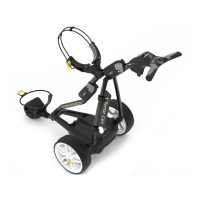

 To Next Page
 General