Page 1 of 7
Content
CONTENTS
Introduction 1
Operation Mode 2
Preventative Maintenance 2
Fault Diagnostics 3
Troubleshooting 3
Override Modes 4-6
Additional Reference Pub. 7
Warranty 7
© Copyright LCI/PowerGear Issued: December 2014
Owner’s Manual Dual Planetary
Gearmotor Slim Rack
Slide Out System
• Vertical channel that mounts into the side wall opening.
• Horizontal gear rack arms that actuate the room.
• A 12 Volt DC gear motor will operate the room using power from the
battery.
• Slideout Systems are equipped with a manual override that allows you
to extend/retract the room in the event of a loss of power.
• A specially designed control that gives the user full control of room
movement, in or out. The control has programmable stops that stop the
motor when the room is fully extended or retracted and the ability to
detect faults for ease in troubleshooting.
• Touchpad that mounts to the wall. It allows room movement and
provides end user feedback.
•
Floor rollers (not supplied by Power Gear)
Owner’s Manual Slim Rack In
Wall Slide Out System
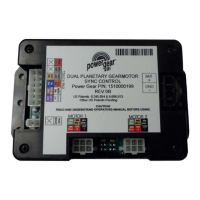
Control Box Part Number
1510000199
Mishawaka, IN 46544
www.powergearus.com
Figure 1
The Power Gear In Wall Slideout System is a rack and pinion design
operated by a 12 Volt DC electric Motor. The system is designed to move a
room of no more than 1500 pounds, with a 30” stroke. Room slide out
systems rated for higher weight or longer strokes can be obtained. Please
contact Power Gear for application assistance.


 To Next Page

 General