3
TABLE OF CONTENTS
Introduction . . . . . . . . . . . . . . . . . . . . . . . . . . . . . . . . . . . . . . . . . . . . . . . . . . . 1
Features . . . . . . . . . . . . . . . . . . . . . . . . . . . . . . . . . . . . . . . . . . . . . . . . . . . . . 1
AC and DC Charging/Recharging . . . . . . . . . . . . . . . . . . . . . . . . . . . . . . . . . . . 3
Viewing Battery Charge Status . . . . . . . . . . . . . . . . . . . . . . . . . . . . . . . . . . . . 3
120 Volt AC Charging using a Common Household Extension Cord
(not included) . . . . . . . . . . . . . . . . . . . . . . . . . . . . . . . . . . . . . . . . . . . . . . . 4
12 Volt DC Charging . . . . . . . . . . . . . . . . . . . . . . . . . . . . . . . . . . . . . . . . . . 4
Using the 12 Volt DC Portable Power Supply . . . . . . . . . . . . . . . . . . . . . . . . . . . . 4
Using the 120 Volt AC Power Supply . . . . . . . . . . . . . . . . . . . . . . . . . . . . . . . . . 5
AC Power Supply Controls, Indicators and Operation . . . . . . . . . . . . . . . . . . . 5
Using the USB Charging Port . . . . . . . . . . . . . . . . . . . . . . . . . . . . . . . . . . . . . . . 5
Using the Emergency Area Light . . . . . . . . . . . . . . . . . . . . . . . . . . . . . . . . . . . . . 6
Using the Clock/Alarm Clock . . . . . . . . . . . . . . . . . . . . . . . . . . . . . . . . . . . . . . 6
Programming the Clock and Alarm Clock . . . . . . . . . . . . . . . . . . . . . . . . . . . . 6
Using the Radio . . . . . . . . . . . . . . . . . . . . . . . . . . . . . . . . . . . . . . . . . . . . . . . . 7
Using the Sleep Feature . . . . . . . . . . . . . . . . . . . . . . . . . . . . . . . . . . . . . . . . 7
Programming Stations Into Memory . . . . . . . . . . . . . . . . . . . . . . . . . . . . . . . . 7
Using the Weather Radio Alert Feature . . . . . . . . . . . . . . . . . . . . . . . . . . . . . . 7
Using the Detachable Hand-Crank LED Flashlight . . . . . . . . . . . . . . . . . . . . . . . . . 8
Care and Maintenance . . . . . . . . . . . . . . . . . . . . . . . . . . . . . . . . . . . . . . . . . . . 9
Specifications . . . . . . . . . . . . . . . . . . . . . . . . . . . . . . . . . . . . . . . . . . . . . . . . . . 9
INTRODUCTION
Thank you for purchasing the
VEC1029FPOB Rechargeable Power Center.
Please read this guide carefully before use to ensure optimum performance and
avoid damage to the unit.
FEATURES
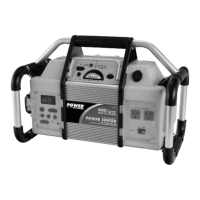
• Built-in 400 watt inverter
• Two 120 Volt AC Outlets to power and recharge 110/120 volt AC appliances
• 12 Volt DC Charging Port to power and recharge cell phones and 12 volt DC
appliances
• USB Charging Port to power and recharge USB personal electronics
• Digital AM/FM and NOAA Weather Alert Radio
• Built-in monophonic speaker
• Earphone Jack for private listening
• Built-in powerful LED Area Light for nighttime use
• Detachable Hand-Crank LED Flashlight for nighttime roadside repairs and use in
remote locations without utility power
• Battery charge level indicators
• Requires no maintenance (other than recharging) for optimum operation
• Battery Status LED Indicator displays battery charge level while charging, or
whenever Battery Status Pushbutton is pressed


 To Next Page