
 Need help?
Do you have a question about the POWER PIus POWX1365MB and is the answer not in the manual?
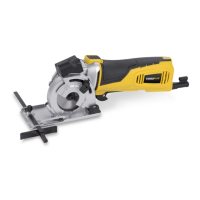
Details the parts and features of the mini circular saw, referencing Figure A for identification.
Illustrates the components of the mitre base attachment, with reference to Figure B.
Explains symbols used in the manual and on the machine for safety and compliance.
Covers work area, electrical safety, personal safety, and tool use/care for safe operation.
Provides crucial safety guidelines specific to the circular saw's operation.
Instructions on adjusting the cutting depth using the clamp and scale for accurate cuts.
Step-by-step guide for safely replacing the saw blade, ensuring correct installation.
Details on how to hold the tool and safely operate the power switch, including safety lock.
Guidance on adjusting the guide fence for precise parallel cuts.
How to use the laser for accurate line following during cuts.
Utilizing the V-shaped pointer on the base plate for guiding cuts accurately.
Instructions for connecting and using the dust extraction system for a cleaner workspace.
Techniques and tips for making internal cuts or shapes within a material.
Guidance for cutting materials like metal, ceramic tiles, and plasterboard safely.
Instructions for setting various mitre angles using the scale and pointer.
Steps to properly mount and secure the workpiece using the clamp.
How to position the work platform with the angle scale for different cutting setups.
Procedure for performing cuts when the saw is mounted on a workbench.
Advice on using sharp blades, their consumable nature, and safe handling during replacement.
This document describes the POWERPLUS POWX1365MB Mini Circular Saw 600W + Mitre Base.
The POWX1365MB is a mini circular saw primarily designed for sawing, both longitudinally and transversely, of solid wood, chipboard, plywood, aluminium, tiles, and stone when held in a fixed position. The saw comes with a pre-installed blade suitable for wood only. Any other use or modification is considered improper and may lead to dangers. It is not suitable for commercial use. The device includes a mitre base for angle adjustments and a laser line generator for improved alignment during cuts. It also features dust extraction capabilities for a cleaner work environment.
General Operation: The tool is equipped with a safety lock button for the mechanical plunge stop (3) and an ON/OFF switch trigger (5) with a lock-off button (6). The LED power-on indicator (14) illuminates when connected to the power supply. The saw blade continues to rotate for a short period after the tool is switched off.
Cutting Depth Adjustment: The cutting depth can be set using the cutting depth setting clamp (7) and scale (4). It is recommended to set the cutting depth approximately 2 mm deeper than the material thickness for a clean cut.
Saw Blade Changing: To change the saw blade, the tool must be unplugged. The spindle lock button (16) is pressed to release the clamping screw (8) with a plain washer using the inner hexagon wrench (f). The cutting depth should be set to maximum, and the base plate (18) lifted to remove the blade. Installation is the reverse process, ensuring the arrow on the saw blade aligns with the rotation direction arrow on the device. Incorrect blade positioning can permanently damage the tool.
Guide Fence Setting: A guide fence (G) can be set by releasing the lock screw (11) on the base plate (18) and positioning the guide fence in its slot (10) for desired width, then retightening the screw.
Laser Line Generator: The laser generator (1) is activated by its switch (2) located at the front of the safety lock button (3). It aids in aligning the cut line on the workpiece. Users are warned not to stare directly at the laser beam or aim it at personnel for extended periods.
Line Following: A V-shaped pointer at the front and rear of the base plate (18) allows for following a line during cutting.
Dust Extraction: The tool has a dust extraction nozzle (17) to which a dust extraction hose (B) can be connected. This feature is particularly efficient due to the fully enclosed blade and should be used for most cutting jobs, especially when dealing with large amounts of dust.
Cutting Techniques: Always cut in a forward direction and never draw the tool backwards. For novice users, practicing on thin wood is recommended. The tool should be held firmly, and the base plate rested on the workpiece. The blade should be allowed to reach maximum speed before plunging into the material slowly and gently. Excess force should be avoided as it can cause operator fatigue, excessive wear, and may trip the temperature cut-out. The base plate must be kept flat on the material throughout the cut. After cutting, the tool should be lifted from the workpiece before switching off. If a lot of dust is generated, the tool should be kept on for a few extra seconds to clear dust.
Cutting Out Tips: For cuts that will be covered (e.g., by a vent cover), corners can be overlapped to ensure complete detachment of waste material. For visible cut-outs, corners should not be overlapped, and any remaining material due to the circular blade shape may need finishing with a knife. If the back surface is unimportant, waste material can be pushed out. If access to the back surface is available, an over-cutting allowance can be marked, and the cut made from the back to ensure perfect front corners.
Cutting Tough or Abrasive Materials: Users should practice on wood before attempting tougher materials. More force and clamping may be required for tougher materials like metals. Materials producing toxic dust or fumes (e.g., PTFE, asbestos) should never be cut.
Mitre Base Usage: The mitre base allows for cutting angle adjustment from -60° to 60°. Common angles (0°, 15°, 30°, 45°) are marked on the angle scale (26). The clamp (20) and extension rod (23) are used to secure the workpiece. The pointer (28) in the display scale window (27) indicates the set angle. The work platform (22) with angle scale can be adjusted and locked in position on a workbench using the lock knob (30). For longer workpieces, the extension rod (23) and tiltable support (24) can be extended.
Cleaning and Maintenance: Regular cleaning is essential for safe operation, as excessive dust buildup can hinder performance. The dust extraction hose (B) may require occasional cleaning, especially if damp wood is cut.
Blades: Always use sharp blades. A blunt blade is a common cause of poor cutting performance or overheating. Blades are consumable items and can become hot during use, so allow them to cool before replacing.
 General
| Brand | POWER PIus |
|---|---|
| Model | POWX1365MB |
| Category | Saw |
| Language | English |

 To Next Page