1 SOFTWARE USAGE
Watchdog options are enabled only when a PowerUSB-Watchdog model is connected to the
computer.
Similar to the Basic PowerUSB model, outlets 1 and 2 can be used for power control of the modem or any
other peripheral devices. The computer to be monitored should be connected to outlet 3, which is controlled
internally by PowerUSB-Watchdog.
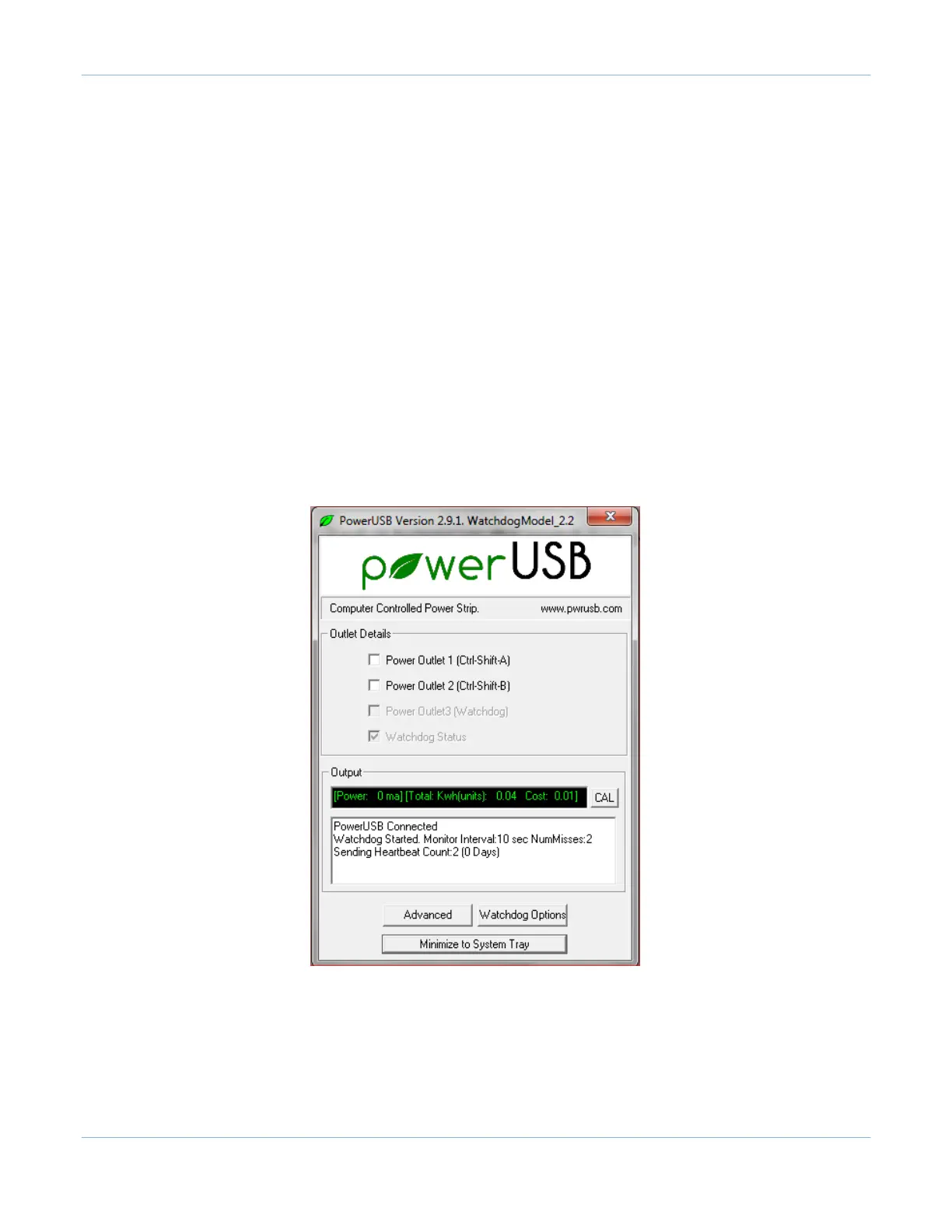
The Watchdog model uses the same software application as is used for the Basic model. The Watchdog
application shows different features in the main screen. The screen below is only seen when a
PowerUSB-Watchdog model is connected to the computer:
-
The Power Outlet 3 check box is disabled as this outlet is always on and goes off only to reboot
if
the computer is in a hung state.
-
The fourth check box is changed to ‘Watchdog Status’, and is checked on if the PowerUSB-Watchdog is
actively monitoring the computer.
-
The main screen displays a ‘Watchdog Options’ button instead of a ‘Scheduled On-Off’ button as seen
in the Basic PowerUSB model.
When the ‘Watchdog Options’ button is clicked, it brings up the Watchdog Options dialog box. The user can
then enable
the Watchdog timer by setting up specifics of heartbeat monitoring and specifying computer
shutdown times.



 To Next Page