Power Smokeless Grill™ 7
Using the Control Panel
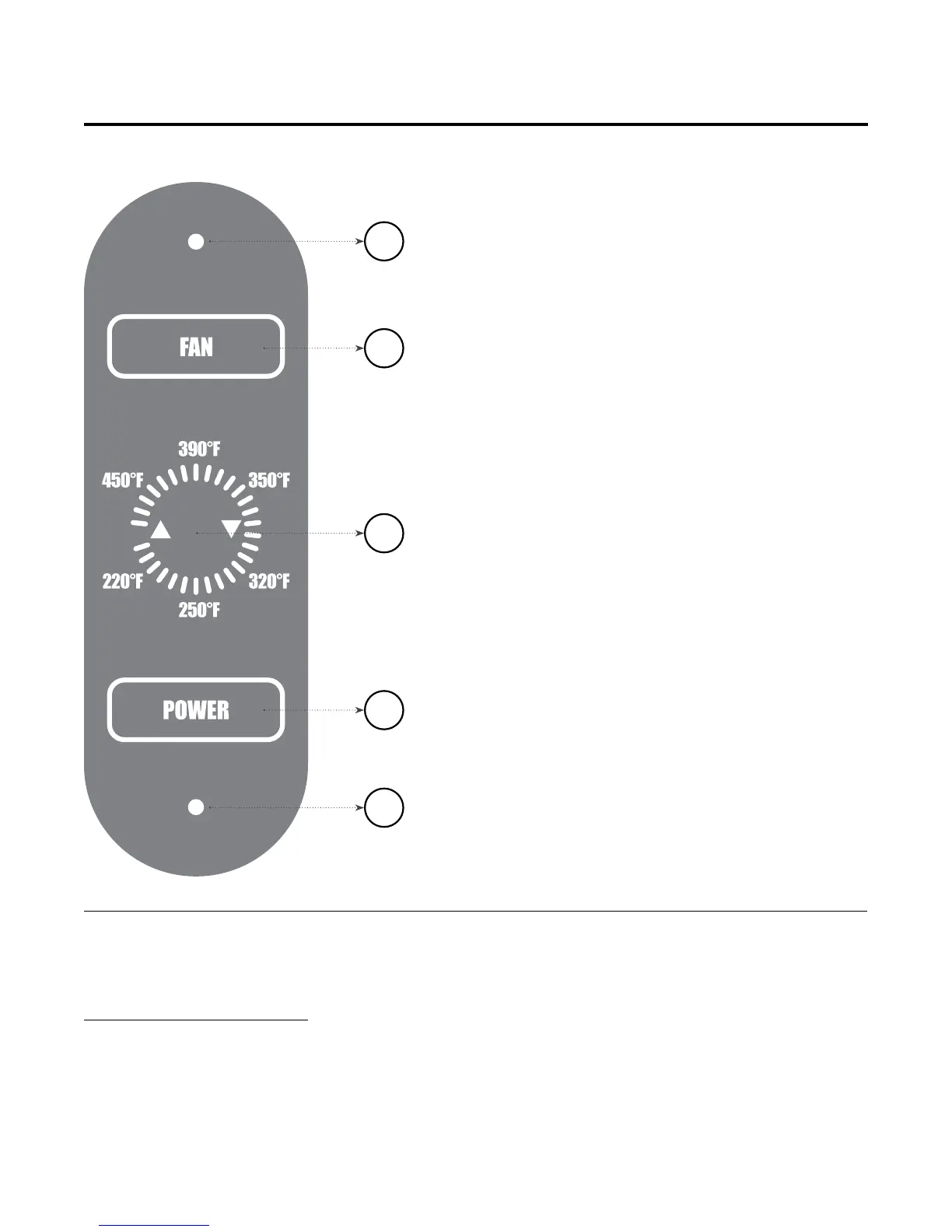
D
E
B
C
A
1. Plug the Power Cord (3) into an outlet.
LED Light (A) will blink on and off.
2. Select Power Button (B), and LED (A)
will stay lit.
3. Select Fan Button (C). Fan will run and Fan
LED (D) will light up.
NOTE: Fan should be kept running
throughout the grilling process to prevent
grease build up.
4. Use Temperature Arrows (E) to adjust
cooking temperature from 220° F to 450° F.
NOTE: You may raise or lower the cooking
temperature at any time during the cooking
process. To keep food warm, set
the temperature between 220° F and 250° F.
5. When you are finished grilling, press
the Power and Fan Buttons to shut down
the Unit. Unplug the Power Cord and allow
unit to cool fully before disassembling
for cleaning.
Special
Features
• Smokeless Grill
with Built-In Fan
• Silicon-Sealed Lid
• Heats Up Quickly
and Maintains Constant
Temperature
• Dishwasher-Safe Parts
and Easy to Clean
• Heats up to 450° F
• Nonstick Coating



 To Next Page