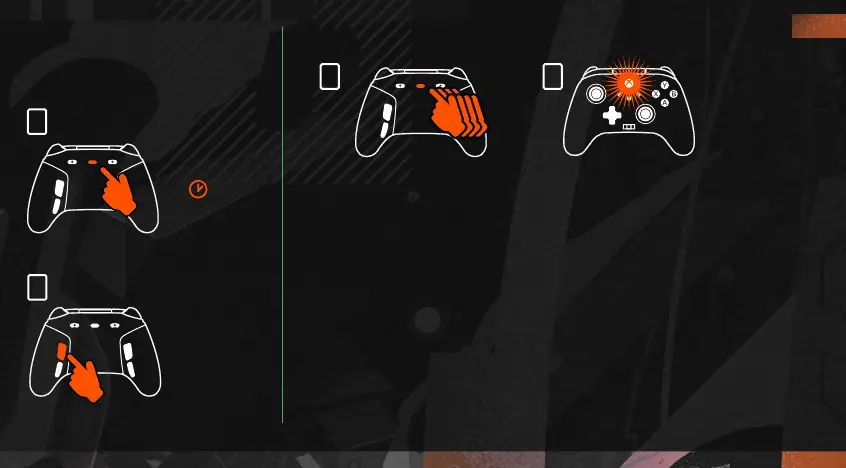
2
2
1
1
1,2,3
RESETTING THE
ADVANCED GAMING
BUTTONS
PROFILE CONTROL
1. Quick-tap the PROGRAM button to cycle through profile settings for T1/T2/T3 trigger locks. The Xbox Fusion Pro 4
Wired controller can store up to 3 profiles at a time locally. The first 3 profiles set by default adjust the deadzone
settings for the triggers.
• Profile 1 is 99% deadzone and is the quickest maximum value setting (use for T1 trigger lock).
• Profile 2 is 50% deadzone (use for T2 trigger lock).
• Profile 3 is no deadzone/full-throw trigger pull (use for T3 trigger lock).
Each press of the PROGRAM button will change to the next profile and then repeat the cycle: 3 —
>
1 —
>
2 —
>
3
2. The top housing LED indicator will quickly flash the number of times related to the profile version to signal a
profile has been changed and then return to solid.
3. To clear the profiles or change the settings, please use the PowerA Gamer HQ app. The above 3 default settings
will be saved as legacy settings (Profile 1 / Profile 2 / Profile 3) in the PowerA Gamer HQ app. The app can store
hundreds of custom profile settings that can be pushed to the controller, but the controller can only store 3 at
any given time chosen from the app.
EN
8







 To Next Page