EasyManua.ls Logo

PowerG PG1800WP User Manual

PowerG PG1800WP
32 pages
To Next Page IconTo Next Page
Page #1 background imageLoading...
Page #1 background image
QUESTIONS? ¿PREGUNTAS?
SAVE THIS MANUAL
FOR REFERENCE
GUARDE ESTE MANUAL
DE REFERENCIA
OPERATING MANUAL
Model/Modelo PG1800WP
Our Customer Service staff is ready
to provide assistance. In the case
of a damaged or missing part, most
replacement parts ship from our facility.
For immediate help with assembly, or for
additional product information,
email support@sumec-na.com
Nuestro personal de servicio al cliente está
listo para proveer asistencia. En el caso
de una parte dañada o faltante, la mayoría
de las piezas de repuesto se envían desde
nuestro centro.
Si necesita ayuda inmediata con el
montaje, o para obtener información
adicional sobre el producto, support@
sumec-na.com o correo electrónico
You will need this manual for safety
instructions, operating procedures, and
Warranty. The original sales invoice is
required for warranty service.
Usted necesitará este manual para
las instrucciones de seguridad, los
procedimientos operativos y de Garantía.
La factura de compra original se requiere
para el servicio de garantía.
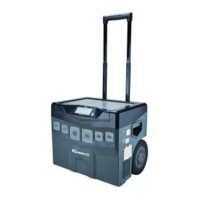
Mobile Power Center
English page 1
Version 1
Copyright ©2013 Sumec North America

Questions and Answers:

PowerG PG1800WP Specifications

General IconGeneral
Max AC Output1800 Watts
Fuel TypeGasoline
Run Time at 50% Load8 hours
Weight46 lbs
Engine Type4-Stroke OHV
Power Output1800 W
Starting MethodRecoil
DC Output12V DC

Summary

Operating Manual Introduction

Mobile Power Center Introduction

Introduces the PG1800WP mobile power center and its purpose.

Important Safety Instructions

General Safety Warnings and Hazards

Details critical warnings for usage, shock, fire hazards, and limitations on use.

Important Safety Instructions

Heat Hazard and Appliance Compatibility Warnings

Covers heat warnings, operational environment limits, and compatibility issues with appliances.

Introduction

Product Specifications and Packing List

Lists the key features, power output, and included items in the package.

Introduction

Mobile Power Center System Components Explained

Details the internal components that constitute the mobile power center system.

Introduction

Benefits During Short-Term Power Outages

Explains how the unit aids during typical power outages and contrasts it with generators.

Introduction

Managing Severe Power Outages with Solar Options

Discusses strategies for prolonged outages, focusing on solar panel charging.

Introduction

Alternative Usage Scenarios and Applications

Covers using the unit with generators and for non-outage activities like outdoor events.

Feature

System Control Panel Overview

Details the main control panel, including power on/off and display functions.

Feature

LCD Display Indicators and Information

Explains the meaning of battery, output, input, and error indicators on the LCD screen.

Feature

System Status Indicators and Notices

Describes indicators for solar, AC charging, battery level, USB, AC output, and DC ports.

Feature

Output Panel and Electrical Outlet Details

Details the types and functions of the unit's output ports: USB, AC, and 12V DC car lighter outlets.

Feature

Input Panel Components and Protection

Covers the AC charging interface, GFCI, fuse set, and ventilation vent.

Feature

Back Panel Features and Handle Operation

Describes the 12 VDC terminals, solar charging input, and how to operate the telescopic handle.

Operation

Working Modes: Output-Only and Charging-Only

Explains how to operate the unit in output-only and charging-only modes, including display indicators.

Operation

Recharging Options and Solar Panel Expansion

Covers charging via AC charger and solar panels, and how to expand solar capacity.

Troubleshooting

Error Code Diagnostics: E01 and E02

Explains error codes E01 and E02, their conditions, and resolution steps.

Troubleshooting

Error Code Diagnostics: E03 to E06

Details error codes E03 through E06, covering overload, temperature, and voltage warnings with resolutions.

Troubleshooting

Error Code Diagnostics: E07 to E10

Covers error codes E07 through E10, related to temperature warnings and fuse trips with their resolutions.

Specification

Inverter and AC Charger Specifications

Provides detailed electrical parameters for the inverter and built-in AC charger.

Specification

Solar Charger Input Specifications

Lists the electrical specifications for the solar charger input, including voltage and current limits.

Replacement & Installation of the Battery

Battery Requirements and Installation Tools

Outlines the criteria for suitable batteries and lists the necessary tools for installation.

Replacement & Installation of the Battery

Step-by-Step Battery Replacement Procedure

Provides a detailed step-by-step guide for safely replacing the battery in the unit.

Used Battery Disposal

Safe Battery Storage and Disposal Guidelines

Explains how to safely store batteries before disposal and outlines proper disposal methods.

Battery Operating Time

Estimated Operating Times for Various Loads

Shows estimated run times for different appliances powered by the unit, based on a 100 Ah battery.

Warranty

Warranty Coverage and Service Information

Details what the limited warranty covers, its duration, and how to obtain service.

Return Policy

Return Policy for Opened and Defective Merchandise

Explains the procedures for returning opened, defective, or damaged products, including fees and notices.

Your System's Information

Recording System and Purchase Details

Provides fields for users to record essential system and purchase information for customer service.

Related product manuals