EasyManua.ls Logo

PowerLed RGBRF-RC1 - User Manual

PowerLed RGBRF-RC1
2 pages
Print Icon
To Next Page IconTo Next Page
Loading...
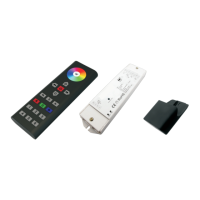
RF wireless LED remote controller
Six zones/areas
Press-button RGBW controller
Model:RGBRF-RC1 with RGBRF-4x5A
Parameter
Wiring diagram
Product Size
Brief introduction of buttons
Product introduction
Part No.
Iuput Voltage
Remarks
Current
12-36VDC
Constant voltage
4x(60-180)W
4x5A
Output
Remote
Part No.
Operation Voltage
DIMENSIONS
ø/h (mm)
Operation
Frequency
3.6VDC
48x140x16
434MHz/868MHz
Receiver
Remarks
load 3pcs 7 AAA (1.5V)
batteries
Note:
One receiver can work with 1-8pcs RGBRF-4x5A or 1pc RGBRF-4x5A
On e RGBRF-RC1 can control multiple receivers
The power supply chosen must be 20% higher than the actual load
5
6
2
3
1
R G B
4
Indicator: indicate the state of
remote control
White channel: the 4th channel
Touch color wheel
Pause/Run button: 10 modes
built-in
R/G/B channels
ON/OFF of all zones
Speed down under dynamic mode
Return previous status button
Save button: save up to 6 colors
or modes into 6 positions
(6-zone buttons)
6 zones: each zone can save
6 color or modes
Speed up under dynamic mode
Brightness: dim up
Brightness: dim down
1) Receiver Connection Diagram for Single Unit
2) Connection Diagram for Multiple Units Receiver
Power Supply
12-36VDC
LN
110V-230VAC
whi t
e
LED CONTROLLER
1234
Lea rning K ey
w
h
it
e
LED CONTROLLER
1234
Lea rning K ey
wh
i
te
LED CONTROLLER
1234
Lea rning K ey
Power Supply
12-36VDC
L
N
110V-230VAC
wh
it
e
LED CONTROLLER
1234
Lea rning K ey
140.0
48.0
17.0
RGBRF-RC1 remote controller has 6 different zones. It can achieve Red/Green/Blue/White colour directly.
The remote controller can save up to 6 colours or 6 modes via the corresponding buttons (1-6 positions) for each zone.
You can choose any colour using the colour wheel. You can also set the system as RGB 3-channel output or
RGBW 4-channel output.
RGBRF-RC1
RGBRF-4x5A
RGBRF-4x5A
RGBRF-4x5A
RGBRF-4x5A
and up to 7pcs PRDIM
RGBRF-4x5A
White (positive)
White (positive)
White (positive)
White (positive)
Question and Answer IconNeed help?

Do you have a question about the PowerLed RGBRF-RC1 and is the answer not in the manual?

Summary

Remote Control Button Functions

Button Descriptions

Overview of all buttons on the RF wireless LED remote controller, including ON/OFF, speed, save, color wheel, and zone functions.

Product Introduction

Product Parameters

Wiring Diagrams

Receiver Connection Diagram for Single Unit

Diagram illustrating how to connect a single RGBRF-4x5A receiver to the power supply and remote.

Receiver Connection Diagram for Multiple Units

Diagram showing the connection of multiple RGBRF-4x5A receivers to the power supply and remote.

Remote Operation Guide

Learning (Matching) Procedure

Step-by-step guide on how to pair the remote control with the receiver unit.

Saving Custom Colors;Modes

Instructions on how to save specific colors or dynamic modes to different zone positions.

Recalling Saved Colors;Modes

Procedure to recall previously saved colors or modes for specific zones.

RGBW Channel Control

Details on how to control individual Red, Green, Blue, and White channels for color and brightness adjustment.

Dynamic Mode Control

Instructions for controlling dynamic modes, including pause/run, speed adjustment, and synchronized running.

Safety and Warnings

General Safety Precautions

Important safety guidelines for installation, operation, and maintenance of the LED controller system.

Warranty Information

Warranty Agreement Details

Information on the provided 3-year warranty, coverage, and conditions for repair or replacement.

Limited Warranty Exclusions

Conditions under which the warranty is voided, including damage from misuse or unauthorized modifications.

PowerLed RGBRF-RC1 Specifications

General IconGeneral
BrandPowerLed
ModelRGBRF-RC1
TypeRemote Control
Control RangeUp to 20 meters
CompatibilityRGB LED Controllers
Battery Type2 x AAA
FunctionsColor selection, brightness adjustment, mode selection