MAINTENANCE
Change saw chain
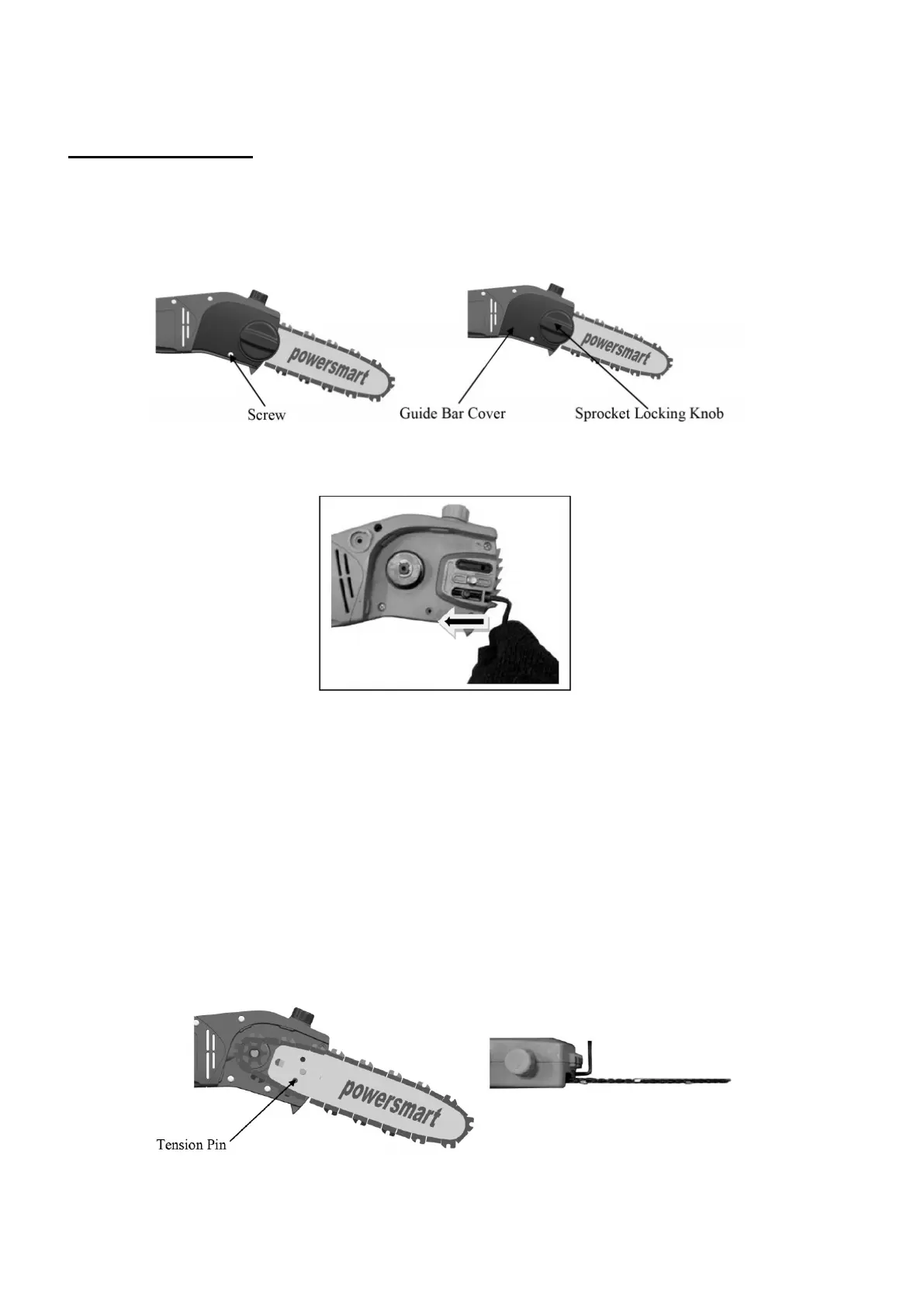
1. Remove the screw and turn Sprocket Locking Knob counterclockwise to remove the guide bar cover.
2. Move the chain tension pin fully back towards the sprocket using the chain tension screw. ( See
direction arrow)
3. Place the guide bar onto the bar studs so that the chain tension pin fits into the hole in the guide bar.
4. Install chain over clutch and place around the sprocket and guide bar.
5. Make sure the chain cutters on top of the guide bar face in the direction that the chain runs.
6. Install guide bar cover. Tighten the sprocket locking knob finger tight.
7. Adjust saw chain tension by first holding the bar nose up and turning the chain tension screw clockwise
until saw chain touches the bottom of the guide.
8. Tighten the sprocket cover locking nut using the wrench provided, keeping the guide bar nose up while
tightening the nut.
9. Pull the saw chain around the guide bar by hand to check for tight spots. Saw chain should move freely
but not sag. If too tight loosen the guide bar nuts and adjust using the chain tension screw.



 To Next Page