15
2. Adjusting the front handle
WARNING:
Remove the battery from string trimmer before performing adjustments.
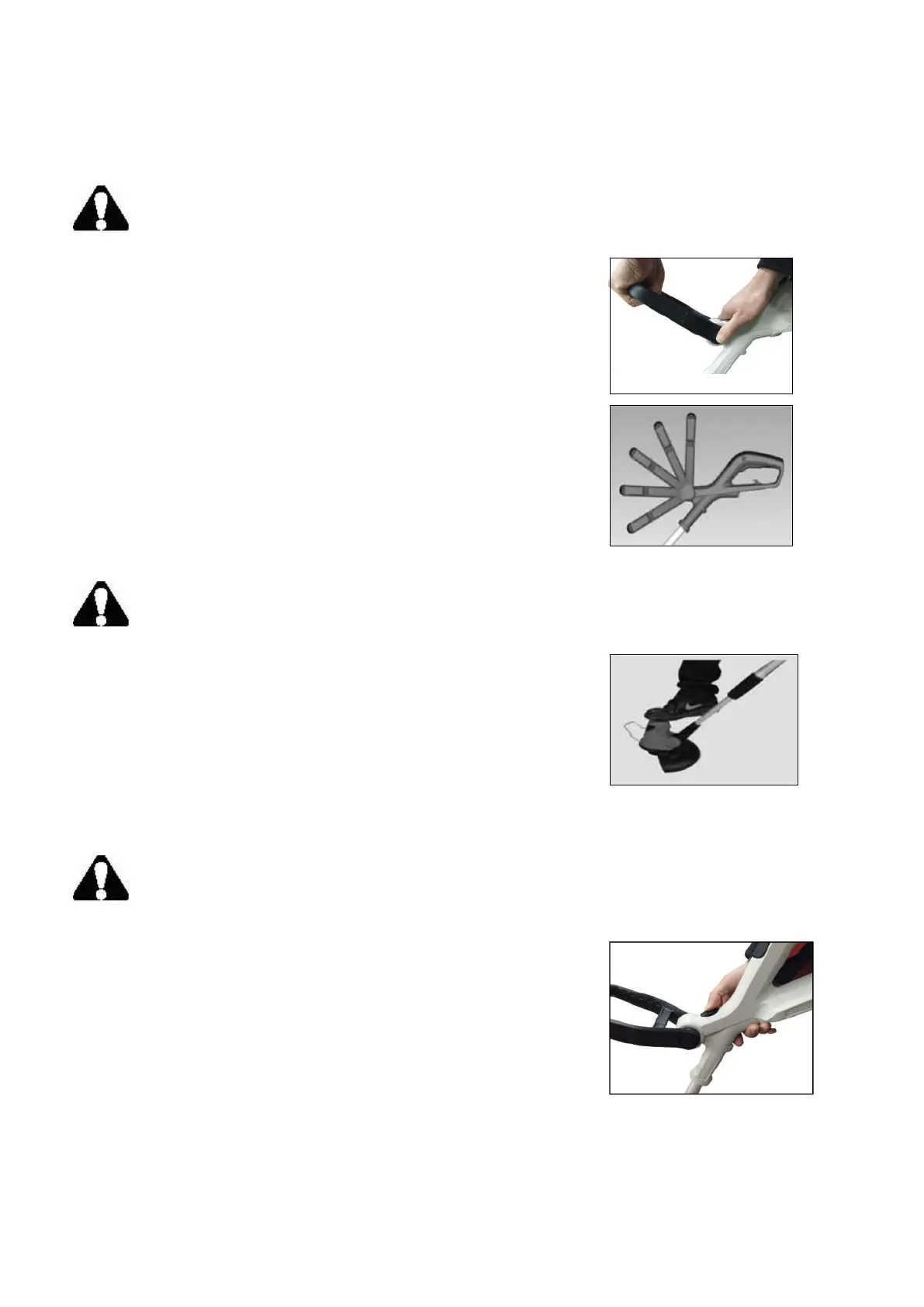
While grip the adjustment button (J) on front handle (C) tightly and
turn it with downward direction (See fig.12), push the front handle
down until the desired angle is set. Then release the adjustment
button on front handle.
There are 5 angles for you to choose the preferred one.
Note: there’s a downward arrow marked on this handle. You can
follow the direction of the arrow to adjust the angle (See fig.13).
3. Adjusting the angle of motor housing
WARNING:
Remove the battery from string trimmer before performing adjustments.
While firmly holding the main handle in one hand and one foot step
on the top of the motor housing, push back and forth the shaft to
adjust the motor housing (4 positions-0
º
,30
º
,60
º
,90
º
) (See fig.14).
4. Adjusting the motor housing angle for trimmer or lawn edging
WARNING:
Remove the battery from string trimmer before performing adjustments.
The PS76110A is designed to offer both trimming and edging function.
To switch from trimming to edging, you press the edger function switch
( D )on the tool, and firmly holding the telescopic shaft (K) in one hand
and turn to left.(See fig.15)
Fig. 12
Fig. 13
Fig. 14
Fig. 15


 To Next Page