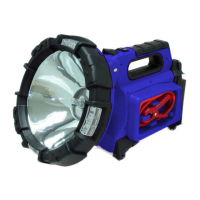
Model No. ACD039
• UseofDAMAGEDorIMPROPERextensioncordstochargethisunitcouldresultinriskofreand/
orelectricshock.Makecertainthattheextensioncordisinsafeandingoodelectricalcondition.
• Preventwaterfromenteringintotheunithousing.Waterwilldamagetheinternalelectronicsboard.
• Thisunithasabuilt-inleadacidbattery.Althoughthisunitarrivespartiallychargedfromthefactory,
itMUSTbefullychargedbeforetherstuse.
• Rechargetheunitaftereachuseorevery3monthstopreventthebatteryvoltagefromdepleting.
ADJUSTABLE HEAD
To adjust headangle, gentlypull up onrim at bottom.Anglecanbe adjustedto 4 differentpositions
indicatedbya “click” sound. Donotforce head beyondnalpoint.Return head toclosedposition for
storagetopreventdamagetomechanism.
SPOTLIGHT
To operatethe spotlight press the switch on handleof yourPowerBeam toeither the “High” or “Low”
position.
Theoperationtimeisuptoapproximately35minutes.
Presstheswitchto“O”toturnoffthespotlight.
LED AREA LIGHT
YourPowerBeamisequippedwithbrightLEDlightslocatedin
therim.Theseprovideanarealightforworkingandgeneralillumination.Tooperate,presstheswitch
locatedonthebackoftheunittothe“LEDAreaLight”position.
Thearealightwilloperatecontinuouslyformanyhoursonafullcharge.Presstheswitchtothemiddle
positiontoturnofftheLEDlights.
RED LED EMERGENCY FLASHER
YourPower Beam is also equipped with RED LED emergency ashers. Tooperate, press the switch
locatedonthebackoftheunittothe“REDLEDEMERGENCYFLASHER”position.
USB POWER PORTS:
Your Power Beam is equipped with THREE 5 volt 2100mAh USB ports for powering or charging
variousdevicesincludingmobilephones,MP3players,tablets,e-Readers,notebookcomputersandother
equipmentwithUSBcapability.Tooperate,connecttheUSBcablethatwassuppliedwiththedeviceyou
wanttochargetooneoftheUSBports.Pressthebuttonlabeled“USB”oncetoturnon,pressagainto
turnoffwhennished.
Sheet4of8


 To Next Page
 Loading...