
 Need help?
Do you have a question about the Powerview Pebble and is the answer not in the manual?
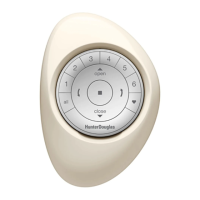
Ergonomically designed, the hand-held remote is available in seven on-trend colours.
Sleek, wall-mounted remote ensuring constant accessibility and easy location.
Guide on how to align and gently push the remote module into the Pebble until snug.
Instructions for orienting the mounting plate, drilling pilot holes, and locking the surface ring.
Steps to align the remote module ribs with the grooves on the Surface for a snug fit.
The PowerView Pebble Remote and Surface Remote are innovative control devices designed to offer precise and stylish management of PowerView Window Coverings. These remotes combine aesthetic appeal with practical functionality, allowing users to effortlessly control natural light throughout their home with the simple press of a button. The design philosophy behind these devices emphasizes ease of use, ergonomic comfort, and seamless integration into various home décors.
The PowerView Pebble Remote is a hand-held device characterized by its ergonomic design, ensuring a comfortable grip and intuitive operation. It is available in seven on-trend colors, allowing users to select a remote that complements their interior design and personal style. This variety in color options makes the remote not just a functional tool but also an elegant accessory for the home.
The front of the Pebble Remote module features a circular layout with several distinct buttons and indicators, each serving a specific purpose in controlling window coverings.
The Pebble Remote is designed for intuitive interaction. To operate, users first select a group of window coverings using the numbered buttons. Once a group is selected, the OPEN, CLOSE, STOP, Favourite, and arrow buttons can be used to control the shades within that group. The ergonomic shape ensures that all buttons are easily accessible and comfortable to press during extended use.
The Pebble Remote is powered by two 3V CR 2032 batteries, which are housed in a dedicated battery compartment located on the back of the remote module. To access the battery compartment, the back cover needs to be removed. This design facilitates easy battery replacement, ensuring continuous operation of the remote. Additionally, a RESET BUTTON is present within the battery compartment, which can be used to reset the remote's settings if needed, aiding in troubleshooting or re-configuration.
To assemble the Pebble Remote, the remote module must be correctly inserted into the Pebble casing. This process involves:
The PowerView Surface Remote offers a sleek, wall-mounted control solution, ensuring that the remote is always in a known location. This design eliminates the common issue of misplacing remotes, providing consistent accessibility and convenience.
The Surface Remote module shares the same functional layout as the Pebble Remote module, featuring group selection buttons, OPEN, CLOSE, STOP, Favourite, and directional arrow buttons. The primary difference lies in its mounting mechanism, which allows it to be securely affixed to a wall.
Once mounted, the Surface Remote provides a fixed control point for PowerView Window Coverings. Its wall-mounted nature makes it ideal for high-traffic areas or rooms where a permanent control station is desired. The intuitive button layout ensures that users can easily operate their shades with a quick glance and press.
Similar to the Pebble Remote, the Surface Remote module is powered by two 3V CR 2032 batteries, accessible by removing the back cover of the module. The RESET BUTTON is also present within the battery compartment for maintenance and troubleshooting.
The installation process for the Surface Remote is straightforward and designed to accommodate various wall types:
After the Surface casing is mounted, the remote module needs to be inserted:
Before either the Pebble or Surface Remote can operate window coverings, an important initial step is required: the window covering must be added to a GROUP. This grouping process is fundamental for the remote to recognize and control specific shades.
To activate the remote for the first time, users need to pull both plastic tabs from the back battery compartment. These tabs prevent battery drain during storage and shipping, ensuring the batteries are fresh upon initial use.
In summary, both the PowerView Pebble and Surface Remotes offer elegant and effective solutions for controlling PowerView Window Coverings. The Pebble Remote provides portable convenience and aesthetic choice, while the Surface Remote offers a fixed, easily accessible control point. Both devices are designed with user-friendliness, durability, and ease of maintenance in mind, making them integral components of a smart home environment. Their intuitive controls, combined with the ability to group shades and recall favourite positions, empower users to effortlessly manage light, privacy, and ambiance throughout their living spaces.
 General
| Type | Remote Control |
|---|---|
| Brand | Hunter Douglas |
| Model | PowerView Pebble |
| Category | Remote Control |
| Compatibility | Hunter Douglas PowerView shades |
| Connectivity | RF (Radio Frequency) |
| Power | Battery |
| Battery Type | CR2032 |

 To Next Page