The MC200 Fuel Saver is a high-specification heating controller designed for modern fuel-efficient heating equipment, adhering to the latest environmental guidelines. It utilizes optimum start technology, continuously monitoring the heating system's previous performance to determine the ideal time to activate heating to reach the desired building temperature by occupancy. Optimum stop functionality can also be selected to save energy at the end of the heating period.
Function Description:
The MC200 operates with a simple menu-based structure for entering both User and Engineer settings. It is protected by two levels of password: a User password to restrict access to certain controls and a second password for commissioning and servicing engineers, allowing access to parameters typically used only during initial setup, a fault log, and a system reset facility. The user keypad provides easy selection of heating and fan-only modes, override functions, and fault reset. These functions can be locked in various combinations to allow different levels of user accessibility. The MC200 can display burner operating hours, aiding in servicing interval assessment, and, once programmed, can indicate heating appliance running costs. It can directly control both Hi/Lo and Modulating burners, with the latter using an internally generated 0-10V signal.
Important Technical Specifications:
- Electricity Supply: 240V 50Hz, fused at 3A.
- Internal Fuses: F1 20mm 6.3A 230V (HRC), F2 20mm 500mA 230V (Non-replaceable).
- Display: 2-line 5mm LCD.
- Set Point Ranges: Day 10 - 30°C, Night 1 - 15°C.
- Temperature Accuracy: 0.5 °C.
- Overall Switching Differential: Adjustable 0.5 - 10.0°C for Hi/Lo burner types.
- Sensing Element: Internal or remotely mounted up to 100m from the control.
- Switching Contacts Ratings: 12A, 240V AC (resistive), all volt-free.
- Modulating Control: 0-10V.
- Heating ON Indicator: Red LED for single-stage, Green for Hi-Low, Yellow for Modulating burner.
- Fault Indicator: Orange LED.
- Battery Backup: 24 hours after initial 12-hour charge.
- Protection Rating: IP20.
- Software Version: 3.0.
- Clock: Date settable from 01/01/2001 to 31/12/2099, recognizes leap years. BST begins last Sunday in March, ends last Sunday in October (time changes at 01:00 GMT). Clock may gain or lose up to 10 minutes per year.
- Dimensions: 160mm (W) x 165mm (H) x 85mm (D) with a mounting depth of 117mm and width of 150mm.
Usage Features:
- Time Switch: Features 14 programmable schedules, assignable to any day or day groupings (e.g., weekdays, weekends). Programs can overlap, with the most recent program determining the set temperature. Heating is active when any program requires "Heat On" and turns off when all programs reach "Heat Off." Programs cannot run past midnight; cross-midnight heating requires two programs. Manual overrides and extensions are cleared at midnight.
- Optimum Start: The MC200 records the time taken to increase temperature per degree in 3°C bands (5°C to 20°C). Using the current overnight temperature, it estimates the time needed to reach the desired level, advancing the heater switch-on time accordingly.
- Optimum Stop: The MC200 records the time taken for the temperature to drop by a specified number of degrees when the heating period ends. When enabled, it switches off heating that many minutes early.
- User Keypad (3 Buttons):
- Heat Button: Short press (less than 2 seconds) switches heat ON/OFF. Longer press (more than 3 seconds) controls extension time in 30-minute steps, up to a maximum allowed period, then reverts to 0 minutes. Extension time applies at the end of the programmed heating period.
- Fan Button: In WINTER and OFF modes, the fan button has no control. In SUMMER mode, it switches the fan ON/OFF for air circulation; if left on, it switches off at midnight. Cannot switch off if the fan is running due to heating being ON or in Auto/Const mode.
- Reset Button: Resets burner controls from lockout (if available on the heater). Reset is automatically timed to 5 seconds.
- Indicators:
- Heating On: Red for single-stage, Green for Hi-Low, Yellow for Modulating burner.
- Fault: Orange when burner control is at lockout.
- LCD Display: Shows current air temperature (internal or average of two sensors), time (hh:mm, 24-hr, flashing colon), day of the week, current heater setting (ON/OFF), and power demand level (High/Low for Hi-Low, bar-graph for modulating, Pn for active program number).
- Programming Keypad (6 Buttons):
- OK (Select): Accepts changes.
- Decrease (-): Decreases values.
- Increase (+): Increases values.
- Cancel: Exits without saving changes.
- Back (<): Enters User Menu, goes back to previous screen.
- Next (>): Enters User Menu, goes forward to next screen.
- User Menu: Accessed by pressing < or > from the status display. Options include Temperature Adjust, Date (displayed only), Clock Set, Programme Settings, Holiday Date, Run Mode, Set User Permissions, Set User Password, Extension Time Maximum, Cost Log, and Enter User Password.
- Temperature Adjustment: Allows temporary adjustment of the target temperature set by the active program. This adjustment lasts until the program expires or another program changes the set temperature. The adjustment range can be limited or disabled.
- Clock Set: Sets current date and time, enabling BST-GMT changeovers and holiday shutdown.
- Programme Settings: Allows configuring 14 programs with ON/OFF times and set temperatures.
- Holiday Date: Sets a future date and duration for heating shutdown. During holidays, heating only operates if temperature falls below frost temperature (if enabled). Manual fan/heater operation is permitted but cancelled at midnight.
- Run Mode: Three modes: Winter (heating operates during "Heat On" periods, maintains Night Temperature, and operates below frost temperature), Summer (fan operates manually, heater only operates below frost temperature), and Off (heater only operates below frost temperature).
- User Button Permissions: Allows enabling/disabling Reset, Change Temperature, Heat Override, and Fan Override controls. Effective only when User access is password-protected.
- Set Password: Allows setting a 4-digit user password. Factory default is 0000 (no restrictions).
- Extension Time: Sets maximum extension period (in 30-minute increments) for heating beyond the last program's switch-off time. Factory default: 1 hour, maximum: 3 hours.
- Cost Log: Displays total hours run and total cost since last cleared, along with the clear date. Requires fuel cost and heater rating (from Engineer Menu) to function. For Hi/Lo heaters, cost is based on two power entries; for modulating, it's an estimate based on half full power.
- Enter Password: Used to access selected user controls. Engineer password (factory set to 535*) grants access to installation controls and all user controls for 1 hour.
Maintenance Features:
- Engineer Controls: Accessed via engineer pass-code (535*). Provides access to:
- Burner Type: Defines controlled burner type (On/Off, High-Low, Modulating).
- Burner Hi (kW): Sets high heat input for cost calculations.
- Burners Test: Facilitates direct testing of burners regardless of current control settings.
- Auto Reset: Sets whether the control performs an automatic reset of lockout (30 minutes after lockout, then every 24 hours).
- Reset Time: Sets duration (1, 3, or 5 seconds) for lockout reset terminal connection to neutral.
- Sensors 2 Function: Configures second sensor input as Not Used, Remote, Heat Off, or Heat On.
- Trim Temperature: Allows temperature offset (-5°C to +5°C) to match displayed temperature with sensor temperature.
- User Temperature Minimum/Maximum: Sets the minimum (default 15°C, can reduce to 10°C) and maximum (default 25°C, can increase to 30°C) temperatures the user can select.
- Temp Adjust: Sets the range (°C) the user can temporarily adjust the current set point.
- Constant Fan: Sets fan operation mode (Auto, Const, ON, OFF).
- Night Setback / Frost Temperature: Enables/disables frost protection/night setback.
- Setback Temperature: Sets frost protection/night setback temperature value (1°C to 15°C).
- Optimum Start/Stop: Enables/disables optimum start/stop. Optimum stop temperature (°C) defines allowable temperature drop.
- Service Date: Allows setting a service date.
- Lockout Log: Displays recent lockout times and dates.
- Clear Lockout Log: Clears the lockout log.
- Restore Defaults: Resets all parameters to factory default settings.
- Temperature Sensors: Default sensor is internal (Sen1 & Com). It can be replaced by a remote sensor. A second remote sensor can be connected (Com & In2) for averaging temperatures or as a volt-free switch input for additional functions (Heat Off/On). If a sensor goes open-circuit, the Fault LED flashes and "sensor failed" is displayed.
- Wiring: Requires wiring external to the MC200 to be installed according to I.E.E. Regulations and local regulations. Conduit entry is at the bottom. Mains supply and control circuit wiring should be at least 0.5mm², fan circuit at least 1.5mm². A local isolator must be fitted. For multiple appliances, an interfacing relay box is required. Sensor wiring must be screened two-core (minimum 0.6mm² solid, 7 x 0.2mm² multistrand), grounded only at the MC100, and run separately from all other wiring to prevent malfunction. Voltage must not be applied to sensor connections.
- Burner Reset: The reset terminal is internally connected to NEUTRAL when the reset button is pressed.
- Handover: Instructions should be demonstrated to the end user, and the User Instructions left with them.

 Need help?
 General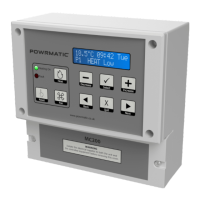

 To Next Page
